
Definition
The Tags Edit Widget allows to configure the edit of flags and reserved flags.
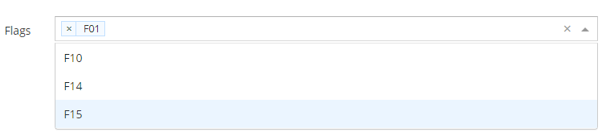
Configuration
Properties
|
Property name |
Type |
Mandatory |
Description |
Values |
|---|---|---|---|---|
|
tags |
|
NO |
Defines one or several tags. |
- |
tags properties
|
Property name |
Type |
Mandatory |
Description |
Values |
|---|---|---|---|---|
|
tag |
|
NO |
Allows to list one or several flag values to limit the choice when editing.
The following i18n keys can be used to add a functional label to the flags: ui.model.attributes.flags.values.Fxx.label |
F01, F02... |
Example
<widget id="flags" xsi:type="ctdbum:AttributeEditorWidgetType">
	<hidden>false</hidden>
	<config>
		<editor>
			<editWidget xsi:type="ctdbum:TagsEditWidgetType">
				<hidden>false</hidden>
				<config>
					<required>false</required>
					<tags>
						<tag>F01</tag>
						<tag>F10</tag>
						<tag>F14</tag>
						<tag>F15</tag>
					</tags>
				</config>
			</editWidget>
		</editor>
		<label></label>
		<lockedInUi>false</lockedInUi>
		<mode>READ_WRITE</mode>
		<multiValued>false</multiValued>
		<override>true</override>
	</config>
	<attributeId>flags</attributeId>
</widget>
Read Next
- Features
Design screens and business features to manage objects.