
Definition
Public Access on the User Portal is used to quickly redirect to a Token Access where a Self-Service Task can be performed. The redirection is dependent on the Identification of the User through various configurable means:
-
Search Panel to retrieve the Identity
-
Attributes to match against the Identity's
-
Security Questions
A Public Access is always done with one or several Self-Service Features Identifiers set to perform a Self-Service Task afterward.
Those are named intents. These intents may be configured directly in the public access configuration.
Configuration
You can access the Public Access configuration :
-
by clicking on "Portal" → “Public Access”
-
by clicking on "System" → "Configurations" → "Business Model" and perform an import/export.
Global properties
All users must have the rights to access the self feature and the portal.
|
Domain |
Code |
|---|---|
|
DataSet : Each feature starts by announcing the DataSet as following:
|
|
|
Public Access Configuration : Each Public Access has the following configuration to describe it. |
This will be detailled in the Public Access Configuration paragraph.
|
|
Version and encoding : Each feature starts by announcing the version and encoding as following |
|
Public Access Properties
|
Properties name |
Type |
Mandatory |
Description |
Values (default value in bold) |
|---|---|---|---|---|
|
id |
|
YES |
The id is the unique identifier of the Public Access.
|
- |
|
name |
|
YES |
The Public Access name. It can be different from the id. It is possible to modify name property after the creation. |
- |
|
description |
|
NO |
Used to describe the Public Access that will be configured. It is possible to modify this property after the creation of the Public Access. |
- |
|
|
YES |
A list of Self Feature identifiers to be set on the Access Code. |
- |
|
|
|
YES |
List of Attribute identifiers for attributes that must be displayed at the top of the page. This list of Attributes is used to find the Identity. The filling of Attribute fields are not mandatory. |
- |
|
|
scope |
|
YES |
See configuration of Scope. |
- |
|
captcha |
|
NO |
Indicate whether or not a Captcha must be displayed on the first page. Memority offers different types of captcha, which can be selected via a setting. |
false, true |
|
|
NO |
List of Attribute identifiers for Attributes that must be requested in a form. Those Attribute will need to be compared with the actual Identity's attribute to verify the user. This may be left empty in which case no verification is performed. In a process where we send an access code or if we validate the identity thanks to security questions, it doesn't make sense to have verification attributes. In these case, we should only have to fill search attribute(s). |
- |
|
|
askSecurityQuestions |
|
NO |
Allows you to define whether the user will have to answer security questions (3 by default) |
false, true |
|
outcomeStrategy |
|
YES |
Strategy to use upon successful verification of the User. |
REDIRECT, NOTIFICATION |
|
accessCodeLifetime |
|
YES |
Lifetime of the access code that provides access to the tasks. |
- |
|
accessCodeType |
|
YES |
Type of the access code that provides access to the tasks. |
PASSWORD_RESET_PUBLIC_REDIRECT |
|
accessCodeUseCount |
|
NO |
Indicates the number of times the Access Code can be used. This is decremented at each use. |
1 |
|
accessCodeUseStrategy |
|
NO |
Indicates the strategy to use to decrement the useCount.
For the task strategy, decrement must be handled in the script task, it will not be done automatically. |
ACCESS, TASK |
|
successActions |
|
NO |
Action executed when the public access is performed successfully, for example a notification to be sent upon successful verification of the user. |
- |
|
failureActions |
|
NO |
Action executed when the public access is failed, for example a notification to be sent upon failed verification of the user. |
- |
successActions & failureActions Properties
|
Properties name |
Type |
Mandatory |
Description |
Values (default value in bold) |
|---|---|---|---|---|
|
action |
|
YES |
The action to execute. |
- |
Examples
Action script to send a simple notification :
  <action class="actionNotification">
    <config xsi:type="ctdrule:CitadelNotificationConfigurationType">
        <notifications>PAC6-common-passwordRecovery-emailDefinition</notifications>
    </config>
  </action>
intents Properties
Each intent will have the following configuration:
|
Properties name |
Type |
Mandatory |
Description |
Values (default value in bold) |
|---|---|---|---|---|
|
intent |
|
YES |
The Identifier of the Self-Service Feature to use for the corresponding Public Access. |
- |
searchAttributes Properties
Each attribute will have the following configuration:
|
Properties name |
Type |
Mandatory |
Description |
Values (default value in bold) |
|---|---|---|---|---|
|
attribute
|
|
YES |
Attributes used to find the Identity. |
- |
verificationAttributes Properties
Each attribute will have the following configuration:
|
Properties name |
Type |
Mandatory |
Description |
Values (default value in bold) |
|---|---|---|---|---|
|
attribute |
|
NO |
Attribute that will need to be compared with the actual Identity's attribute to verify the user. |
- |
Example
|
Code |
Preview |
|---|---|
|
Minimum configuration |
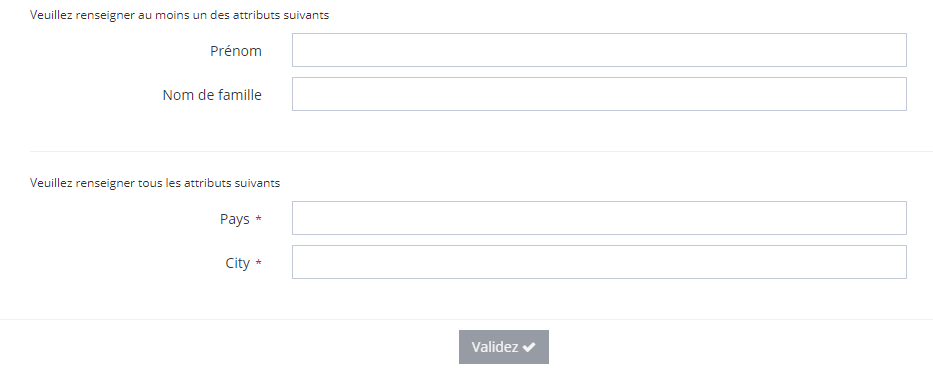
|
|
Configuration without Verification Attributes
|

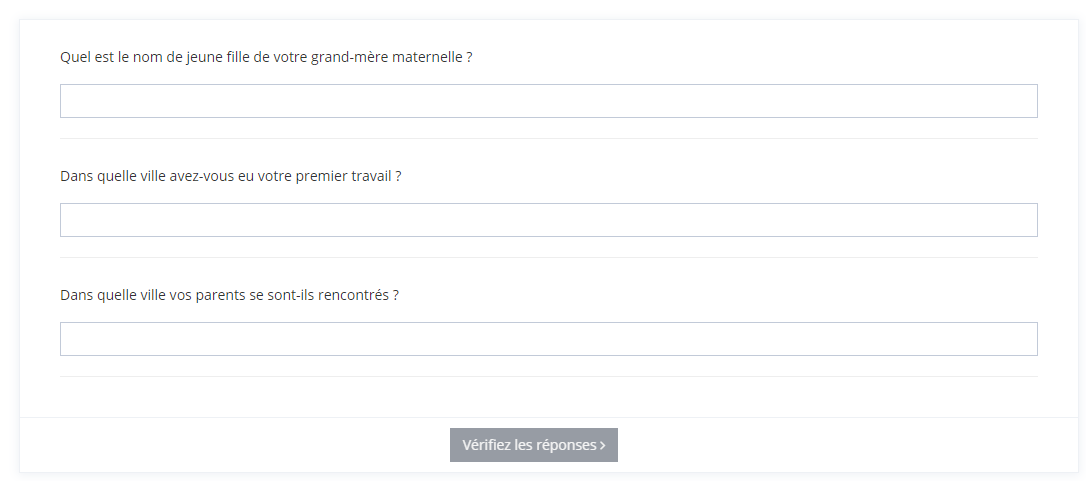
|
Read Next
-
General Configuration Principles Overview of Memority’s general configuration principles.
-
Data Model Describes objects and their attributes like Identity, Organization, Roles, etc.
-
Features Design screens and business features to manage objects.
-
Workflows Trigger workflows to validate an action (e.g., object, role assignment).
-
Policies Scheduled or triggered automatic actions on objects.
-
Login Tasks Request users to execute tasks before accessing the User Portal.
-
Public Access -
Notifications Send notifications based on object lifecycle or feature validation.
-
Synchronization Objects Synchronization with external accounts hosted on remote applications.
-
Recertification Create and schedule campaigns to review assigned roles.
-
Reporting Create reports, displaying lists, aggregated data, or charts.
-
Rights Defines rights granted to identities via roles.
-
System Manages global configuration, such as files, settings, and logs.
-
Customization Customize colors and translations of the user portal.
-
Rules & Actions API Write reusable scripts to automate tasks.
-
API Guardian Guide Expose APIs to allow integration with applications.
-
Access Allow the configurator to manage access features.
-
Access Risk -
Federation Integrate applications with Memority using standards like SAML, OAuth2, or OIDC
-
Authentication Define authentication methods based on criteria.
-
Feature flags