Configuration Guide

Object Reference Widget

Definition

Several types of Widgets allow to configure the display /edit of attributes which are defined as Object Reference (Identity, Organization, Resource, Role, Role Publication types):

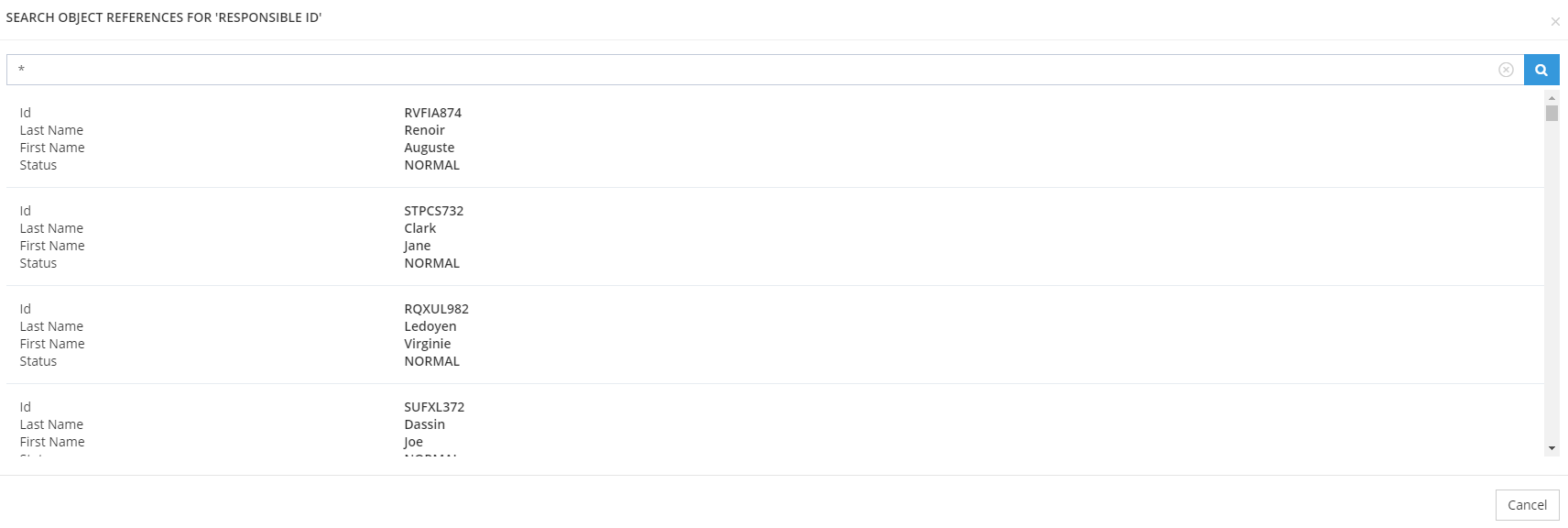
  • Object Reference Edit : can be used on features of search, create, update or bulk type. Allows to display an additional search pop-up (simple search).

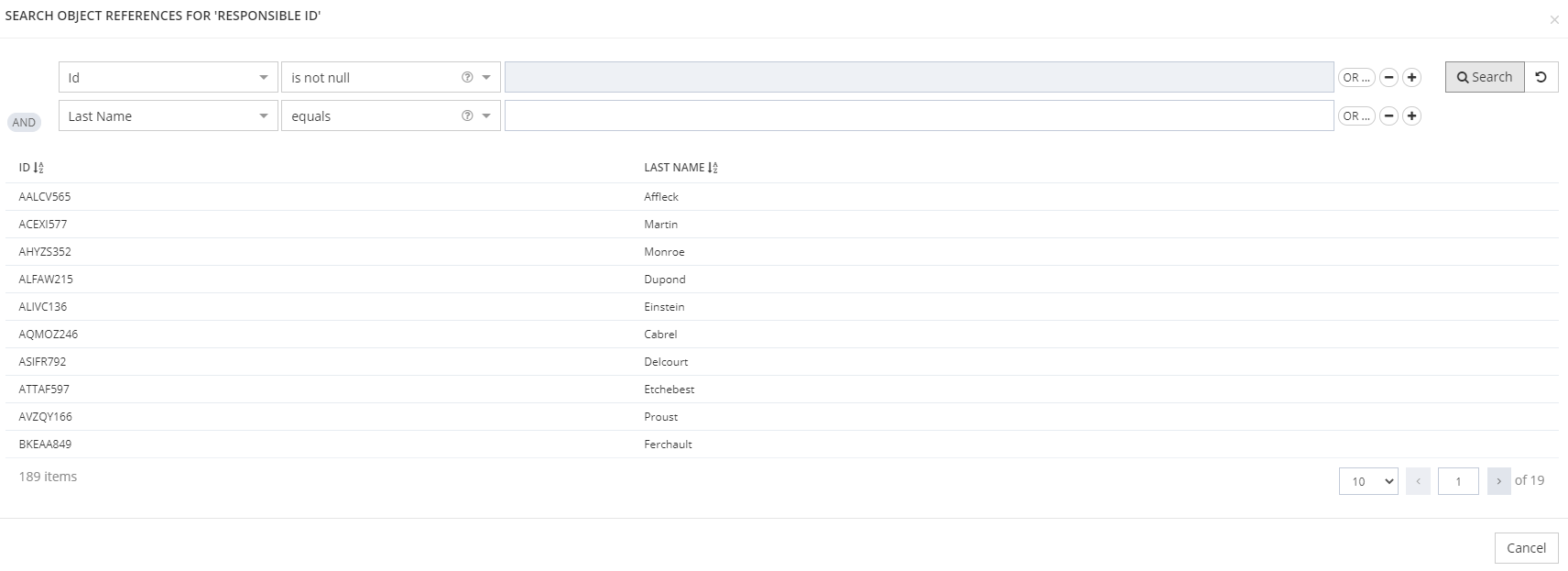
  • Advanced Object Reference Edit: can be used on features of search, create, update or bulk type. Allows to display an additional search pop-up (multicriteria and formula search).

  • Object Reference Display

The attribute must be activated as a searchable criterion.

Object Reference Edit

Advanced Object Reference Edit

Object Reference Display

image-20220928-080549.png
image-20220928-080554.png
image-20220928-080557.png


image-20220928-080603.png
image-20220928-080615.png
image-20220928-080619.png


image-20220928-080626.png
image-20220928-080631.png


Configuration

Properties


Properties name

Type

Mandatory

Description

Values (default value in bold)

OR Edit

Advanced OR Edit

OR display

resultAttributes

String

NO

Defines which attributes will be displayed in the search results.

If no attribute is configured, by default the displayed attributes are: kind, id, entity id, type, enabled and status.

-

check mark

cross mark

check mark

popupAttributes

String

NO

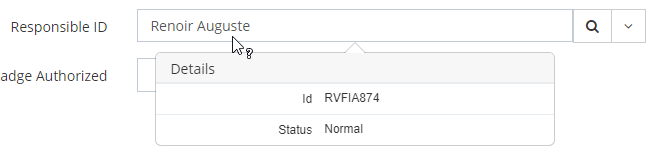
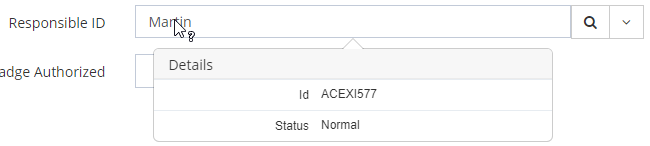
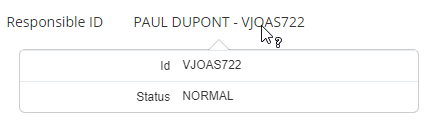
Defines which attributes will be displayed in the pop-up (when the mouse hovers over it). 

If no attribute is configured, by default the displayed attributes are: kind, id, entity id, type, enabled and status.

-

check mark

check mark

check mark

alternativeSelectionAttribute

String

NO

Change the attribute selected when picking results (defaults to "id" when not configured).

Note that the display of the selected result will still be the id of the object if no i18n key was configured. Use the i18n key property to customize the display if necessary.

Should not be used with IDM object, this is for some reporting cases.

null

check mark

check mark

check mark

displayPopup

Boolean

NO

Allows to display the pop-up.

true, false

check mark

check mark

check mark

limit

Integer

NO

Allows to limit the search results.

-

minimum value: 1

check mark


check mark

scope

-

NO

Allows to limit the search results.

-

check mark

check mark

check mark

search

-

YES

Defines how to search for an object.
See the configuration of the search Widget.

-

cross mark

check mark

cross mark

pageSize

Integer

NO

Allows to limit the search results.

This property is limited to a maximum of 5,000 search results displayed.

-

minimum value: 1

cross mark

check mark

cross mark

i18nKey

String

NO

Defines how attributes will be displayed in the results field.

Three choices:

  • don't configure any translation (the id of the object will be displayed)

  • configure an i18n key

  • configure an object excerpt display (in the object type translation)

Beware to configure, in the columns of the search contract, the attribute(s) used in the excerpt, otherwise the value is not displayed properly on the edit widget

ui.model.identityType."id of the identity type"."id of the attribute".

check mark

check mark

check mark

resultAttributes & popupAttributes properties

Property name

Type

Mandatory

Description

Values (default value in bold)

attribute

String

NO

Used to indicate the id of the Attribute.

-

Example

Object Reference Edit

Advanced Object Reference Edit

Object Reference Display

XML
<widget id="Responsible_ID" xsi:type="ctdbum:AttributeEditorWidgetType">
	<hidden>false</hidden>
	<config>
		<editor>
			<editWidget xsi:type="ctdbum:ObjectReferenceEditWidgetType">
				<hidden>false</hidden>
				<config>
					<resultAttributes>
						<attribute>id</attribute>
						<attribute>lastName</attribute>
						<attribute>firstName</attribute>
						<attribute>status</attribute>
					</resultAttributes>
					<popupAttributes>
						<attribute>id</attribute>
						<attribute>status</attribute>
					</popupAttributes>
					<displayPopup>true</displayPopup>
					<scope type="EXPRESSION" objectKind="IDENTITY" xsi:type="ctd:DynamicObjectScopeType">
						<searchExpression>
							<search:And>
								<search:Prop op="EQUALS" name="enabled">
									<value script="false">true</value>
								</search:Prop>
								<search:Prop op="EQUALS" name="status">
									<value script="false">NORMAL</value>
								</search:Prop>
							</search:And>
						</searchExpression>
						<objectTypes>
							<objectType>Employee</objectType>
						</objectTypes>
					</scope>
				</config>
			</editWidget>
		</editor>
		<label></label>
		<lockedInUi>false</lockedInUi>
		<mode>READ_WRITE</mode>
		<multiValued>false</multiValued>
		<override>true</override>
	</config>
	<attributeId>Responsible_ID</attributeId>
</widget>


XML
<widget id="Responsible_ID" xsi:type="ctdbum:AttributeEditorWidgetType">
	<hidden>false</hidden>
	<config>
		<editor>
			<editWidget xsi:type="ctdbum:AdvancedObjectReferenceEditWidgetType">
				<hidden>false</hidden>
				<config>
					<popupAttributes>
						<attribute>id</attribute>
						<attribute>status</attribute>
					</popupAttributes>
					<search>
						<actions/>
						<allowExport>false</allowExport>
						<columns>
							<column>
								<attribute>true</attribute>
								<dataKey>id</dataKey>
								<dataType>string</dataType>
								<dateFormat>DAY_MONTH_YEAR_LONG</dateFormat>
								<ellipsis>false</ellipsis>
								<hidden>false</hidden>
								<sortAs>ALPHA</sortAs>
								<sortDirection>ASC</sortDirection>
								<sortable>true</sortable>
								<sorted>true</sorted>
								<type>general</type>
							</column>
							<column>
								<attribute>true</attribute>
								<dataKey>lastName</dataKey>
								<dataType>string</dataType>
								<dateFormat>DAY_MONTH_YEAR_LONG</dateFormat>
								<ellipsis>false</ellipsis>
								<hidden>false</hidden>
								<sortAs>ALPHA</sortAs>
								<sortDirection>ASC</sortDirection>
								<sortable>true</sortable>
								<sorted>true</sorted>
								<type>general</type>
							</column>
						</columns>
						<rowClickActions/>
						<additionalSearchAttributes>
							<attribute>enabled</attribute>
						</additionalSearchAttributes>
						<displayFrozenOperators>true</displayFrozenOperators>
						<frozen>NO</frozen>
						<modes>
							<mode>MULTICRITERIA</mode>
						</modes>
						<objectReferences/>
						<searchExpression>
							<search:And>
								<search:Prop op="IS_NOT_NULL" name="id"/>
								<search:Prop op="EQUALS" name="lastName"/>
							</search:And>
						</searchExpression>
					</search>
					<displayPopup>true</displayPopup>
					<scope type="EXPRESSION" objectKind="IDENTITY" xsi:type="ctd:DynamicObjectScopeType">
						<searchExpression>
							<search:And>
								<search:Prop op="EQUALS" name="enabled">
									<value script="false">true</value>
								</search:Prop>
								<search:Prop op="EQUALS" name="status">
									<value script="false">NORMAL</value>
								</search:Prop>
							</search:And>
						</searchExpression>
						<objectTypes>
							<objectType>Employee</objectType>
						</objectTypes>
					</scope>
					<alternativeSelectionAttribute>lastName</alternativeSelectionAttribute>
				</config>
			</editWidget>
		</editor>
		<label></label>
		<lockedInUi>false</lockedInUi>
		<mode>READ_WRITE</mode>
		<multiValued>false</multiValued>
		<override>true</override>
	</config>
	<attributeId>Responsible_ID</attributeId>
</widget>
XML
<widget id="Responsible_ID" xsi:type="ctdbum:AttributeEditorWidgetType">
	<hidden>false</hidden>
	<config>
		<editor>
			<displayWidget xsi:type="ctdbum:ObjectReferenceDisplayWidgetType">
				<hidden>false</hidden>
				<config>
					<resultAttributes/>
					<popupAttributes>
						<attribute>id</attribute>
						<attribute>status</attribute>
					</popupAttributes>
					<displayPopup>true</displayPopup>
				</config>
			</displayWidget>
		</editor>
		<label></label>
		<lockedInUi>false</lockedInUi>
		<mode>READ</mode>
		<multiValued>false</multiValued>
		<override>true</override>
	</config>
	<attributeId>Responsible_ID</attributeId>
</widget>


  • Features

    Design screens and business features to manage objects.