
Definition
The Boolean Widgets allows to configure the display of boolean attributes.
|
On/Off display |
Icon display |
True/False display |
|---|---|---|

|
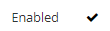
|
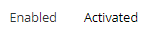
|
Configuration
Properties
|
Properties name |
Type |
Mandatory |
Description |
Values (default value in bold) |
|---|---|---|---|---|
|
backgroundColor |
|
NO
|
The color displayed for the background. |
Standard CSS color value, #ffffff |
|
bold |
|
NO |
Defines if the value is displayed in bold or not. |
true, false |
|
fontSize |
|
NO |
Defines the displayed size. |
INHERIT, XX_SMALL, X_SMALL, SMALL, MEDIUM, LARGE, X_LARGE, XX_LARGE |
|
italic |
|
NO |
Defines if the value is displayed in italic or not. |
true, false |
|
textAlign |
|
NO |
Defines where the text is aligned when displayed. |
LEFT, CENTER, RIGHT |
|
textColor |
|
NO |
Defines the displayed color. |
Standard CSS color value, #000000 |
|
underline |
|
NO |
Defines if the value is underlined or not. |
true, false |
|
booleanDisplayType |
|
NO |
Defines the display of the different values. |
ICON, TRUE_FALSE, ON_OFF* |
|
falseIcon |
|
YES , if type is ICON |
Defines an icon to display if boolean value is false. |
https://fontawesome.com/v4.7.0/icons/ Example: <falseIcon>fa fa-times</falseIcon> |
|
falseText |
|
NO |
Defines a text to display if boolean value is false. |
|
|
trueIcon |
|
YES , if type is ICON |
Defines an icon to display if boolean value is true. |
https://fontawesome.com/v4.7.0/icons/ Example: <trueIcon>fa fa-check-square</trueIcon> |
|
trueText |
|
NO |
Defines a text to display if boolean value is true. |
|
Example
|
Display - On/Off |
Display - |
Display - True/False (text) |
|---|---|---|
|
XML
|
XML
|
XML
|
Read Next
- Features
Design screens and business features to manage objects.