
Definition
The Radio Edit Widget allows to configure the edit of a string type by configuring a list of values.
The user will be able to choose one and only one value.
|
Radio Edit (STANDARD) |
Radio Edit (BUTTON_GROUP) |
|---|---|
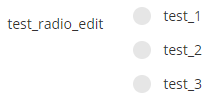
|

|
Configuration
Properties
|
Property name |
Type |
Mandatory |
Description |
Values (default value in bold) |
|---|---|---|---|---|
|
i18nPrefix |
- |
NO |
Allows to define the first part of the i18n key for each configured id. If this property is used, you cannot use the <text> property, otherwise the translation not will be taken into account. |
- |
|
id |
|
NO |
Defines a unique id for each option. |
- |
|
inline |
|
NO |
Defines if the buttons are inline or not. Only available for STANDARD style. |
true, false |
|
|
NO |
Allows to define one or several value(s) to choose. |
- |
|
|
radioStyle |
|
NO |
Defines the display of the buttons. |
STANDARD, BUTTON_GROUP |
options properties
|
Property name |
Type |
Mandatory |
Description |
Values (default value in bold) |
|---|---|---|---|---|
|
|
NO |
Defines the different values. |
- |
option properties
Each option will have the following configuration:
|
Property name |
Type |
Mandatory |
Description |
Values (default value in bold) |
|---|---|---|---|---|
|
id |
|
NO |
Defines a unique id for each option. |
- |
|
text |
|
NO , but necessary |
Defines, for each id, the text that will be displayed to the user. |
- |
Example
|
Radio Edit |
Radio Edit with i18nPrefix |
|---|---|
|
|
Read Next
- Features
Design screens and business features to manage objects.