
Definition
The Float Widgets allows to configure the display of decimal attributes.
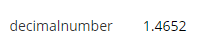
Configuration
Properties
|
Properties name |
Type |
Mandatory |
Description |
Values (default value in bold) |
|---|---|---|---|---|
|
backgroundColor |
|
NO |
Defines the displayed background color. |
Standard CSS color value, #ffffff |
|
bold |
|
NO |
Defines if the value is displayed in bold or not. |
true, false |
|
fontSize |
|
NO |
Defines the displayed size. |
INHERIT, XX_SMALL, X_SMALL, SMALL, MEDIUM, LARGE, X_LARGE, XX_LARGE |
|
italic |
|
NO |
Defines if the value is displayed in italic or not. |
true, false |
|
textAlign |
|
NO |
Defines the displayed text alignment. |
LEFT, CENTER, RIGHT |
|
textColor |
|
NO |
Defines the displayed text color. |
Standard CSS color value, #000000 |
|
underline |
|
NO |
Defines if the value is underlined or not. |
true, false |
|
decimal |
|
NO |
Defines the decimals to display. |
2 |
Example
<widget id="decimalnumber" xsi:type="ctdbum:AttributeEditorWidgetType">
	<hidden>false</hidden>
    <config>
    	<editor>
        	<displayWidget xsi:type="ctdbum:FloatDisplayWidgetType">
            	<hidden>false</hidden>
                <config>
                	<backgroundColor>#ffffff</backgroundColor>
                    <bold>false</bold>
                    <fontSize>INHERIT</fontSize>
                    <italic>false</italic>
                    <textAlign>LEFT</textAlign>
                    <textColor>#000000</textColor>
                    <underline>false</underline>
                    <decimal>2</decimal>
				</config>
			</displayWidget>
		</editor>
        <label></label>
        <lockedInUi>false</lockedInUi>
        <mode>READ</mode>
        <multiValued>false</multiValued>
        <override>false</override>
	</config>
    <attributeId>decimalnumber</attributeId>
</widget>
Read Next
- Features
Design screens and business features to manage objects.