
Definition
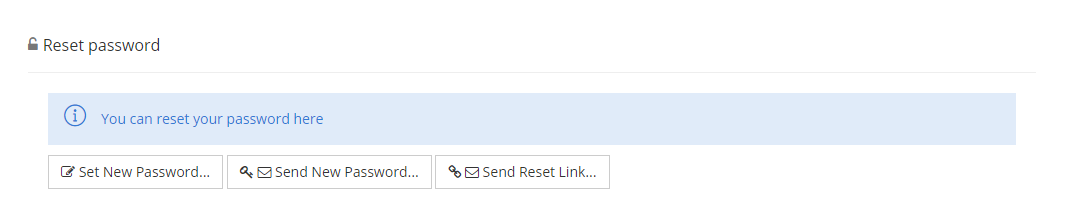
The Reset Password Widget allows to reset the password of an Identity.
Several possibilities are available to perform the request:
-
force a new password manually
-
force a new password automatically
-
generate a new password and send it with a notification:
-
to a predefined email address or by sms
-
to a specific email address or phone number
-
-
generate a new password reset access code and link to it, and send it with a notification:
-
to a predefined email address or by sms
-
to a specific email address or phone number.
-
It is possible to verify the identity of a user through security questions.
Tips
To access the Reset Password Widget, you must configure the Widget on a feature with an object kind set to IDENTITY and the operation needs the type CHANGE_PASSWORD.
For an optimal use of this Widget, prefer the dedicated feature (of type UI_FOR_OBJECT or UPDATE) or the Widget To Open (avoid search Feature).
Configuration
Properties
|
Properties name |
Type |
Mandatory |
Description |
Values (default value in bold) |
|---|---|---|---|---|
|
bordered |
|
NO |
Defines if the action buttons are bordered or not. |
true, false |
|
title |
|
NO |
Defines the title of the widget. The title will have to be translated by a I18N key: "tenant.password.reset.title.label". |
true, false |
|
securityQuestions |
|
NO |
Indicates whether or not the security questions (and their answers) must be displayed to verify the user's Identity. |
true, false |
|
securityQuestionsCount |
|
NO |
Number of security questions to display. Set to 0 to display all security questions. |
2 |
|
manualPasswordEntry |
|
NO |
Indicates whether or not to authorize manual entry of the new password. |
true, false |
|
autogeneratePasswordEntry |
|
NO |
Indicates whether or not to authorize auto-generation of a password (that must respect password policy). |
true, false |
|
sendPasswordEmail |
|
NO |
Indicates whether or not to authorize sending the password by email. |
true, false |
|
sendPasswordEmailNotificationId |
|
NO |
Identifier of the notification to use when sending the password by email. |
password_generate_email |
|
sendPasswordOverride |
|
NO |
Authorizes administrator to override the destination email address when sending the password by email. |
true, false |
|
sendPasswordSms |
|
NO |
Indicates whether or not to authorize sending the password by sms. |
true, false |
|
sendPasswordSmsNotificationId |
|
NO |
Identifier of the notification to use when sending the password by sms. |
password_generate_sms |
|
sendPasswordSmsOverride |
|
NO |
Authorizes administrator to override the destination phone number when sending the password by sms. |
true, false |
|
sendResetLinkEmail |
|
NO |
Indicates whether or not to authorize performing a reset through a reset link by email. |
true, false |
|
sendResetLinkEmailIntent |
|
NO |
Identifier of the Self-Service Feature to use to reset the password. |
password_reset |
|
sendResetLinkEmailNotificationId |
|
NO |
Identifier of the notification to use when sending the password reset link by email. |
password_reset_link |
|
sendResetLinkEmailOverride |
|
NO |
Authorizes administrator to override the destination email address when sending the password reset link by email. |
true, false |
|
sendResetLinkLifetime |
|
NO |
Lifetime of the access code to reset the password when sending a reset link by email. |
PT30M |
|
sendResetLinkUseCount |
|
NO |
Number of allowed uses for the password reset link |
1 |
|
requirePasswordChange |
|
NO |
Indicates whether or not the PASSWORD_CHANGE_REQUESTED login task is set on user after the password has been reset. |
true, false |
|
style |
|
NO |
Defines the style of the widget. |
INLINE, MODAL (pop-up) |
Example
<widget id="reset-password-widget" xsi:type="ctdbum:ResetPasswordWidgetType">
	<hidden>false</hidden>
	<config>
		<bordered>false</bordered>
        <title>true</title>
        <securityQuestions>true</securityQuestions>
        <securityQuestionsCount>2</securityQuestionsCount>
        <manualPasswordEntry>true</manualPasswordEntry>
        <autogeneratedPasswordEntry>false</autogeneratedPasswordEntry>
        <sendPasswordEmail>true</sendPasswordEmail>
        <sendPasswordEmailNotificationId>password_generated_email</sendPasswordEmailNotificationId>
        <sendPasswordEmailOverride>true</sendPasswordEmailOverride>
        <sendPasswordSms>true</sendPasswordSms>
        <sendPasswordSmsNotificationId>password_generated_sms</sendPasswordSmsNotificationId>
        <sendPasswordSmsOverride>false</sendPasswordSmsOverride>
        <sendResetLinkEmail>true</sendResetLinkEmail>
        <sendResetLinkEmailIntent>password_reset</sendResetLinkEmailIntent>
        <sendResetLinkEmailNotificationId>password_reset_link</sendResetLinkEmailNotificationId>
        <sendResetLinkEmailOverride>true</sendResetLinkEmailOverride>
        <sendResetLinkLifetime>PT30M</sendResetLinkLifetime>
        <sendResetLinkUseCount>1</sendResetLinkUseCount>
        <requirePasswordChange>true</requirePasswordChange>
        <style>MODAL</style>
	</config>
</widget>
Read Next
-
Password Edit Widget Allows the user to update his/her password.
-
Reset Password Widget -
Standalone Password Edit Widget Allows the user to update his/her password in a standalone widget.