Configuration Guide

Role Request Widget

Definition

The Role Request Widget allows to manage the Role form on the Workflow user task. This form will:

  • display Role information

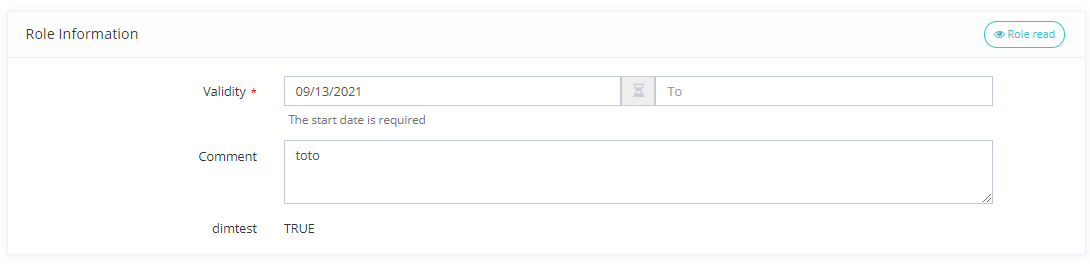
  • display read-only dimensions

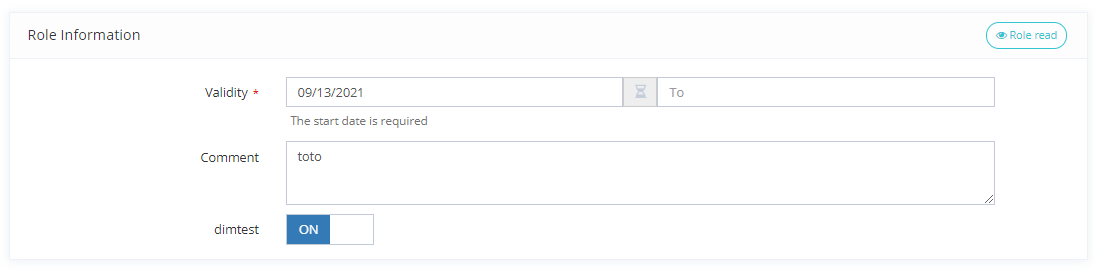
  • display read-write dimensions

Role Request Widget with read only dimensions

Role Request Widget with read write dimensions

image-20220928-084620.png
image-20220928-084625.png

When a Warning-type SoD violation is detected, the violation is reminded during workflow approval.

If the violation is of type Forbid, the approver will only be able to reject the approval.
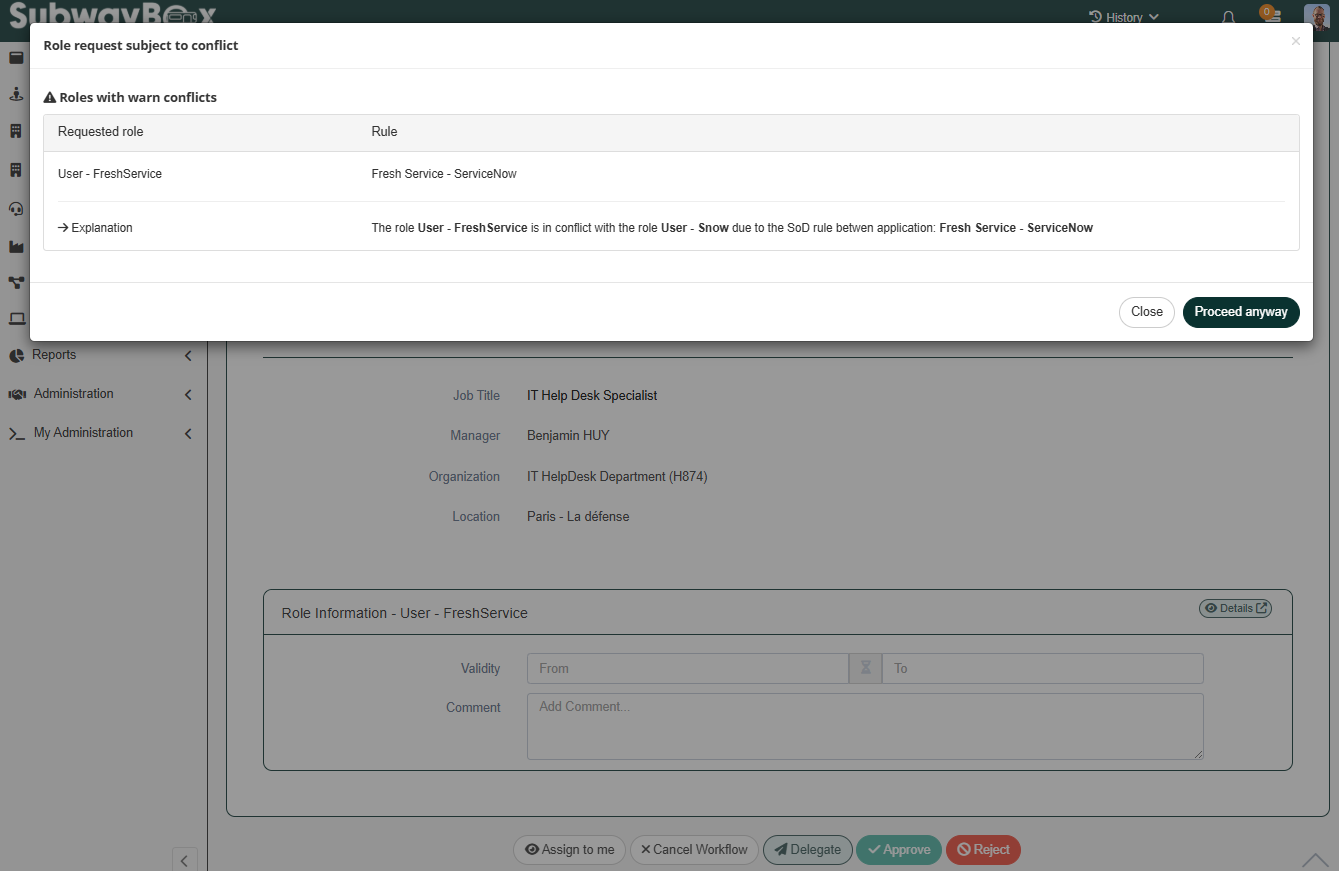
image-20250919-065210.png

Tips

To access this Widget, you must configure it on a user task of a Workflow.

Each dimension can be translated with these I18N keys:

  • ui.model.dimensions.<dimensionId>.name (in this case, all dimensions with the same id will be translated on all roles using it).

  • ui.model.roles.<roleId>.dimensions.<dimensionId>.name (in this case, only the dimension on a specific role will be translated).

Configuration

Properties

Property name

Type

Mandatory

Description


actions

List<Actions>

NO


Allows to configure a Button Widget in order to redirect the user to another feature.


fields

List<FieldEditorWidget>

NO

Allows you to configure field editors to be displayed (see Field Editors)

These fields will be accessible when evaluating Role Request Policies and in workflows


tagsForCreate
tagsForUpdate
tagsForDelete

-

NO

Allows to indicate the tag(s) that will be displayed or editable in the user task when a Workflow is launched for an assignment, modification or deletion.


validityRangeGranularity

ValidityRangeGranularity

YES

Allows you to define the precision used for the validity dates of a role:
DAY (day only) or HOUR (day + hour)

DAY, HOUR

fields Properties

Properties name

Type

Mandatory

Description

Values (default value in bold)

field

FieldEditorWidget

NO

Allows you to configure field editors to be displayed (see Field Editors)

These fields will be accessible when evaluating Role Request Policies and in workflows

-

tagsForCreate & tagsForUpdate& tagsForDelete properties

Property name

Type

Mandatory

Description

readOnlyDimensionTags

-

NO

Allows to indicate the tag(s) of the dimensions that will be displayed.

readWriteDimensionTags

-

NO

Allows to indicate the tag(s) of the dimensions that will be editable.

readOnlyDimensionTags & readWriteDimensionTags properties

Property name

Type

Mandatory

Description

tag

String

NO

Id of the configured tag in the dimension.

Example

Read only dimensions

Read write dimensions

<columns>
    <column>
        <widgets>
            <widget id="roleAssignment" xsi:type="ctdbum:RoleRequestWidgetType">
                <hidden>false</hidden>
                <config>
                	<actions>
                    	<action id="role-read" xsi:type="ctdbum:ButtonWidgetType">
                        	<hidden>false</hidden>
                        	<config>
                        		<align>LEFT</align>
    		             		<authenticationLevelSufficient>true</authenticationLevelSufficient>
                            	<borderless>false</borderless>
                            	<circle>true</circle>
                            	<color>green</color>
                            	<icon>fa fa-eye</icon>
                           		<label>true</label>
                            	<link>feature://role-card-read/{widgetData.id}</link>
                            	<linkTarget>SELF</linkTarget>
                            	<outline>true</outline>
                            	<size>SM</size>
							</config>
						</action>
					</actions>
                    <tagsForCreate>
                    	<readOnlyDimensionTags>
							<tag>request</tag>
                        </readOnlyDimensionTags>
                        <readWriteDimensionTags/>
                    </tagsForCreate>
                    <tagsForUpdate>
                    	<readOnlyDimensionTags/>
                        <readWriteDimensionTags/>
                    </tagsForUpdate>
                    <tagsForDelete>
                        <readOnlyDimensionTags/>
                        <readWriteDimensionTags/>
                    </tagsForDelete>
                    <fields>
                        <field id="fieldTargetId">
                            <hidden>false</hidden>
                            <config>
                                <editor>
                                    <editWidget xsi:type="ctdbum:TextInputEditWidgetType">
                                        <hidden>false</hidden>
                                        <config>
                                            <required>true</required>
                                            <type>text</type>
                                        </config>
                                    </editWidget>
                                </editor>
                                <label></label>
                                <lockedInUi>false</lockedInUi>
                                <mode>READ_WRITE</mode>
                                <multiValued>false</multiValued>
                            </config>
                            <fieldId>fieldTargetId</fieldId>
                        </field>
                    </fields>
                    <validityRangeGranularity>DAY</validityRangeGranularity>
				</config>
			</widget>
        </widgets>
    </column>
</columns>
<columns>
    <column>
        <widgets>
            <widget id="roleAssignment" xsi:type="ctdbum:RoleRequestWidgetType">
                <hidden>false</hidden>
                <config>
                	<actions>
                    	<action id="role-read" xsi:type="ctdbum:ButtonWidgetType">
                        	<hidden>false</hidden>
                        	<config>
                        		<align>LEFT</align>
    		             		<authenticationLevelSufficient>true</authenticationLevelSufficient>
                            	<borderless>false</borderless>
                            	<circle>true</circle>
                            	<color>green</color>
                            	<icon>fa fa-eye</icon>
                           		<label>true</label>
                            	<link>feature://role-card-read/{widgetData.id}</link>
                            	<linkTarget>SELF</linkTarget>
                            	<outline>true</outline>
                            	<size>SM</size>
							</config>
						</action>
					</actions>
                    <tagsForCreate>
                    	<readOnlyDimensionTags/>
                        <readWriteDimensionTags>
							<tag>request</tag>
						</readWriteDimensionTags>
                    </tagsForCreate>
                    <tagsForUpdate>
                    	<readOnlyDimensionTags/>
                        <readWriteDimensionTags/>
                    </tagsForUpdate>
                    <tagsForDelete>
                        <readOnlyDimensionTags/>
                        <readWriteDimensionTags/>
                    </tagsForDelete>
                    <fields>
                        <field id="fieldTargetId">
                            <hidden>false</hidden>
                            <config>
                                <editor>
                                    <editWidget xsi:type="ctdbum:TextInputEditWidgetType">
                                        <hidden>false</hidden>
                                        <config>
                                            <required>true</required>
                                            <type>text</type>
                                        </config>
                                    </editWidget>
                                </editor>
                                <label></label>
                                <lockedInUi>false</lockedInUi>
                                <mode>READ_WRITE</mode>
                                <multiValued>false</multiValued>
                            </config>
                            <fieldId>fieldTargetId</fieldId>
                        </field>
                    </fields>
                    <validityRangeGranularity>DAY</validityRangeGranularity>
				</config>
			</widget>
        </widgets>
    </column>
</columns>