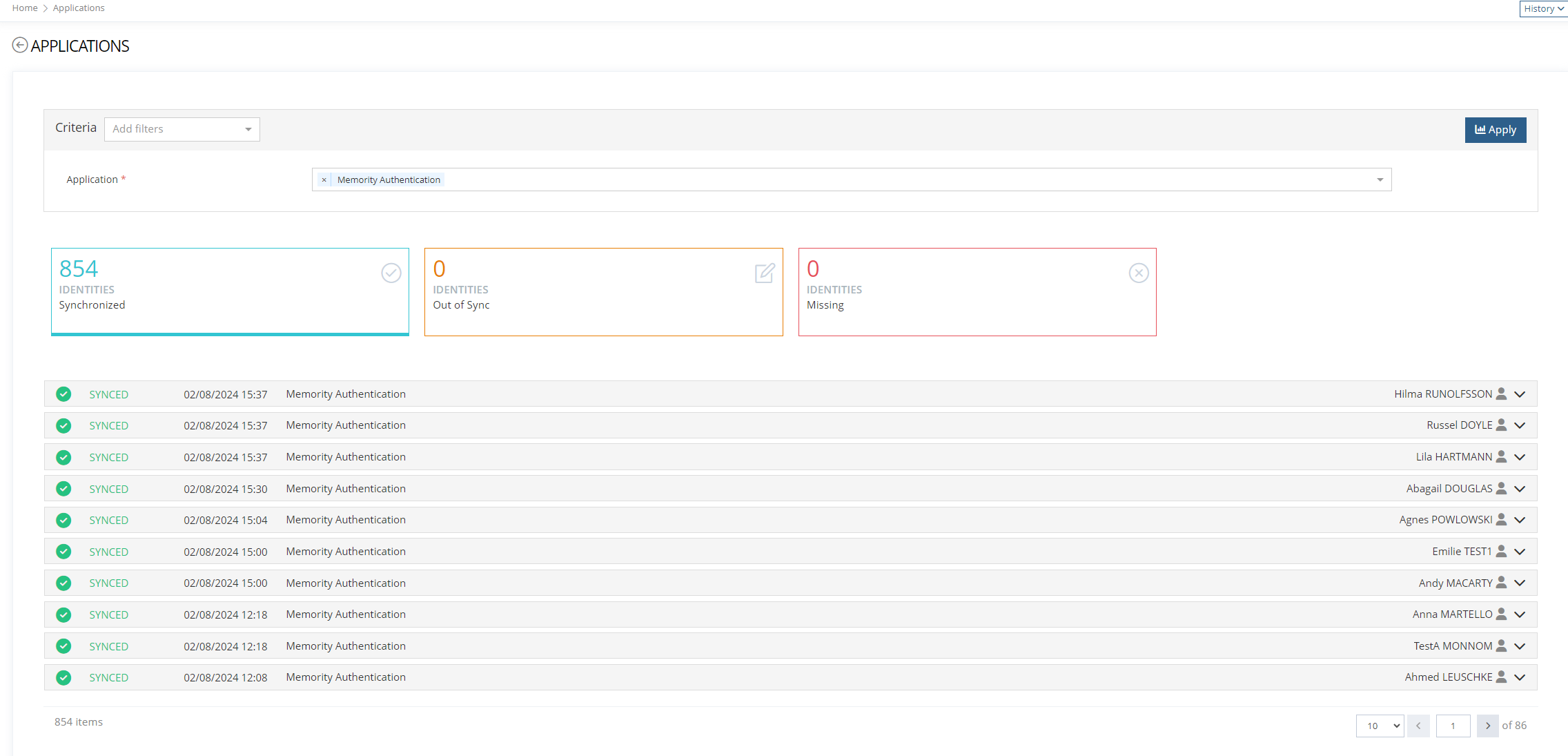
This widget is dedicated to the display of Account Information (provisioned accounts). It can also perform synchronization actions on the Accounts if configured.
It must be used with a "reportingId" that maps to the builtin collection ACCOUNT_INFORMATIONor a custom collection that targets the same collection name ("account").
Property
Type
Mandatory
Description
Values (default values in bold)
type
ReportingAccountInformationWidgetType
YES
The type of the widget in XML configuration
-
reportingId
String
YES
The id of a ReportingObjectConfiguration which this widget will target. Must be a configuration which uses the ACCOUNT_INFORMATION builtin collection or a custom one that targets the same collection "account".
-
allowExport
Boolean
NO
Allows to define if the export of the results data is allowed or not.
true,false
displayOnInit
Boolean
NO
If true, the chart will be displayed initially without requiring to click the "Apply" button of the criteria panel first.
true,false
contract
ReportingContractConfiguration
YES
A ReportingWidgetContractConfiguration specifying the different criteria used by the widget for displaying the filter elements. It is also used for validating the submitted criteria.
See Reporting widget contract section for detailed configuration information.
-
renderingRule
RuleDefinition (Normalization rule)
NO
This rule will be applied for each document of the results and allows to transform the content. It MUST return a Map of String to Object.
Example:
  <renderingRule>
   <script><![CDATA[
   // Request criteria can be accessed on VARS.criteria
   // OBJECT is still the Feature target
   // The "row" element is accessed on VALUE
   def dateCriteria = VARS.criteria["_id.date"];

   def thisRowFirstName = VALUE.firstName as String

   // A column "fullNameAndDate " can be configured on the widget
   VALUE.fullNameAndDate = "${thisRowFirstName} ${OBJECT.lastName} ${dateCriteria}";

   if (VALUE.lastMdAuthent != null) {
        // Nested object must be casted to List<Map<String, Object>>
        def firstMdAuthent = VALUE.lastMdAuthent as List<Map<String, Object>>;
        VALUE.firstMdAuthent = firstMdAuthent.get(0).get("md");
   }

   // The value must be returned
   return VALUE;
   ]]></script>
</renderingRule>
-
actionsGroups
List<ActionGroup>
NO
Allow to configure buttons by object kind
<actionsGroups>
    <actionsGroup>
        <objectKind>IDENTITY</objectKind>
        <actions>
            <action id="view-entry-btn" xsi:type="ctdbum:ButtonWidgetType">
                <hidden>false</hidden>
                <config>
                    <authenticationLevelSufficient>false</authenticationLevelSufficient>
                    <borderless>false</borderless>
                    <circle>true</circle>
                    <color>blue</color>
                    <icon>fa fa-eye</icon>
                    <label>true</label>
                    <target xsi:type="ctdBum:LinkTargetType">
                      <link>feature://test_user-card-read/{dataKey.idmObjectId}</link>
                      <target>NEW_TAB</target>
                    </target>
                    <outline>true</outline>
                    <size>XS</size>
                </config>
            </action>
        </actions>
    </actionsGroup>
</actionsGroups>
Empty list
syncActions
List<SyncActionConfiguration>
NO
Allows to configure synchronization actions for the accounts
Empty list
Property
Type
Mandatory
Description
Values (default values in bold)
id
String
YES
Unique identifier of the action being performed.
This prevents conflicts between multiple actions (CUSTOM actions notably).
It is also used in the i18n of CUSTOM actions.
-
action
AccountSyncAction
YES
The builtin synchronization action. Possible values are:
SYNCHRONIZE_IDM_OBJECT : display a button to allow synchronization of the target account with the idm object. This action is only available if the account is SYNCED and LINKED.
ASSIGN_APPLICATION_ROLE : open a role assignment feature (to be configured using the property “modalLink”) to assign a role to the identity. This action is only available if the account is SYNCED and UNLINKED.
DELETE_APPLICATION_OBJECT : hard delete the account. This action is only available if the account is ORPHANED and UNMATCHED.
IGNORE_APPLICATION_OBJECT : ignore the account i.e mark the reporting document with a property “ignored” set to true (this is only useful for filtering ignored account with a criteria on the “ignored” property). This action is only available if the account is ORPHANED and UNMATCHED.
UNIGNORE_APPLICATION_OBJECT : Remove the “ignored” flag on the account. This action is only available if the account was already marked as “ignored”.
CUSTOM : Perform a custom action on the account using a rule configured on the application configuration. A static context can be provided during the action execution using the “staticContext” property
-
objectKinds
Set<ObjectKind>
NO
Allows to restrict the action to a set of object kinds. If left empty the action will apply to all compatible object kinds.
-
modalTarget
ModalTarget
NO
Only applicable if the action ASSIGN_APPLICATION_ROLE is configured.
<modalTarget>
    <link>feature://assign-role/{dataKey.idmObjectId}</link>
    <modalSize>LG</modalSize>
    <onDismiss>NONE</onDismiss>
</modalTarget>
A link that should match the feature scheme “feature://<featureId>/{dataKey.idmObjectId}” where “featureId” is the id of a Feature containing a RoleAssignmentWidget.
-
staticContext
List<SyncActionContext>
NO
Only applicable for actions of type CUSTOM.
A static context that will be sent in the execution request to the sync service. By defining different static contexts, one can perform branching logic in the custom rule action depending on the performed custom action.
-
color
String
NO
The color of the action button (if null, a default value will be used)
-
icon
String
NO
The icon of the action button (if null, a default value will be used)
Empty list
syncActions
List<SyncActionConfiguration>
NO
Allows to configure synchronization actions for the accounts
Empty list
accountDisplay
Set<AccountDisplayConfiguration>
NO
Allows to configure the display of an account
Empty set
Property
Type
Mandatory
Description
Values (default values in bold)
name
String
YES
Unique name of the context
-
value
String
NO
Value of the context
-
Account Information Widget
<?xml version="1.0" encoding="UTF-8"?>
<kit:DataSet xmlns:atlastcf="http://www.memority.com/atlas/tcf/1_0" xmlns:ctd="http://www.memority.com/citadel/1_0" xmlns:ctdbpmn="http://www.memority.com/citadel/bpmn/1_0" xmlns:ctdbum="http://www.memority.com/citadel/bum/1_0" xmlns:ctdcore="http://www.memority.com/citadel/core/1_0" xmlns:ctdidm="http://www.memority.com/citadel/idm/1_0" xmlns:ctdrep="http://www.memority.com/citadel/rep/1_0" xmlns:ctdrule="http://www.memority.com/citadel/rule/1_0" xmlns:ctdtnt="http://www.memority.com/citadel/tnt/1_0" xmlns:i18n="http://www.memority.com/toolkit/addons/i18n/1_0" xmlns:kit="http://www.memority.com/toolkit/1_0" xmlns:maiaamcp="http://www.memority.com/maia/amcp/1_0" xmlns:netfilter="http://www.memority.com/toolkit/network-filtering/1_0" xmlns:rule="http://www.memority.com/toolkit/rule/1_0" xmlns:ruleaddon="http://www.memority.com/toolkit/addons/rule/1_0" xmlns:search="http://www.memority.com/toolkit/search-expression/1_0" xmlns:settings="http://www.memority.com/toolkit/addons/settings/1_0" xmlns:xs="http://www.w3.org/2001/XMLSchema" xmlns:xsi="http://www.w3.org/2001/XMLSchema-instance" tenant="default" env="memority" stack="memority">
<ctdbum:FeatureConfiguration id="test_reporting-account-information-feature">
<createdAt>2022-06-01T14:13:50.849Z</createdAt>
<updatedAt>2024-04-24T12:41:31.112Z</updatedAt>
<name>reporting-account-information-feature</name>
<description>Display provisioned account information</description>
<type>UI</type>
<scope type="EXPRESSION" objectKind="IDENTITY">
<searchExpression/>
<objectTypes>
<objectType>test_identityType_employee</objectType>
</objectTypes>
</scope>
<options>
<formLabelOnTop>false</formLabelOnTop>
<pendingOperationBehaviour>WARN</pendingOperationBehaviour>
<submit>
<reportDisplay>DISPLAY_ALL</reportDisplay>
</submit>
</options>
<screen>
<views>
<view id="reporting-account-information-view-1">
<description></description>
<icon>fa fa-user</icon>
<sections>
<section id="reporting-account-information-section-1">
<layout>SINGLE</layout>
<columns>
<column>
<sections/>
<widgets>
<widget id="reporting-account-information-widget" xsi:type="ctdbum:ReportingAccountInformationWidgetType">
<hidden>false</hidden>
<displayOptions>
<modalSize>LG</modalSize>
</displayOptions>
<config>
<bordered>false</bordered>
<title>false</title>
<contract>
<criteria>
<criterion>
<allowFixedValueOverride>false</allowFixedValueOverride>
<controlType>
<multivalued>false</multivalued>
<options>
<periodSelection>
<mode>IN_LAST</mode>
</periodSelection>
</options>
<valueType>TEXT</valueType>
</controlType>
<displayFixedValue>false</displayFixedValue>
<fixedMatchOperator>CONTAINS_LIKE</fixedMatchOperator>
<forGrouping>false</forGrouping>
<mandatory>false</mandatory>
<name>account.displayName</name>
<values>
<staticValues/>
</values>
</criterion>
<criterion>
<allowFixedValueOverride>false</allowFixedValueOverride>
<controlType>
<multivalued>false</multivalued>
<options>
<periodSelection>
<mode>IN_LAST</mode>
</periodSelection>
</options>
<valueType>TEXT_CHOICE</valueType>
</controlType>
<displayFixedValue>false</displayFixedValue>
<forGrouping>false</forGrouping>
<mandatory>false</mandatory>
<name>dominoApplicationId</name>
<values>
<staticValues>
<value>ldap-application-demo</value>
<value>dummy-application-test-3</value>
<value>ldap-application-test-1</value>
<value>ldap-application-test-2</value>
<value>prov-activeDirectory-application</value>
</staticValues>
</values>
</criterion>
<criterion>
<allowFixedValueOverride>false</allowFixedValueOverride>
<controlType>
<multivalued>false</multivalued>
<options>
<periodSelection>
<mode>IN_LAST</mode>
</periodSelection>
</options>
<valueType>TEXT_CHOICE</valueType>
</controlType>
<displayFixedValue>false</displayFixedValue>
<forGrouping>false</forGrouping>
<mandatory>false</mandatory>
<name>accountStatus</name>
<values>
<staticValues>
<value>SYNCED</value>
<value>OUT_OF_SYNC</value>
<value>MISSING</value>
<value>ORPHANED</value>
<value>NOT_PROVISIONED</value>
<value>UNKNOWN</value>
</staticValues>
</values>
</criterion>
</criteria>
</contract>
<displayOnInit>true</displayOnInit>
<reportingId>accountInformation</reportingId>
<actionsGroups>
<actionsGroup>
<actions>
<action id="view-entry-btn" xsi:type="ctdbum:ButtonWidgetType">
<hidden>false</hidden>
<config>
<authenticationLevelSufficient>false</authenticationLevelSufficient>
<borderless>false</borderless>
<circle>true</circle>
<color>blue</color>
<icon>fa fa-eye</icon>
<label>true</label>
<linkTarget>NEW_TAB</linkTarget>
<outline>true</outline>
<size>XS</size>
<target xsi:type="ctdbum:LinkTargetType">
<link>feature://test_user-card-read/{dataKey.idmObjectId}</link>
<target>SELF</target>
</target>
</config>
</action>
</actions>
<objectKind>IDENTITY</objectKind>
</actionsGroup>
</actionsGroups>
<syncActions>
<syncAction id="syncIdmObject">
<objectKinds/>
<staticContext/>
<action>SYNCHRONIZE_IDM_OBJECT</action>
</syncAction>
<syncAction id="ignoreApplicationObject">
<objectKinds/>
<staticContext/>
<action>IGNORE_APPLICATION_OBJECT</action>
</syncAction>
<syncAction id="uningnoreApplicationObject">
<objectKinds/>
<staticContext/>
<action>UNIGNORE_APPLICATION_OBJECT</action>
</syncAction>
<syncAction id="assignRole">
<objectKinds/>
<staticContext/>
<action>ASSIGN_APPLICATION_ROLE</action>
<modalTarget>
<link>feature://test_employee-dashboard/{dataKey.idmObjectId}</link>
<modalSize>LG</modalSize>
<onDismiss>REFRESH</onDismiss>
</modalTarget>
</syncAction>
<syncAction id="customAction1">
<objectKinds/>
<staticContext>
<context>
<name>key1</name>
<value>value1</value>
</context>
<context>
<name>key2</name>
<value>value2</value>
</context>
</staticContext>
<action>CUSTOM</action>
<color>blue</color>
<icon>fa fa-bolt</icon>
</syncAction>
<syncAction id="deleteApplicationObject">
<objectKinds/>
<staticContext/>
<action>DELETE_APPLICATION_OBJECT</action>
</syncAction>
</syncActions>
</config>
</widget>
</widgets>
</column>
</columns>
</section>
</sections>
</view>
</views>
<frame>
<actions/>
<collapsible>false</collapsible>
<display>PORTLET</display>
<initiallyCollapsed>false</initiallyCollapsed>
<title>false</title>
</frame>
</screen>
<authentication>
<authenticationLevelComparison>MINIMUM</authenticationLevelComparison>
</authentication>
<operations/>
<operationOnSelf>false</operationOnSelf>
</ctdbum:FeatureConfiguration>
</kit:DataSet>
Account Information Widget with association
<?xml version="1.0" encoding="UTF-8"?>
<kit:DataSet xmlns:ctd="http://www.memority.com/citadel/1_0" xmlns:ctdbpmn="http://www.memority.com/citadel/bpmn/1_0" xmlns:ctdbum="http://www.memority.com/citadel/bum/1_0" xmlns:ctdcore="http://www.memority.com/citadel/core/1_0" xmlns:ctdidm="http://www.memority.com/citadel/idm/1_0" xmlns:ctdrep="http://www.memority.com/citadel/rep/1_0" xmlns:ctdrule="http://www.memority.com/citadel/rule/1_0" xmlns:ctdtnt="http://www.memority.com/citadel/tnt/1_0" xmlns:kit="http://www.memority.com/toolkit/1_0" xmlns:rule="http://www.memority.com/toolkit/rule/1_0" xmlns:ruleaddon="http://www.memority.com/toolkit/addons/rule/1_0" xmlns:search="http://www.memority.com/toolkit/search-expression/1_0" xmlns:settings="http://www.memority.com/toolkit/addons/settings/1_0" xmlns:xs="http://www.w3.org/2001/XMLSchema" xmlns:xsi="http://www.w3.org/2001/XMLSchema-instance" tenant="default" env="memority" stack="memority">
<ctdbum:FeatureConfiguration id="test_reporting-account-information-counter-feature">
<createdAt>2022-06-02T13:36:55.069Z</createdAt>
<updatedAt>2022-06-02T14:14:48.484Z</updatedAt>
<name>account-information-counter-feature</name>
<description>Display report about user accounts</description>
<type>UI</type>
<scope type="EXPRESSION" objectKind="IDENTITY">
<searchExpression/>
<objectTypes>
<objectType>test_identityType_employee</objectType>
</objectTypes>
</scope>
<options>
<formLabelOnTop>false</formLabelOnTop>
<pendingOperationBehaviour>WARN</pendingOperationBehaviour>
<submit>
<reportDisplay>DISPLAY_ALL</reportDisplay>
</submit>
</options>
<screen>
<views>
<view id="reporting-account-information-view-1">
<description></description>
<icon>fa fa-user</icon>
<sections>
<section id="reporting-account-information-section-1">
<layout>SINGLE</layout>
<columns>
<column>
<widgets>
<widget id="reporting-account-information-top-filter-widget" xsi:type="ctdbum:ReportingWidgetType">
<hidden>false</hidden>
<displayOptions>
<modalSize>SM</modalSize>
</displayOptions>
<config>
<bordered>false</bordered>
<title>false</title>
<associations>
<association>
<criteriaMapping>
<mapping>
<source>dominoApplicationId</source>
<target>dominoApplicationId</target>
</mapping>
</criteriaMapping>
<allowEditCriteria>true</allowEditCriteria>
<propagation>
<strategy>ALWAYS</strategy>
</propagation>
<widgetId>reporting-account-information-counter-synced-widget</widgetId>
</association>
<association>
<criteriaMapping>
<mapping>
<source>dominoApplicationId</source>
<target>dominoApplicationId</target>
</mapping>
</criteriaMapping>
<allowEditCriteria>true</allowEditCriteria>
<propagation>
<strategy>ALWAYS</strategy>
</propagation>
<widgetId>reporting-account-information-counter-out-of-sync-widget</widgetId>
</association>
</associations>
<contract>
<criteria>
<criterion>
<allowFixedValueOverride>false</allowFixedValueOverride>
<controlType>
<multivalued>false</multivalued>
<options>
<periodSelection>
<mode>IN_LAST</mode>
</periodSelection>
</options>
<valueType>TEXT</valueType>
</controlType>
<displayFixedValue>false</displayFixedValue>
<forGrouping>false</forGrouping>
<mandatory>false</mandatory>
<name>dominoApplicationId</name>
<values>
<staticValues/>
</values>
</criterion>
</criteria>
</contract>
<display>
<xySeries/>
<pieSeries/>
<axes>
<axesX/>
<axesY/>
</axes>
<chartType>NONE</chartType>
<counter>
<borderColor>grey</borderColor>
<counterColor>dark</counterColor>
</counter>
<displayOnInit>false</displayOnInit>
<legend>
<display>true</display>
</legend>
<size>
<cssHeight>500px</cssHeight>
<cssWidth>100%</cssWidth>
<radiusPercent>50</radiusPercent>
</size>
<timeline>
<bullets/>
<horizontal>false</horizontal>
<initialRange>
<endRange>1.0</endRange>
<startRange>0.0</startRange>
</initialRange>
<levelCount>3</levelCount>
<timelineColor>#67b7dc</timelineColor>
<tooltipConfiguration>
<maxHeight>500</maxHeight>
<maxWidth>500</maxWidth>
<orientation>VERTICAL</orientation>
</tooltipConfiguration>
</timeline>
</display>
<reportingId>accountInformation</reportingId>
</config>
</widget>
</widgets>
</column>
</columns>
</section>
<section id="reporting-account-information-section-2">
<layout>SINGLE</layout>
<frame>
<actions/>
<collapsible>false</collapsible>
<display>PORTLET</display>
<initiallyCollapsed>false</initiallyCollapsed>
<title>false</title>
</frame>
<columns>
<column>
<widgets>
<widget id="reporting-account-information-counter-synced-widget" xsi:type="ctdbum:ReportingWidgetType">
<hidden>false</hidden>
<displayOptions>
<modalSize>SM</modalSize>
</displayOptions>
<config>
<bordered>false</bordered>
<title>true</title>
<associations>
<association>
<criteriaMapping>
<mapping>
<source>accountStatus</source>
<target>accountStatus</target>
</mapping>
</criteriaMapping>
<allowEditCriteria>true</allowEditCriteria>
<propagation>
<strategy>SELECTION</strategy>
</propagation>
<widgetId>reporting-account-information-status-synced-widget</widgetId>
</association>
</associations>
<contract>
<criteria>
<criterion>
<allowFixedValueOverride>false</allowFixedValueOverride>
<controlType>
<multivalued>true</multivalued>
<options>
<periodSelection>
<mode>IN_LAST</mode>
</periodSelection>
</options>
<valueType>TEXT</valueType>
</controlType>
<displayFixedValue>false</displayFixedValue>
<forGrouping>false</forGrouping>
<mandatory>false</mandatory>
<name>accountStatus</name>
<staticFixedValue>SYNCED</staticFixedValue>
<values>
<staticValues/>
</values>
</criterion>
<criterion>
<allowFixedValueOverride>false</allowFixedValueOverride>
<controlType>
<multivalued>false</multivalued>
<options>
<periodSelection>
<mode>IN_LAST</mode>
</periodSelection>
</options>
<valueType>TEXT</valueType>
</controlType>
<displayFixedValue>false</displayFixedValue>
<forGrouping>false</forGrouping>
<mandatory>false</mandatory>
<name>dominoApplicationId</name>
<values>
<staticValues/>
</values>
</criterion>
</criteria>
</contract>
<display>
<xySeries/>
<pieSeries/>
<axes>
<axesX/>
<axesY/>
</axes>
<chartType>COUNTER_CHART</chartType>
<counter>
<aggregationExpression>count()</aggregationExpression>
<borderColor>green</borderColor>
<counterColor>green</counterColor>
<icon>icon-note</icon>
<text>tenant.reporting.synced.title.label</text>
<title>tenant.reporting.stat1.title.label</title>
</counter>
<displayOnInit>false</displayOnInit>
<legend>
<display>true</display>
</legend>
<size>
<cssHeight>500px</cssHeight>
<cssWidth>100%</cssWidth>
<radiusPercent>50</radiusPercent>
</size>
<timeline>
<bullets/>
<horizontal>false</horizontal>
<initialRange>
<endRange>1.0</endRange>
<startRange>0.0</startRange>
</initialRange>
<levelCount>3</levelCount>
<timelineColor>#67b7dc</timelineColor>
<tooltipConfiguration>
<maxHeight>500</maxHeight>
<maxWidth>500</maxWidth>
<orientation>VERTICAL</orientation>
</tooltipConfiguration>
</timeline>
</display>
<reportingId>accountInformation</reportingId>
</config>
</widget>
<widget id="reporting-account-information-counter-out-of-sync-widget" xsi:type="ctdbum:ReportingWidgetType">
<hidden>false</hidden>
<displayOptions>
<modalSize>SM</modalSize>
</displayOptions>
<config>
<bordered>false</bordered>
<title>true</title>
<associations>
<association>
<criteriaMapping>
<mapping>
<source>accountStatus</source>
<target>accountStatus</target>
</mapping>
</criteriaMapping>
<allowEditCriteria>true</allowEditCriteria>
<propagation>
<strategy>SELECTION</strategy>
</propagation>
<widgetId>reporting-account-information-status-out-of-sync-widget</widgetId>
</association>
</associations>
<contract>
<criteria>
<criterion>
<allowFixedValueOverride>false</allowFixedValueOverride>
<controlType>
<multivalued>true</multivalued>
<options>
<periodSelection>
<mode>IN_LAST</mode>
</periodSelection>
</options>
<valueType>TEXT</valueType>
</controlType>
<displayFixedValue>false</displayFixedValue>
<forGrouping>false</forGrouping>
<mandatory>false</mandatory>
<name>accountStatus</name>
<staticFixedValue>OUT_OF_SYNC</staticFixedValue>
<values>
<staticValues/>
</values>
</criterion>
<criterion>
<allowFixedValueOverride>false</allowFixedValueOverride>
<controlType>
<multivalued>false</multivalued>
<options>
<periodSelection>
<mode>IN_LAST</mode>
</periodSelection>
</options>
<valueType>TEXT</valueType>
</controlType>
<displayFixedValue>false</displayFixedValue>
<forGrouping>false</forGrouping>
<mandatory>false</mandatory>
<name>dominoApplicationId</name>
<values>
<staticValues/>
</values>
</criterion>
</criteria>
</contract>
<display>
<xySeries/>
<pieSeries/>
<axes>
<axesX/>
<axesY/>
</axes>
<chartType>COUNTER_CHART</chartType>
<counter>
<aggregationExpression>count()</aggregationExpression>
<borderColor>red</borderColor>
<counterColor>red</counterColor>
<icon>icon-note</icon>
<text>tenant.reporting.out-of-sync.title.label</text>
<title>tenant.reporting.stat1.title.label</title>
</counter>
<displayOnInit>false</displayOnInit>
<legend>
<display>true</display>
</legend>
<size>
<cssHeight>500px</cssHeight>
<cssWidth>100%</cssWidth>
<radiusPercent>50</radiusPercent>
</size>
<timeline>
<bullets/>
<horizontal>false</horizontal>
<initialRange>
<endRange>1.0</endRange>
<startRange>0.0</startRange>
</initialRange>
<levelCount>3</levelCount>
<timelineColor>#67b7dc</timelineColor>
<tooltipConfiguration>
<maxHeight>500</maxHeight>
<maxWidth>500</maxWidth>
<orientation>VERTICAL</orientation>
</tooltipConfiguration>
</timeline>
</display>
<reportingId>accountInformation</reportingId>
</config>
</widget>
</widgets>
</column>
</columns>
</section>
<section id="reporting-sync-report-section-3">
<layout>SINGLE</layout>
<columns>
<column>
<widgets>
<widget id="reporting-account-information-status-synced-widget" xsi:type="ctdbum:ReportingAccountInformationWidgetType">
<hidden>false</hidden>
<displayOptions>
<modalSize>LG</modalSize>
</displayOptions>
<config>
<bordered>false</bordered>
<title>false</title>
<contract>
<criteria>
<criterion>
<allowFixedValueOverride>false</allowFixedValueOverride>
<controlType>
<multivalued>true</multivalued>
<options>
<periodSelection>
<mode>IN_LAST</mode>
</periodSelection>
</options>
<valueType>TEXT</valueType>
</controlType>
<displayFixedValue>false</displayFixedValue>
<forGrouping>false</forGrouping>
<mandatory>false</mandatory>
<name>accountStatus</name>
<staticFixedValue>SYNCED</staticFixedValue>
<values>
<staticValues/>
</values>
</criterion>
<criterion>
<allowFixedValueOverride>false</allowFixedValueOverride>
<controlType>
<multivalued>false</multivalued>
<options>
<periodSelection>
<mode>IN_LAST</mode>
</periodSelection>
</options>
<valueType>TEXT_CHOICE</valueType>
</controlType>
<displayFixedValue>false</displayFixedValue>
<forGrouping>false</forGrouping>
<mandatory>false</mandatory>
<name>dominoApplicationId</name>
<values>
<staticValues>
<value>ldap-application-demo</value>
<value>dummy-application-test-3</value>
<value>ldap-application-test-1</value>
<value>ldap-application-test-2</value>
</staticValues>
</values>
</criterion>
</criteria>
</contract>
<displayOnInit>false</displayOnInit>
<reportingId>accountInformation</reportingId>
</config>
</widget>
<widget id="reporting-account-information-status-out-of-sync-widget" xsi:type="ctdbum:ReportingAccountInformationWidgetType">
<hidden>false</hidden>
<displayOptions>
<modalSize>LG</modalSize>
</displayOptions>
<config>
<bordered>false</bordered>
<title>false</title>
<contract>
<criteria>
<criterion>
<allowFixedValueOverride>false</allowFixedValueOverride>
<controlType>
<multivalued>true</multivalued>
<options>
<periodSelection>
<mode>IN_LAST</mode>
</periodSelection>
</options>
<valueType>TEXT</valueType>
</controlType>
<displayFixedValue>false</displayFixedValue>
<forGrouping>false</forGrouping>
<mandatory>false</mandatory>
<name>accountStatus</name>
<staticFixedValue>OUT_OF_SYNC</staticFixedValue>
<values>
<staticValues/>
</values>
</criterion>
<criterion>
<allowFixedValueOverride>false</allowFixedValueOverride>
<controlType>
<multivalued>false</multivalued>
<options>
<periodSelection>
<mode>IN_LAST</mode>
</periodSelection>
</options>
<valueType>TEXT_CHOICE</valueType>
</controlType>
<displayFixedValue>false</displayFixedValue>
<forGrouping>false</forGrouping>
<mandatory>false</mandatory>
<name>dominoApplicationId</name>
<values>
<staticValues>
<value>ldap-application-demo</value>
<value>dummy-application-test-3</value>
<value>ldap-application-test-1</value>
<value>ldap-application-test-2</value>
</staticValues>
</values>
</criterion>
</criteria>
</contract>
<displayOnInit>false</displayOnInit>
<reportingId>accountInformation</reportingId>
</config>
</widget>
</widgets>
</column>
</columns>
</section>
</sections>
</view>
</views>
<frame>
<actions/>
<collapsible>false</collapsible>
<display>PORTLET</display>
<initiallyCollapsed>false</initiallyCollapsed>
<title>false</title>
</frame>
</screen>
<authentication>
<authenticationLevelComparison>MINIMUM</authenticationLevelComparison>
</authentication>
<operations/>
<operationOnSelf>false</operationOnSelf>
</ctdbum:FeatureConfiguration>
</kit:DataSet>
Data freshness
This widget does not query the Synchronization server directly. It reads the reporting collection account, which is a copy maintained from synchronization events. What is displayed therefore reflects the last reported state of an account, not necessarily its current state on the target application.
In practice, a recently created or modified account may not appear immediately, and this widget can momentarily differ from screens that query the Synchronization server live, such as the Shadow Account widget. Both converge once the reporting collection has been updated.