
The Google Provisioning plugin will be available with the release of the Memority Integration Tool (MIT) 3.0.0.
Memority's REST connector can provision a Google Workspace tenant through Google APIs. Some prerequisites must be met before the application can be provisioned.
This page explains how Google provisioning works in Memority and the prerequisites required to provision Google Workspace.
Generic REST connector prerequisites are explained on the REST provisioning page.
Definitions
What is provisioning?
See the definition of provisioning on the REST provisioning page.
What Google objects can be managed ?
The connector can manage user accounts, distribution lists, groups and group memberships.
The Google Provisioning plugin configures user accounts and licenses only. You can add the other objects manually on top of the generated configuration.
Can licenses be managed ?
Yes. Licenses can be managed through the connector or through automatic license assignment rules in Google.
Can account delegation and ownership be managed ?
Mailbox delegation can be managed through the connector.
The connector can also manage the ownership of calendars, Drive files and documents, in order to transfer them to another account.
Memority REST connector
API authentication prerequisites
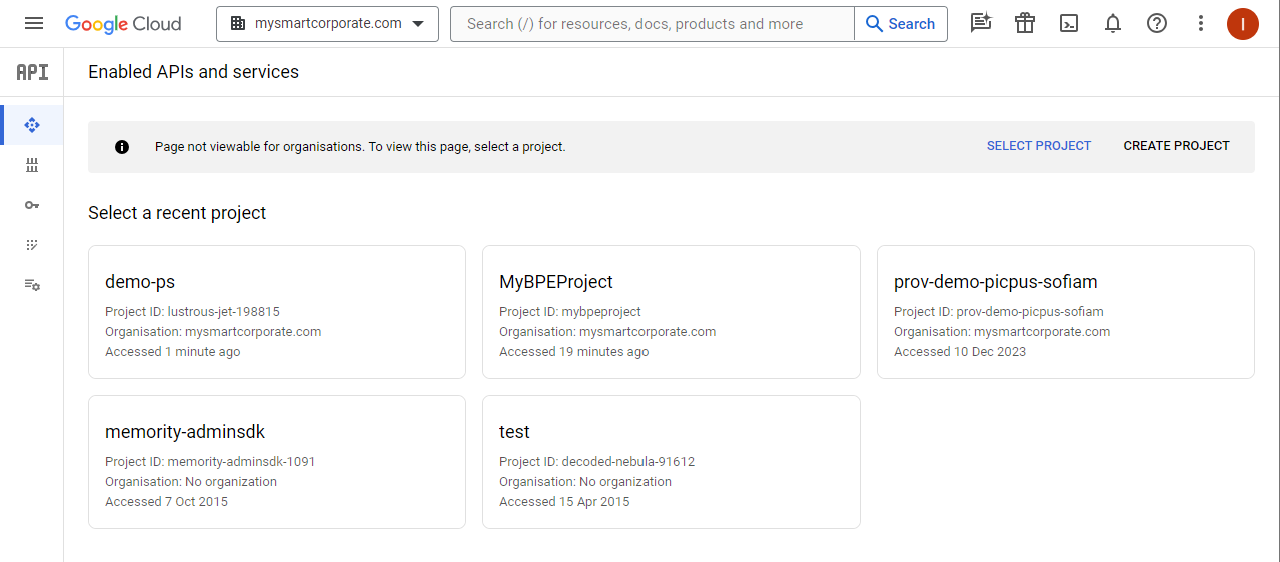
To call Google APIs, Memority's connector authenticates with an OAuth2 JWT token. The procedure below explains how to configure Google for this authentication.
|
Step |
Screenshot |
|
|---|---|---|
|
1 |
Open the Google developer console: https://console.developers.google.com |
|
|
2 |
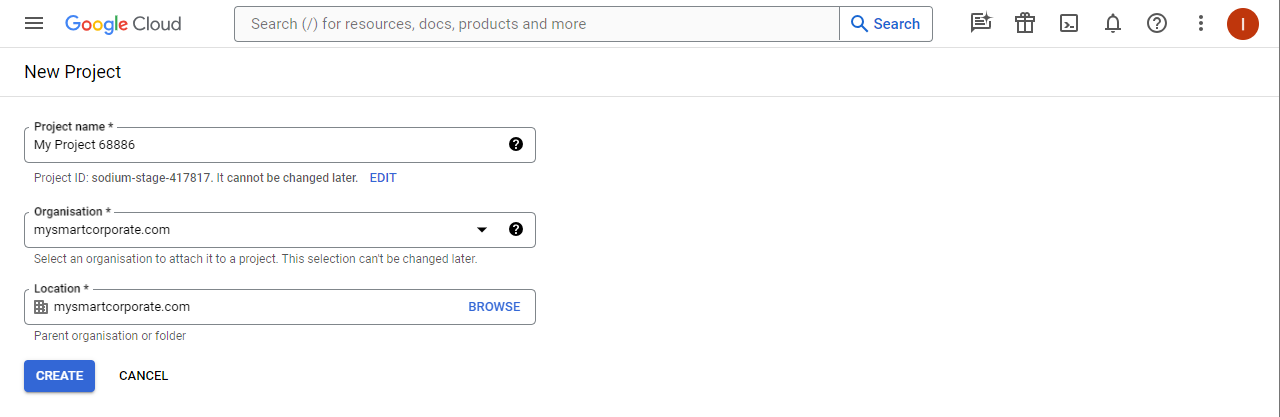
Create a new project:
|
|
|
3 |
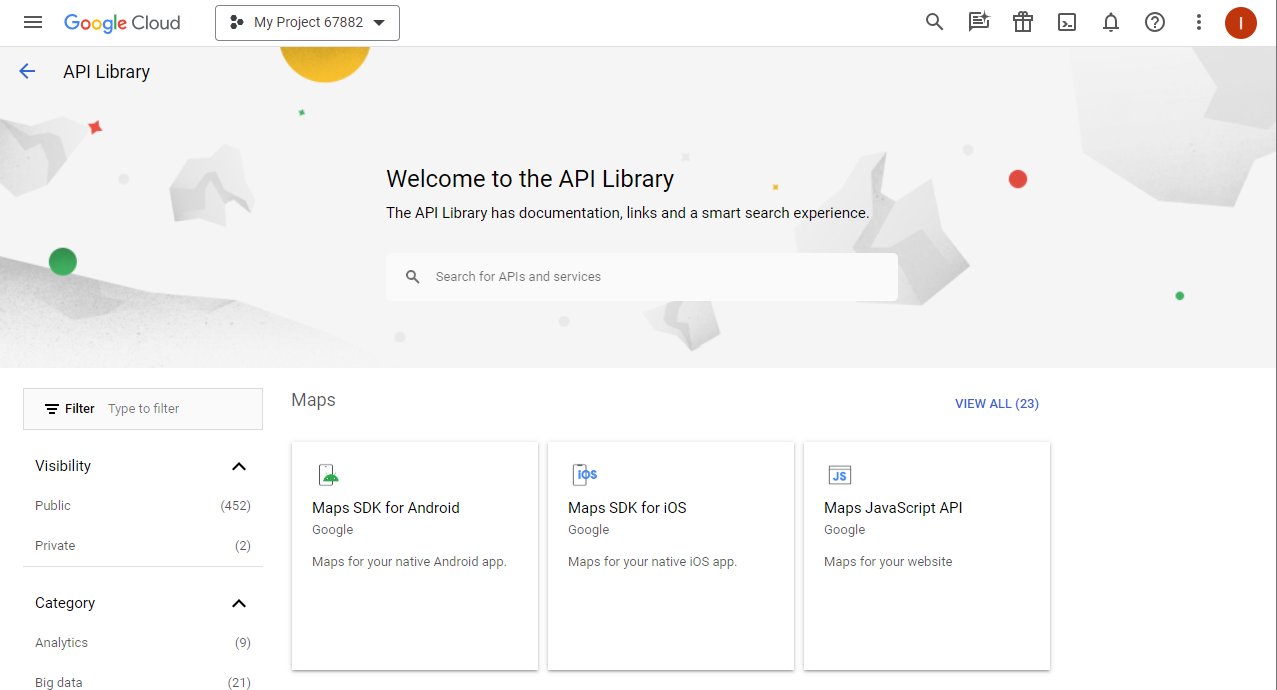
In the left menu, click Library to open the API library. |
|
|
4 |
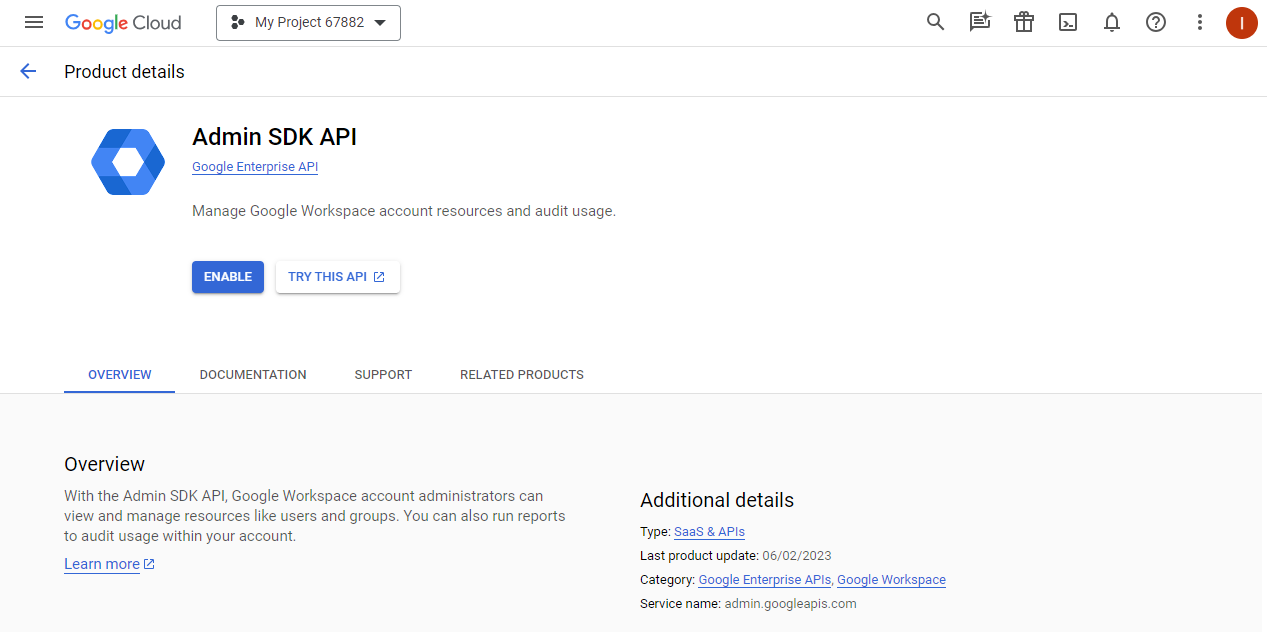
Enable the Admin SDK API:
|
|
|
5 |
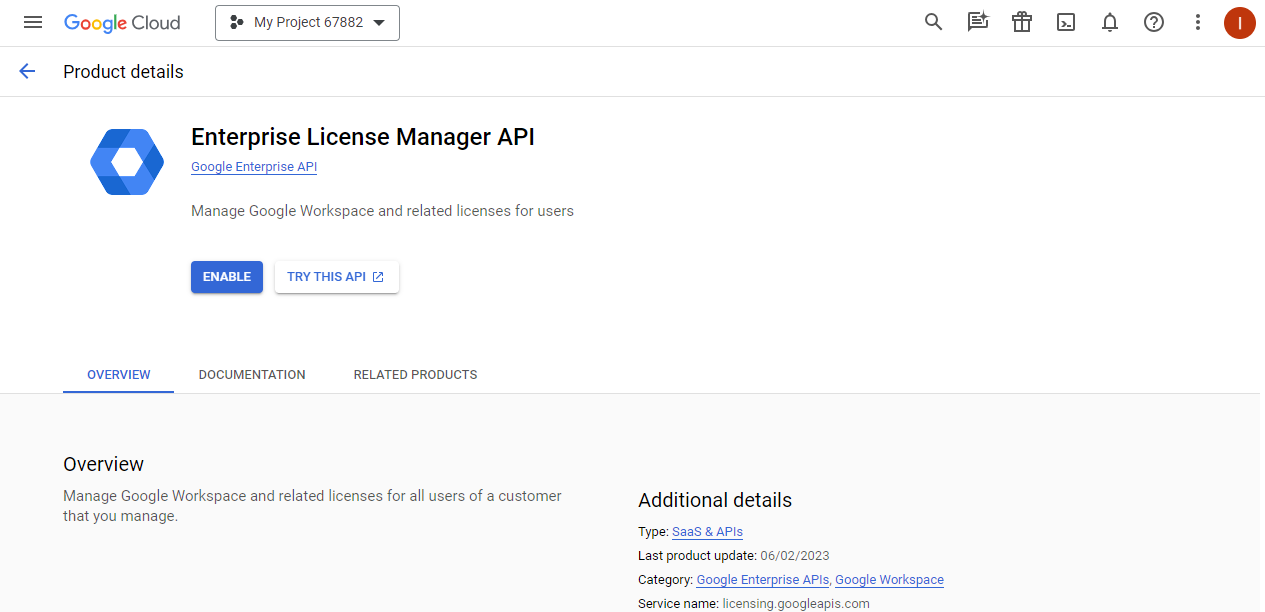
Enable the Enterprise License Manager API:
|
|
|
6 |
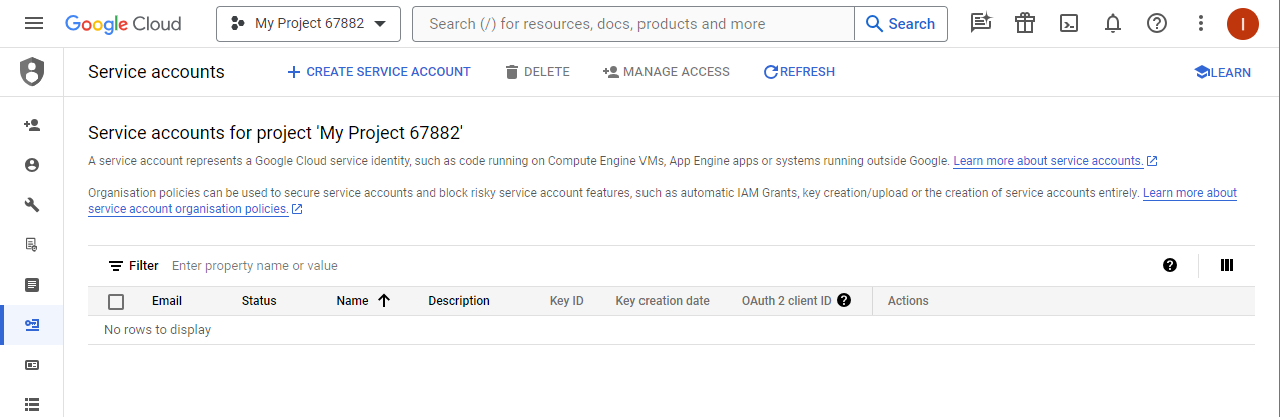
Open the service account management page of the Google Cloud console:
|
|
|
7 |
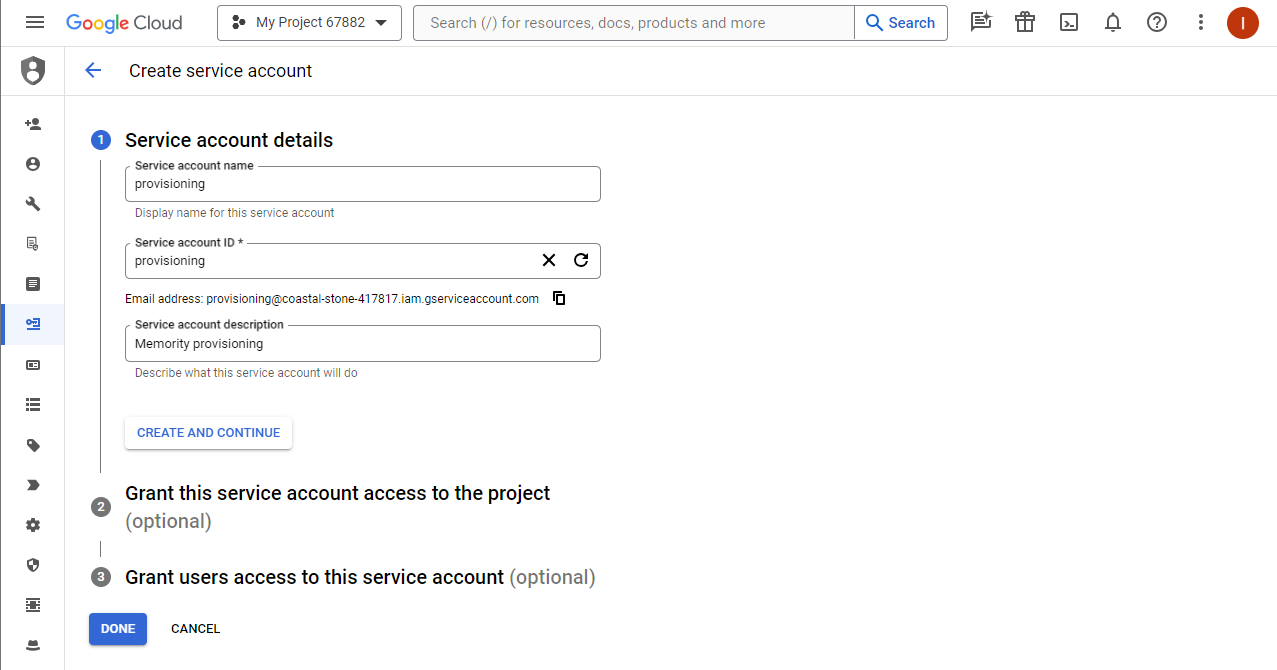
Create a new service account:
|
|
|
8 |
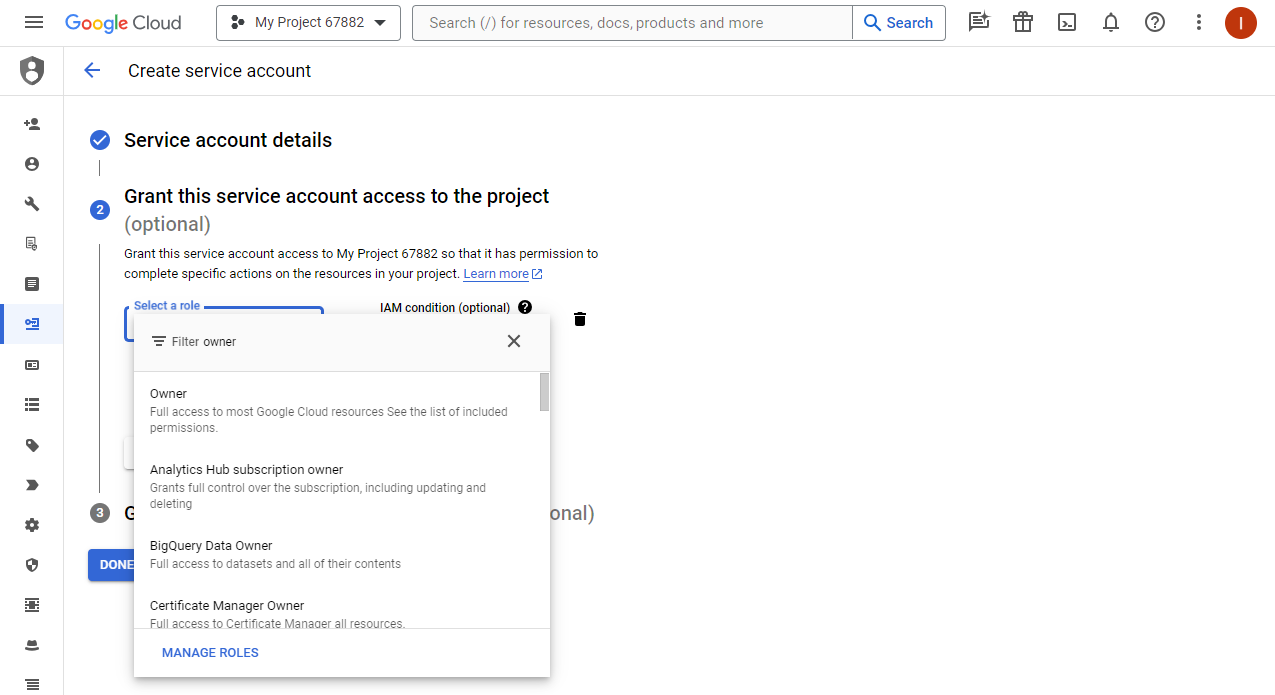
Grant the service account a role on the project:
|
|
|
9 |
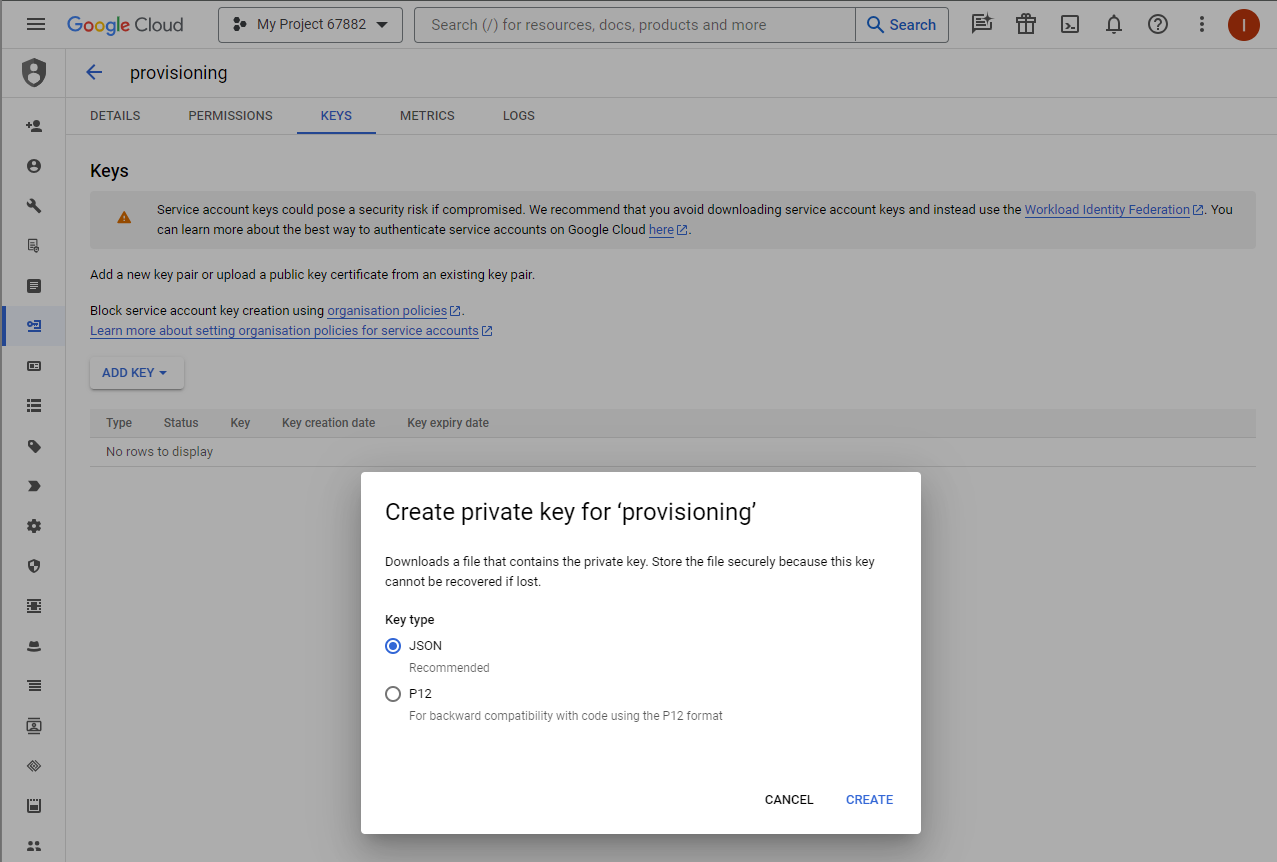
Generate a key for the service account:
|
|
|
10 |
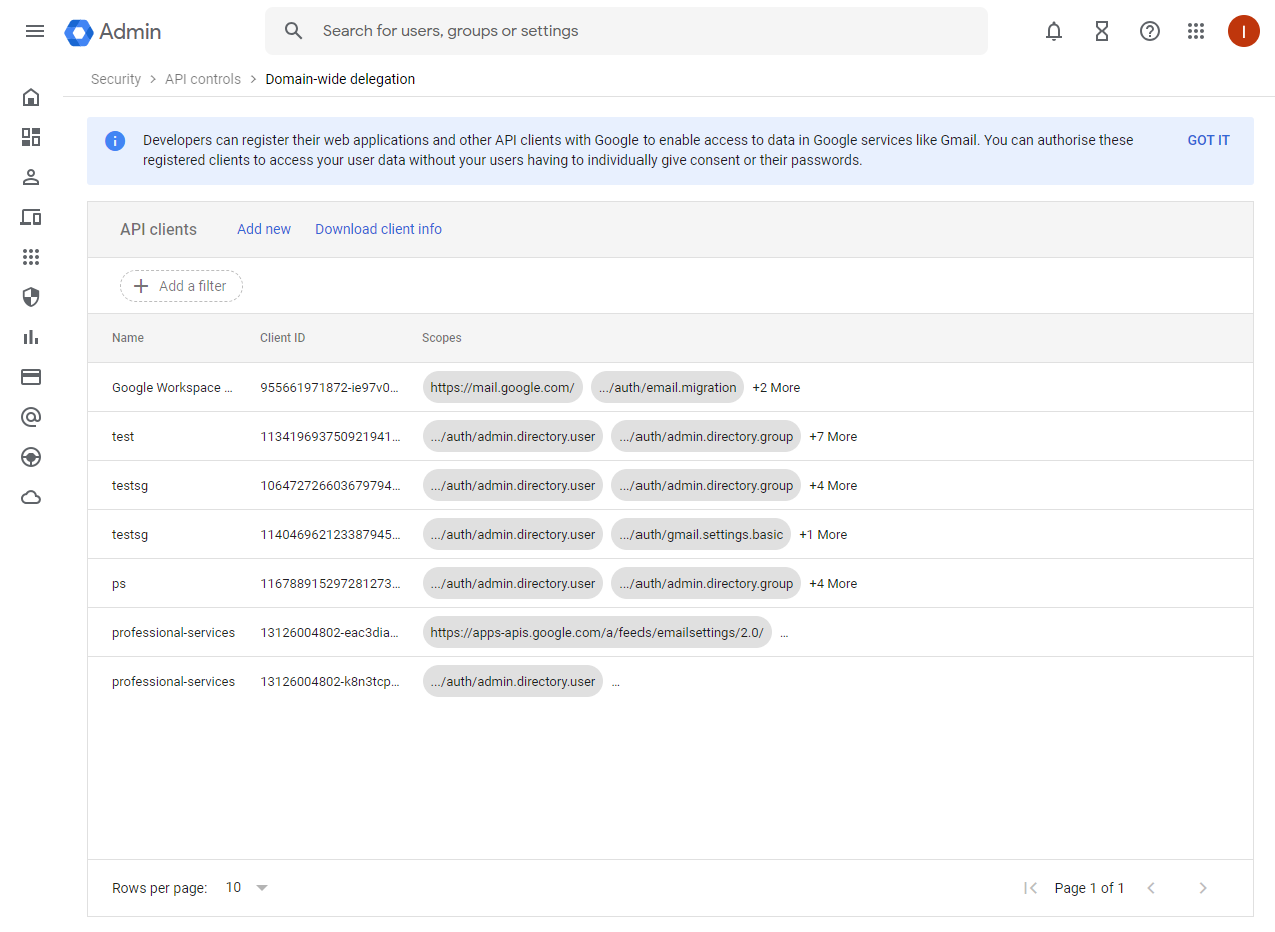
Open the domain-wide delegation page of the Google Admin console: https://admin.google.com/ac/owl/domainwidedelegation |
|
|
11 |
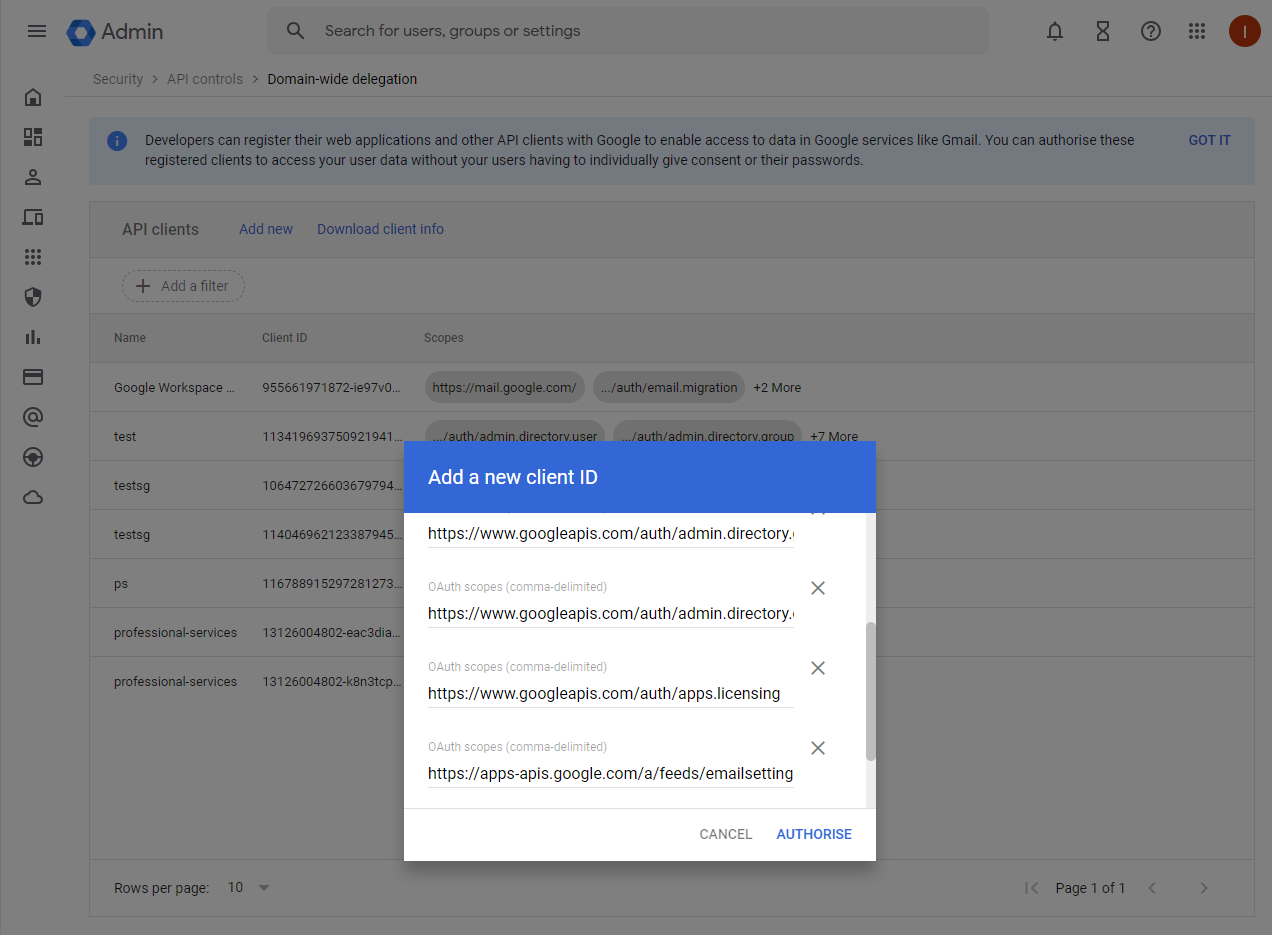
Add a new entry:
|
|
|
12 |
Send the JSON key file to the integrator through a secure channel. It contains the private key of the service account. |
|
Google Provisioning plugin
Memority provides a plugin in the MIT Plugin Store that installs and configures the Google Provisioning connector. The plugin generates all the configuration files and data that your tenant needs.
Prerequisites
In addition to the common plugin prerequisites, this plugin requires:
|
Prerequisite |
Description |
|
|---|---|---|
|
1 |
Tenant initialized with presets 3.3.0 or later, or Application Dimensions Manager plugin installed |
License management relies on Application Dimensions. Your tenant must have been initialized with presets 3.3.0 or later, or the Application Dimensions Manager plugin must have been installed on your project. |
|
2 |
Google Workspace configured |
Google Workspace must be configured as explained above. |
Installation
The plugin is installed with the standard procedure described on the Memority Plugins page. This section only gives the information that is specific to the Google Provisioning plugin.
Installation mode: single installation. The plugin can be installed only once per project.
Plugin form parameters
Fill in the following parameters for both preprod and prod.
|
Parameter |
Description |
Example |
|---|---|---|
|
JWT service account email |
Email of the service account created in step 7. |
|
|
Impersonated Google admin email |
Email of the Google administrator that the service account impersonates. |
JWT private key
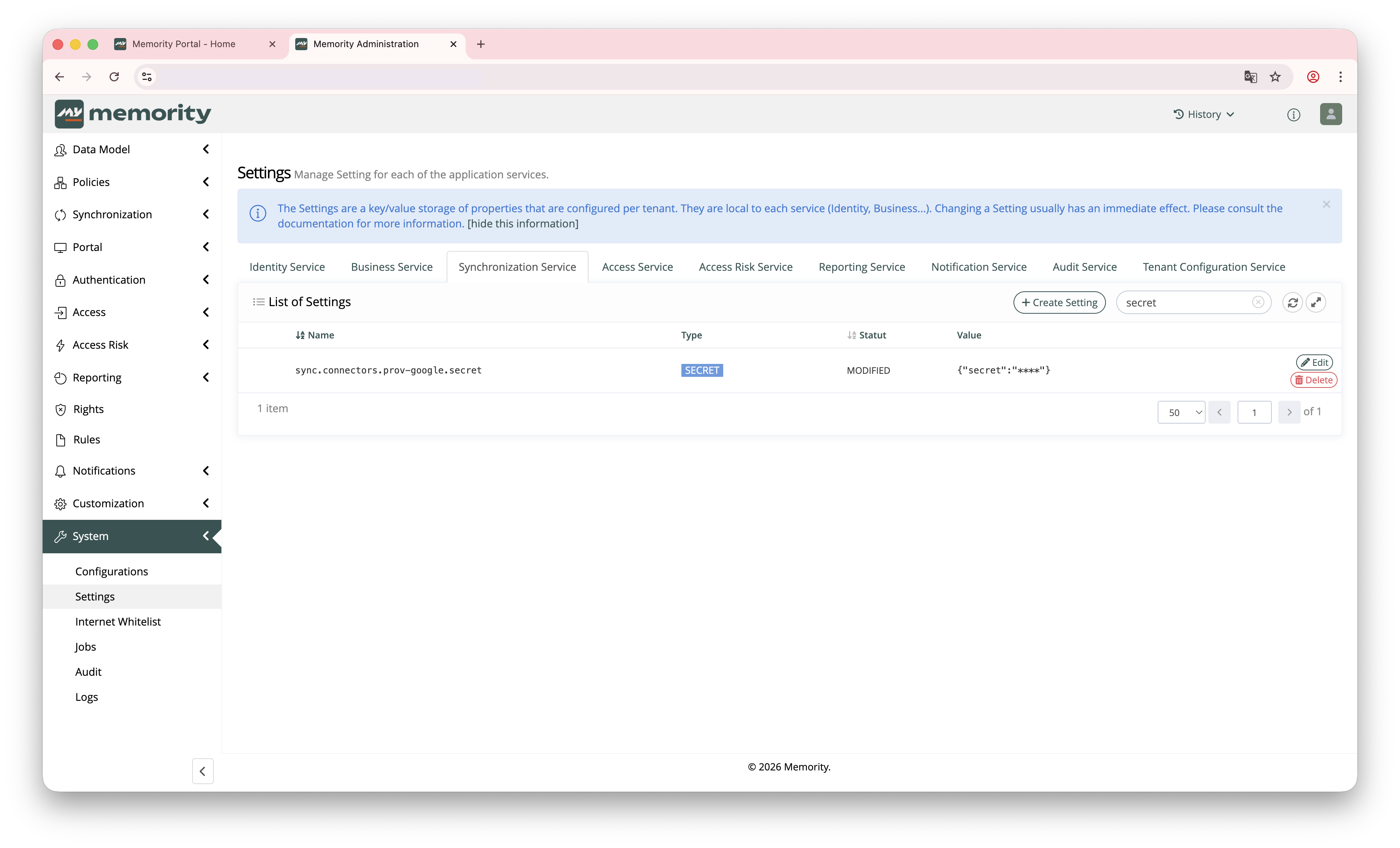
The JWT private key is not requested by the form. Create it manually in the Memority administrator portal, for both preprod and prod. Go to System → Settings → Synchronization Service and create a setting of type SECRET: sync.connectors.prov-google.secret. Set its value to the private_key value of the JSON key generated in step 9.
Data import order
Always import the data in the following order:
-
The application resource of the target environment (resources_pprod_ProvisioningGoogle.json or resources_prod_ProvisioningGoogle.json)
-
The roles (roles_ProvisioningGoogle.json)
-
The license resources (resources_googleLicences.json)
What does it do ?
The generated configuration works out of the box, but it may need adjustments for specific client needs.
The plugin generates the complete configuration required for Google Workspace provisioning in just a few clicks.
It manages users across the full CRUD scope, with a data model that includes first name, last name, email and suspension status. Licenses are managed through Application Dimensions: you select them when you assign the role to a user, which makes license allocation flexible.
The plugin also generates data that you can use right away: one application resource per environment (preprod and prod), one applicative role and three pre-configured licenses (Business Starter, Business Standard and Business Plus).
Authentication relies on OAuth2 JWT with domain-wide delegation. The service account authenticates to Google APIs, then impersonates the designated Google administrator to perform operations.
On user creation, the connector generates a random password (16 characters with letters, digits and punctuation), because Google APIs require one. This is an integration choice that you can change according to client needs. Memority does not store this password and does not send it to the user. Users can reset their password with the "Forgot password" feature of the Google sign-in page, or an administrator can reset it in the Google Admin console.
Technical details
Generated files
|
File |
Path |
Description |
|---|---|---|
|
prov-google-restConnector.xml |
im/sync/src/main/resources/RestConnectorDefinition/Plugins/ProvisioningGoogle/ |
REST connector definition with Groovy scripts for the SEARCH, GET, CREATE, PATCH, DELETE and DISCOVER operations |
|
prov-google-connector.xml |
im/sync/src/main/resources/ConnectorDefinition/Plugins/ProvisioningGoogle/ |
Links the REST connector with the application file |
|
prov-google-application.xml |
im/sync/src/main/resources/Application/Plugins/ProvisioningGoogle/ |
Maps attributes from Memority to Google Workspace |
|
prov-google-applicationProfile.xml |
im/sync/src/main/resources/ApplicationProfile/Plugins/ProvisioningGoogle/ |
Links the application file to the technical right |
|
sync.connectors.prov-google.defaultUrlPrefix.xml |
im/sync/src/main/resources/Setting/Google/Plugins/ProvisioningGoogle/ |
Default URL prefix of the Google Admin SDK API |
|
sync.connectors.prov-google.scope.xml |
im/sync/src/main/resources/Setting/Google/Plugins/ProvisioningGoogle/ |
OAuth2 JWT scopes |
|
sync.connectors.prov-google.licensingUrlPrefix.xml |
im/sync/src/main/resources/Setting/Google/Plugins/ProvisioningGoogle/ |
URL prefix of the Google Licensing API |
|
_sync.connectors.prov-google.secret.xml |
im/sync/src/main/resources/Setting/Google/Plugins/ProvisioningGoogle/ |
Reminder file for JWT private key configuration |
|
accountDiscovery-google-TaskDefinition.xml |
im/sync/src/main/resources/AccountDiscoveryTaskDefinition/Plugins/ProvisioningGoogle/ |
Account discovery task |
|
app.prov.APP_CCC00020.xml |
im/idm/src/main/resources/Right/Application/Plugins/ProvisioningGoogle/ |
Provisioning right for the Google Workspace resource |
|
app.license.APP_CCC00020.xml |
im/idm/src/main/resources/Right/Application/Plugins/ProvisioningGoogle/ |
License assignment right |
|
app.access.APP_CCC00020.xml |
im/idm/src/main/resources/Right/Application/Plugins/ProvisioningGoogle/ |
Access right for the Google Workspace resource |
|
resources_pprod_ProvisioningGoogle.json |
im/idm/src/main/data/Plugins/ProvisioningGoogle/ |
Google Workspace application resource (preprod) |
|
resources_prod_ProvisioningGoogle.json |
im/idm/src/main/data/Plugins/ProvisioningGoogle/ |
Google Workspace application resource (prod) |
|
roles_ProvisioningGoogle.json |
im/idm/src/main/data/Plugins/ProvisioningGoogle/ |
Google Workspace applicative role |
|
resources_googleLicences.json |
im/idm/src/main/data/Plugins/ProvisioningGoogle/ |
Google Workspace license instances |
Updated files
|
File |
Path |
Description |
|---|---|---|
|
_citadel-i18n_export.xml |
shared/i18n/src/main/resources/ |
Adds the i18n keys for the Google labels |
|
whitelisting.xml |
shared/tcf/src/main/resources/WhiteListing/ |
Adds the Google API domains to the whitelist |
|
report-prov-applications.xml |
im/idm/src/main/resources/ReferenceTable/ |
Adds Google provisioning to the monitoring table |
|
vars_preprod.properties |
im/sync/ |
Adds the Google environment variables for preprod |
|
vars_prod.properties |
im/sync/ |
Adds the Google environment variables for prod |
Troubleshooting
For issues with the Plugin Store itself (plugin not found, installation error), see the troubleshooting section of the Memority Plugins page.
JWT authentication fails with an "Invalid credentials" error
The JWT private key is not configured or is incorrect. Check that the sync.connectors.prov-google.secret setting exists in the Memority administrator portal and contains the correct value.
User creation fails with a "403 Forbidden" error
The service account does not have enough permissions in Google Workspace. Check that domain-wide delegation is configured with all the required scopes in the Google Admin console.
License assignment fails with a "License not found" error
The license does not exist in your Google Workspace subscription. Before you assign them, check that the license types (Business Starter, Business Standard and Business Plus by default) are available in your subscription.
The account discovery task reports no accounts
Check that the https://www.googleapis.com/auth/admin.directory.user scope is granted to the service account, and that the impersonated Google admin email entered in the plugin form is correct.