
Application Dimensions are available on tenants initialized with presets 3.3.0 or later. The Application Dimensions Manager plugin, which adds them to older tenants, will be available with the release of the Memority Integration Tool (MIT) 3.0.0.
Application Dimensions let you manage application entitlements (profiles, groups or licenses) as entries maintained by administrators in Memority, and reuse them consistently in provisioning rights and applicative roles. Some prerequisites must be met before you can use them in a tenant.
This page explains what Application Dimensions are, how they support provisioning and how to use them.
Application Dimensions are available only on tenants initialized with presets 3.3.0 or later. On older tenants, install the Application Dimensions Manager plugin to add the required configuration and make the features described on this page available.
Definitions
What is provisioning ?
See the definition of provisioning on the REST provisioning page.
What are Application Dimensions ?
Application Dimensions are entries that you create and maintain in Memority to represent the entitlements of a target application, such as:
-
profiles;
-
groups;
-
licenses.
Once created, they can be selected as dimension values when you configure provisioning rights and applicative roles.
Memority provides the tools and screens to manage Application Dimensions, but it does not provide any entitlement values by default. You must create the profiles, groups and licenses that match each target application.
What is a dimension in Memority ?
In Memority, a dimension is a parameter of a right that specifies what the right applies to (for example which application, license or group). Dimensions are usually valued when you build an applicative role or when you assign a role.
More information: Rights - Dimensions
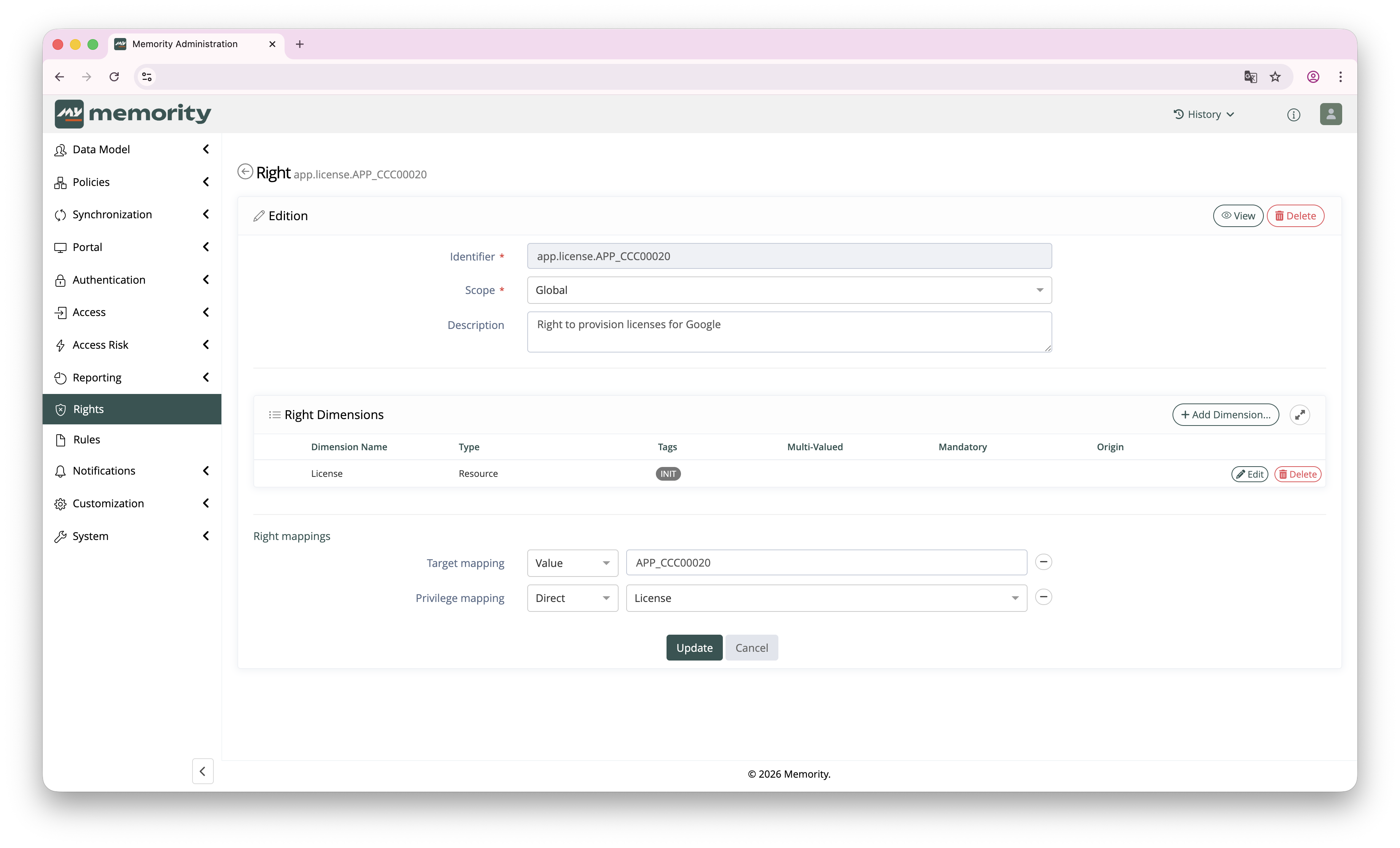
What is the Technical ID used for ?
Each dimension item has a Technical ID (rsrcTechnicalId). This value must match the identifier expected by the target system (SKU ID, group ID, role code, and so on). Provisioning connectors send this value when they call the target application.
Application Dimensions in Memority
Application Dimensions are available in the user portal. They are designed for provisioning use cases where entitlements must be selected from a controlled catalog that you build for each application.
What can be managed ?
Memority manages three categories of dimension items:
-
Profiles: application profiles or functional profiles;
-
Groups: application groups or teams;
-
Licenses: application licenses or SKUs.
Typical process flow
A typical use follows the steps below:
-
Create the entitlement catalog of the application in Memority (profiles, groups, licenses).
-
Create application-specific provisioning rights based on the preset templates.
-
Build applicative roles with these rights, and select the dimension values.
-
When the role is assigned, provisioning uses the selected dimension items and their Technical ID.
Prerequisites
Tenant prerequisites
|
ID |
Prerequisite |
|---|---|
|
PRESET1 |
The tenant must be initialized with presets 3.3.0 or later, or the Application Dimensions Manager plugin must be installed. |
|
ACCESS1 |
You must have administration permissions to manage Application Dimensions and the related configuration. |
Functional prerequisites
|
ID |
Prerequisite |
|---|---|
|
FUNC1 |
You must identify which entitlements are provisioned in the target application (profiles, groups, licenses). |
|
FUNC2 |
You must know the exact Technical IDs that the target system uses for these entitlements. |
If you do not know the Technical IDs, start from the target application and its API documentation.
Configuration
Where to manage Application Dimensions
In the user portal:
-
Go to Applications.
-
Open the target application.
-
Open the Applicative roles tab.
-
Open the Dimensions sub-tab.
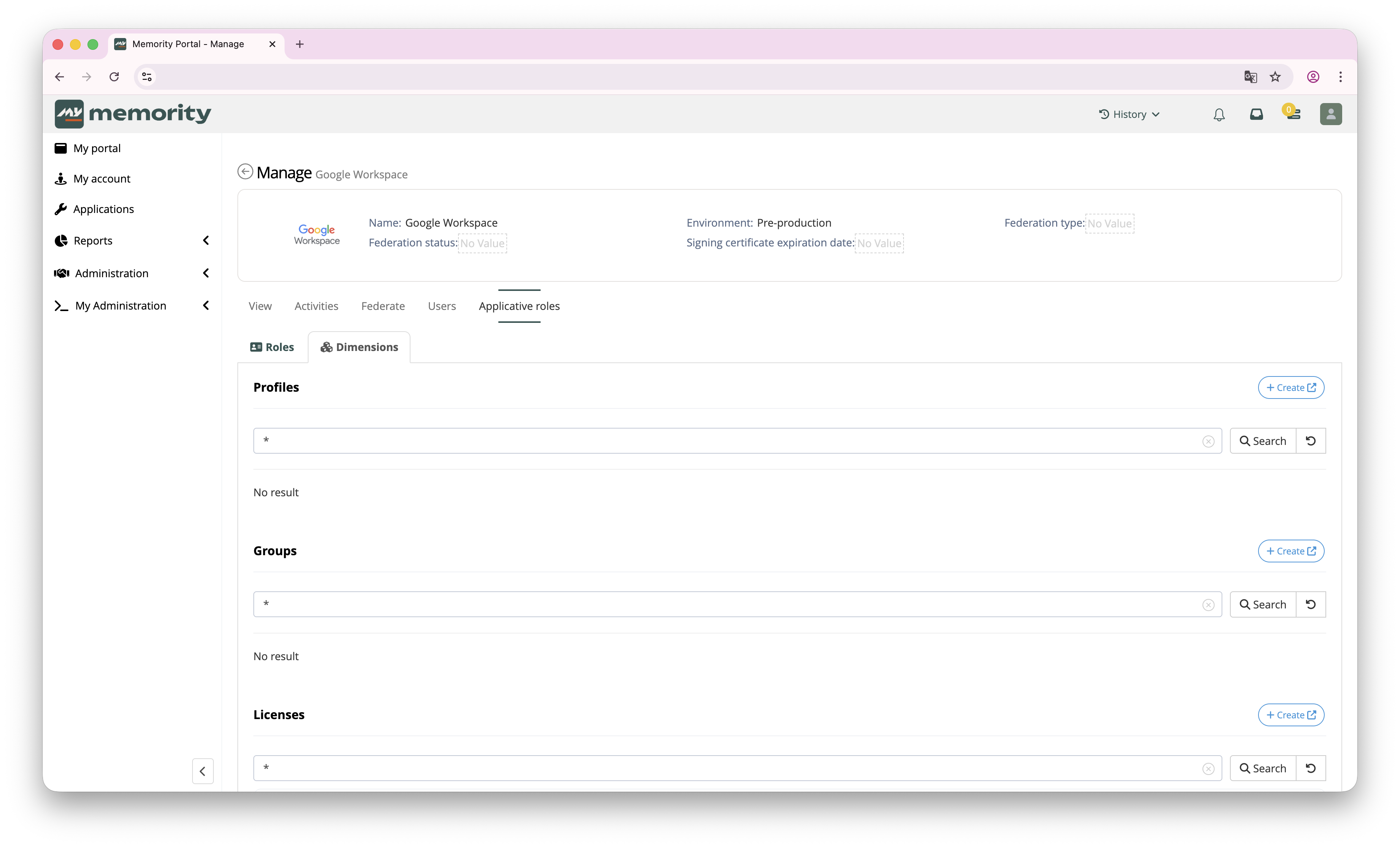
The Dimensions sub-tab contains three sections: Profiles, Groups and Licenses.
Create dimension items (profiles, groups, licenses)
-
In the relevant section (Profiles, Groups or Licenses), click Create.
-
Fill in the dimension item form.
-
Submit.
Instead of creating dimension items one by one, you can also manage them at scale with a CSV import, or import them automatically from the provisioning connector (when the connector supports it).
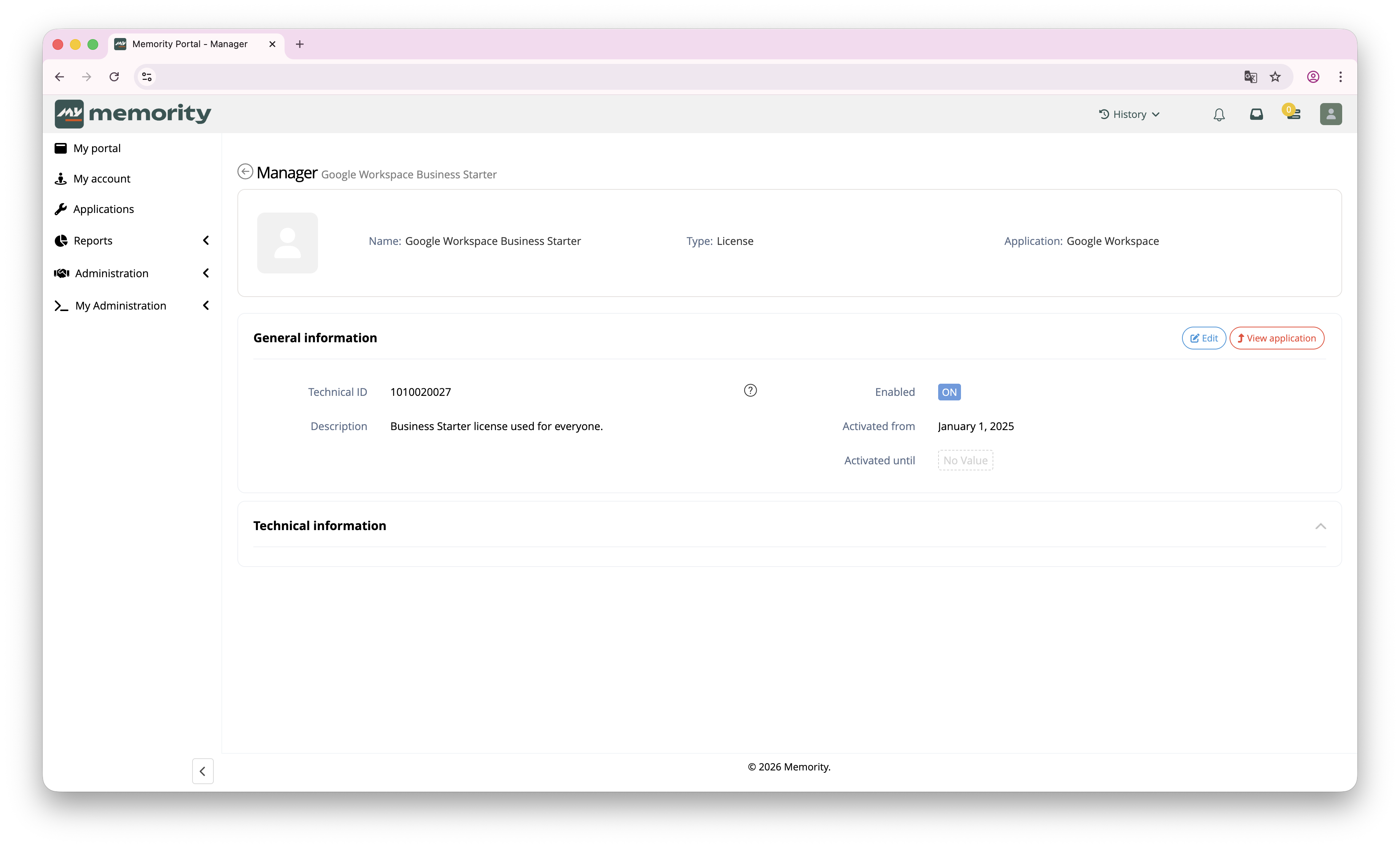
The most important fields are:
-
Name: it must be easy to understand for administrators.
-
Technical ID: it must match the identifier used by the target system.
If the Technical ID is incorrect, provisioning may fail or assign the wrong entitlement.
Create application-specific provisioning rights
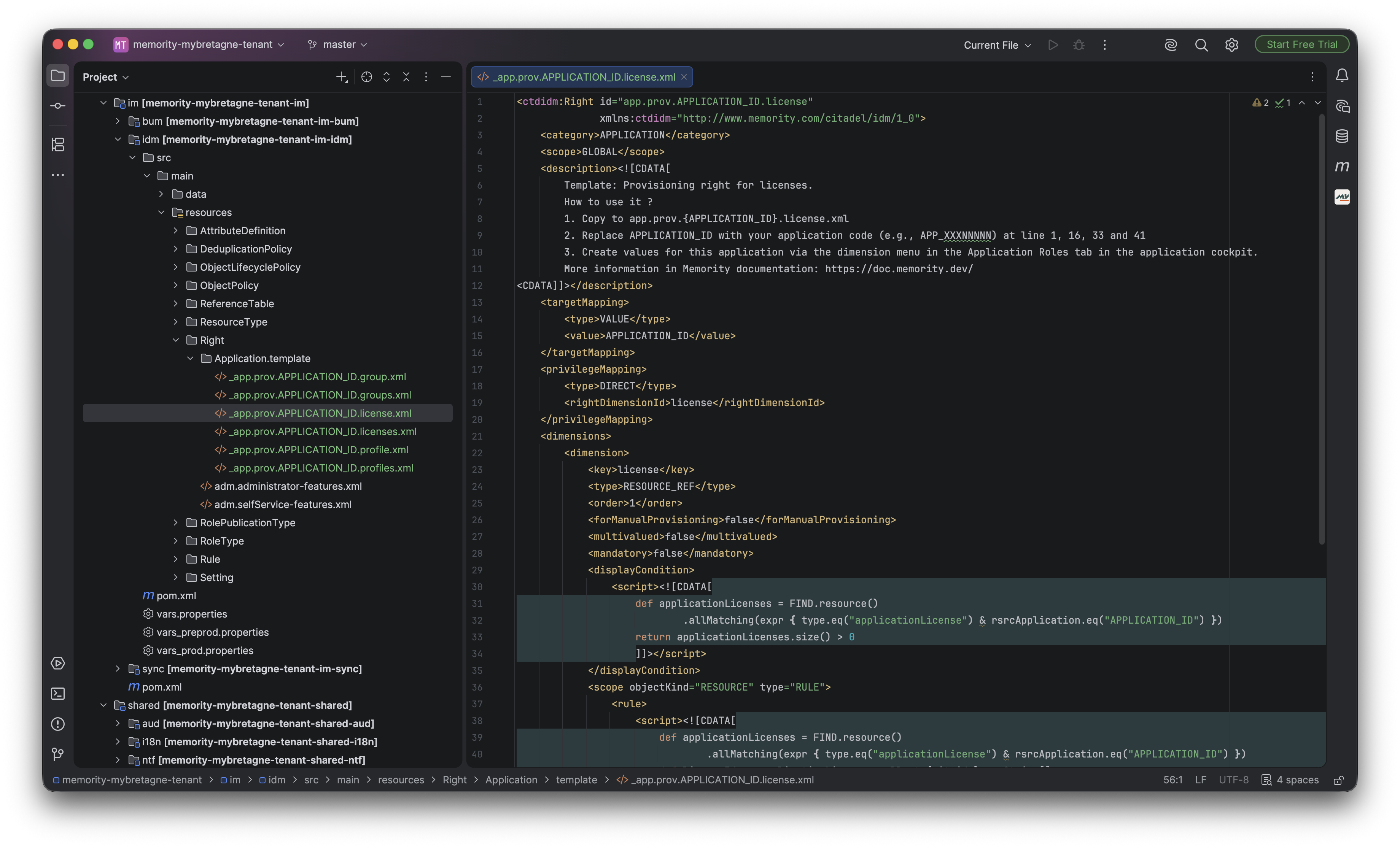
To use dimension items in provisioning, create application-specific rights based on the templates delivered with the presets.
Depending on the needs of the target application, use either:
-
a single-value right (exactly one profile, group or license);
-
a multi-value right (several profiles, groups or licenses).
Use dimensions in an applicative role
-
Create or edit an applicative role for the application.
-
Add the relevant right (profile, group or license).
-
Select the dimension values from the catalog that you created.
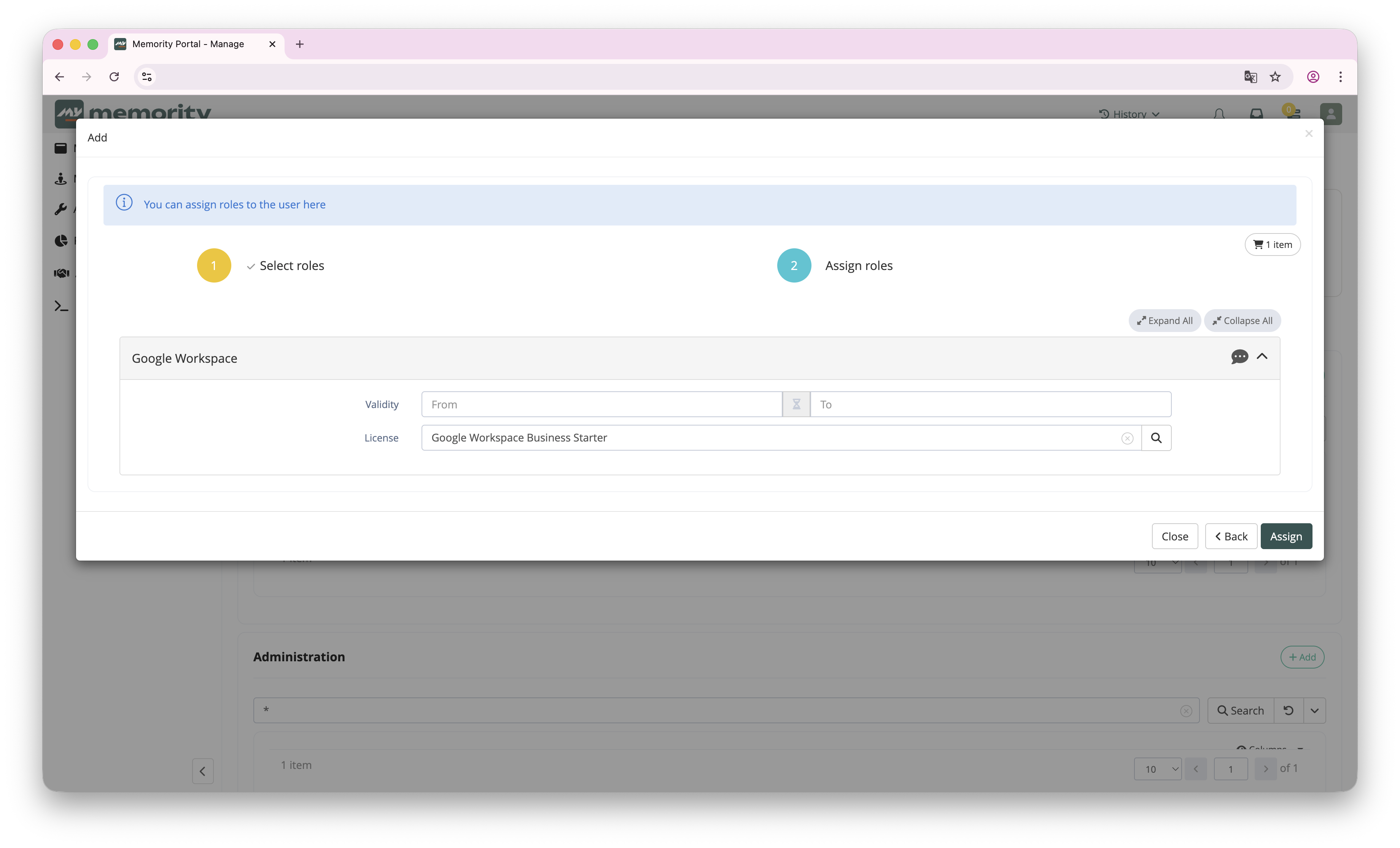
By default, only enabled dimensions are displayed. If a dimension is disabled after it was assigned to a user, the role assignment does not change. Decide with the client what action to take in this case.
When a role is assigned to an identity, the provisioning connector uses the selected dimension items and their Technical ID to provision the target application.
Troubleshooting
I cannot find the Dimensions screen
-
Check that the tenant uses presets 3.3.0 or later. If it does not, install the Application Dimensions Manager plugin to add this configuration.
-
Check your permissions.
Provisioning assigns the wrong entitlement
-
Double-check the Technical ID of the selected dimension item.
-
Check that the connector expects this exact identifier format.
A role assignment references an expired or disabled dimension
By default, a role assignment is not updated automatically when a dimension expires (for example, when its end date is reached).
This has no visible impact on provisioning as long as the dimension remains on the role assignment.
If you remove the dimension value from the role assignment, you cannot select the same value again later if the dimension item is expired or disabled. This is expected: expired dimensions are not meant to be selected again, unless they are enabled again or extended.
INTERNAL_SERVER_ERROR after a dimension is permanently deleted
When a dimension reaches its end date, it expires and is disabled. Then, according to the lifecycle policy of the tenant, it is later marked as deleted and finally permanently removed from the tenant.
If the dimension is permanently removed while one or more role assignments still reference it, the role assignment screens of the impacted identities return an INTERNAL_SERVER_ERROR.
In this situation, provisioning can remain in place as long as the assignment is not modified, because the role assignment still contains the dimension reference.
Workaround:
-
Update or remove the deleted dimension on all impacted role assignments.
-
Agree with the client on the expected action when a dimension expires, so that the update can be automated.
Application Dimensions Manager plugin
The Application Dimensions Manager plugin adds to an existing tenant the configuration required to manage Application Dimensions as native resources in Memority, and makes all the features described on this page available.
When to use the plugin
Use the plugin if your tenant was not initialized with presets 3.3.0 or later and you want to use Application Dimensions.
Do not install the plugin on a tenant initialized with presets 3.3.0 or later. This tenant already contains the Application Dimensions configuration: the generated configuration does not work, and the deployment to the tenant may fail.
Installation
The plugin is installed with the standard procedure described on the Memority Plugins page. This section only gives the information that is specific to the Application Dimensions Manager plugin.
Installation mode: single installation. The plugin can be installed only once per project.
-
Plugin form parameters: none. The plugin requires no parameter.
-
Secrets: none.
-
Data import: none. The plugin generates no data files. Only the configuration (step 8) and the translations (step 9) must be imported.
What does it do ?
The plugin generates, in just a few steps, the configuration required to make Application Dimensions available on an existing tenant.
It creates the resource types, screens, deduplication policies and right templates needed to manage profiles, groups and licenses in Memority, and to reuse them consistently in provisioning rights and applicative roles.
In addition to this resource model, the plugin updates the existing configuration required to use these new features.
The generated configuration provides the technical framework to manage Application Dimensions, but it does not create any entitlement values. You must still create the profiles, groups and licenses of each target application, according to client needs and to the capabilities of each application.
Technical details
Generated files
|
File |
Path |
Description |
|---|---|---|
|
|
|
Attribute definition for the application reference |
|
|
|
Attribute definition for the technical identifier |
|
|
|
Deduplication policy for application groups |
|
|
|
Deduplication policy for application licenses |
|
|
|
Deduplication policy for application profiles |
|
|
|
Resource type definition for application groups |
|
|
|
Resource type definition for application licenses |
|
|
|
Resource type definition for application profiles |
|
|
|
Template right for single-value group provisioning |
|
|
|
Template right for multi-value group provisioning |
|
|
|
Template right for single-value license provisioning |
|
|
|
Template right for multi-value license provisioning |
|
|
|
Template right for single-value profile provisioning |
|
|
|
Template right for multi-value profile provisioning |
|
|
|
Attribute editor for the application reference |
|
|
|
Attribute editor for the description field |
|
|
|
Shared hub for Application Dimensions |
|
|
|
Shared read view for Application Dimensions |
|
|
|
Shared search view for Application Dimensions |
|
|
|
Create screen for application groups |
|
|
|
Update screen for application groups |
|
|
|
Deduplication screen for application groups |
|
|
|
Create screen for application licenses |
|
|
|
Update screen for application licenses |
|
|
|
Deduplication screen for application licenses |
|
|
|
Create screen for application profiles |
|
|
|
Update screen for application profiles |
|
|
|
Deduplication screen for application profiles |
Updated files
|
File |
Path |
Description |
|---|---|---|
|
|
|
Adds the labels and texts related to dimension management |
|
|
|
Adds the features required to manage Application Dimensions |
|
|
|
Adds the Dimensions view to the application screen |
|
|
|
Adds a menu entry related to dimension management |
|
|
|
Adds to the project the plugin dependencies required by the presets |