
The Active Directory Provisioning plugin will be available with the release of the Memority Integration Tool (MIT) 3.0.0.
Memority's Active Directory & LDAP connector can provision an Active Directory or any LDAP directory. Some prerequisites must be met before the application can be provisioned.
This page explains how provisioning works in Memority and the prerequisites required to provision a directory.
Definitions
What is provisioning?
See the definition of provisioning on the REST provisioning page.
Memority Active Directory & LDAP connector
The Memority Active Directory & LDAP connector creates, updates and, when needed, deactivates or deletes objects in a target directory (user accounts, groups or organizations) with LDAPS commands.
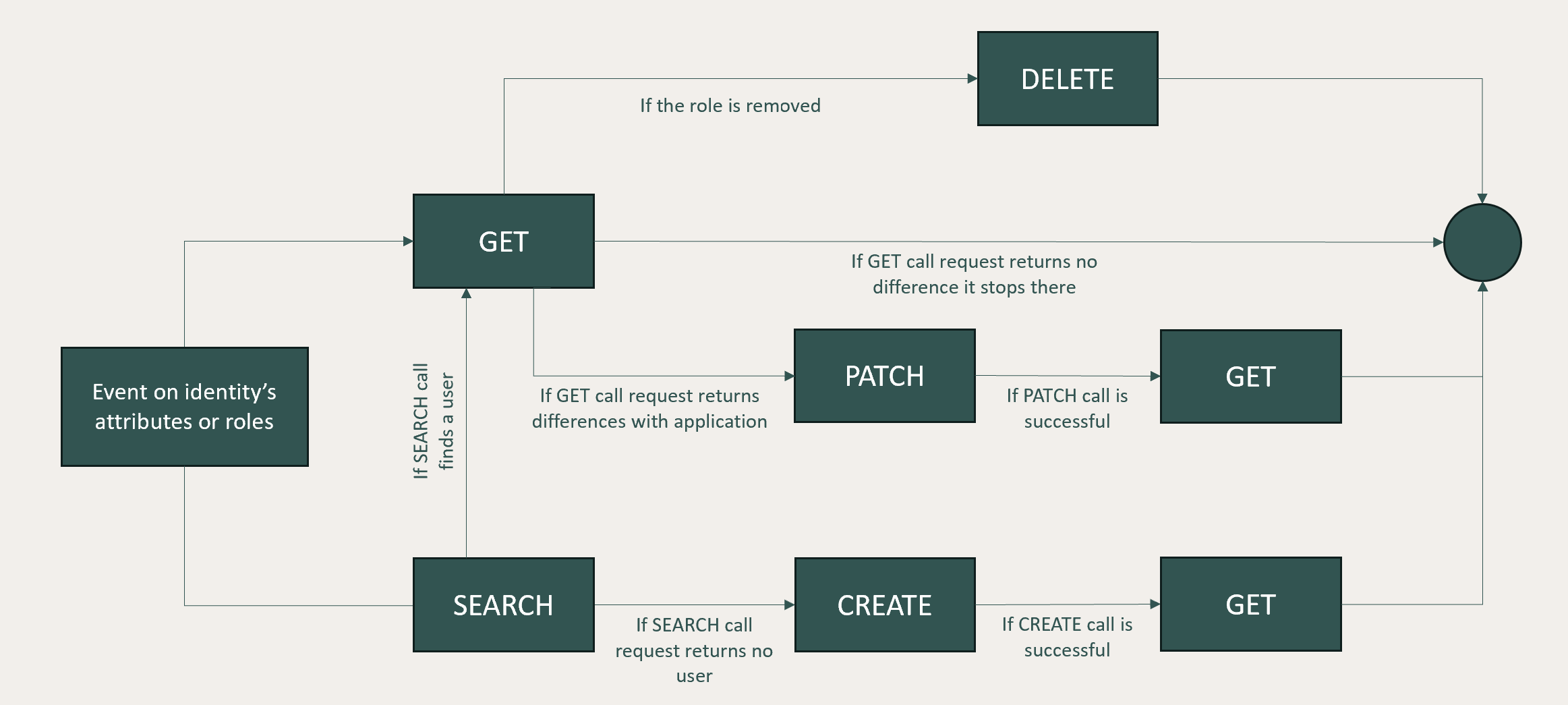
The Active Directory & LDAP connector, like all other Memority connectors, computes the delta between Memority data and target data at each event occurring on the Memority object to determine the action to perform:
-
Create a new object
-
Link an existing object
-
Update an existing object
-
Delete / Deactivate an existing object
To perform these actions, the Memority Active Directory & LDAP connector relies on five methods: SEARCH, GET, CREATE, UPDATE and DELETE.
When an event is detected on an object, and that event impacts the provisioning because it has been defined in mapped attributes, then the following process will be triggered:
-
If an application’s object is already linked to the Memority’s object, the connector uses the GET method to check whether there is a delta between Memority and application object
-
If a Memority object to provision is not linked to an existing application object, the connector uses the SEARCH method to check whether an existing application object already matches
-
Whenever an action method is called (CREATE, UPDATE or DELETE), a GET is performed afterwards to check that the provisioning succeeded. This means that the connector sends three requests for each action.
-
When the identity authorization is removed, the connector will use the DELETE method to deactivate or delete the account in the application.
Memority accesses the schema of the directory and is therefore able to provision custom attributes.
Once an Active Directory account is linked to a Memority object, Memority identifies it by its objectGUID. Even if the account is moved or modified locally, Memority can find it and overwrite the local modifications. Before the link exists, Memority finds the matching account with the correlation rule of the application (the Active Directory Provisioning plugin correlates on sAMAccountName).
The correlation key between Memority and an LDAP account is the DN. Even if the LDAP account is moved, Memority can find it with the SEARCH method and overwrite the local modifications.
Active Directory & LDAP authentication prerequisites
To be able to request directory actions, Memority's connector needs to authenticate against the application. The Active Directory & LDAP connector binds to the targeted directory in LDAPS through an IPsec tunnel established between Memority's network and the client's network.
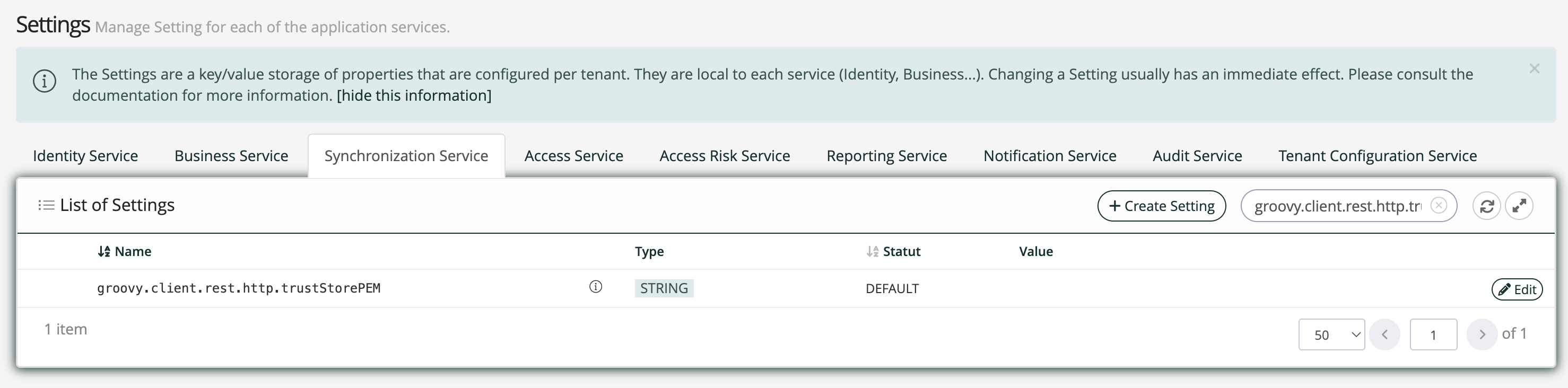
To be able to set the LDAPS binding, Memority must trust the whole certificate chain that generated the directory SSL certificate. So any private root certificate must be added to the dedicated Synchronization service setting groovy.client.rest.http.trustStorePEM to be trusted.
The connector binds with an account that must have administration rights on the accounts to manage. The provisioning account's password should not expire, to avoid any provisioning outage.
|
ID |
Prerequisites |
|---|---|
|
AUTH1 |
An IPsec tunnel must be established between Memority's network and the client's directory network. |
|
AUTH2 |
SSL Root & Intermediate CA certificates must be trusted by Memority when using LDAPS protocol. |
|
AUTH3 |
A provisioning account must be created with a password (the connector binds with the DN and the password of this account). |
|
AUTH4 |
The provisioning account must have domain administrator rights, or at least these rights:
|
|
AUTH5 |
The provisioning account’s password must have an entropy greater than 150 bits and shouldn’t automatically expire to avoid provisioning outage. |
The rights related to groups and inetOrgPerson objects (AUTH4) are only required if you manage those objects. They are not needed for a deployment limited to the scope of the Active Directory Provisioning plugin, which manages user accounts only.
Active Directory configuration prerequisites
The Memority Active Directory connector officially supports Windows Server 2019 and later.
The schema must be readable by the provisioning account to be able to get existing attributes.
|
ID |
Prerequisites |
|---|---|
|
CONF1 |
The Active Directory version should be Windows Server 2019 or later. |
|
CONF2 |
The schema must be readable by the provisioning account. |
|
CONF3 |
The Global Catalog URL is required for a multi-domain forest. |
Active Directory Provisioning plugin
The Active Directory Provisioning plugin deploys a ready-to-use Active Directory provisioning configuration on a Memority tenant, through the Memority Integration Tool (MIT). It generates the connector, the application mapping, the application profile, the settings, the provisioning right, the role and resource data and an account discovery task.
Prerequisites
The plugin requires the common plugin prerequisites, and the authentication and configuration prerequisites described above.
Scope and limitations
The plugin covers the user account lifecycle only, together with initial password provisioning and a forced password change at first logon. Groups, organizations, admin roles and account delegation are out of scope. Use the plugin for a standard user provisioning setup, then extend the generated configuration manually as described in the Configuration chapter below if your target scope is wider, for instance a multi-Domain Forest or a Domain migration.
Be aware of the deprovisioning behavior it generates: both the loss of the application assignment and the deletion of the Memority identity trigger DELETE_APPLICATION_OBJECT, so the Active Directory account is deleted, not just disabled. Change the activation definition of the generated application if your policy requires the account to be kept and disabled instead. Account enabling and disabling during the account's lifetime is managed separately, through the userAccountControl attribute.
Installation
The plugin is installed with the standard procedure described on the Memority Plugins page. This section only gives the information that is specific to the Active Directory Provisioning plugin.
Installation mode: single installation. The plugin can be installed only once per project.
Plugin form parameters
The plugin form asks for eight values, four per environment. Collect them from the client's Active Directory administrator before starting. All eight fields are mandatory and have no default value.
|
Parameter |
Description |
Example |
|
|---|---|---|---|
|
1 |
Active Directory server - Preprod |
FQDN or IP address of the preprod Domain Controller |
|
|
2 |
Provisioning account DN - Preprod |
Full DN of the preprod service account, must start with CN= |
CN=prov-activeDirectory,OU=Services,DC=preprod,DC=internal,DC=my,DC=com |
|
3 |
LDAP base DN - Preprod |
Base DN for all LDAP searches in preprod, must start with DC= |
DC=preprod,DC=internal,DC=my,DC=com |
|
4 |
Target users OU - Preprod |
OU where preprod user accounts are created, must start with OU= |
OU=Users,DC=preprod,DC=internal,DC=my,DC=com |
|
5 |
Active Directory server - Prod |
FQDN or IP address of the production Domain Controller |
|
|
6 |
Provisioning account DN - Prod |
Full DN of the production service account, must start with CN= |
CN=prov-activeDirectory,OU=Services,DC=internal,DC=my,DC=com |
|
7 |
LDAP base DN - Prod |
Base DN for all LDAP searches in production, must start with DC= |
DC=internal,DC=my,DC=com |
|
8 |
Target users OU - Prod |
OU where production user accounts are created, must start with OU= |
OU=Users,DC=internal,DC=my,DC=com |
Provisioning account password
The provisioning account password is not requested by the form. Set it manually in the Memority administrator portal, for both preprod and prod. Go to System → Settings → Synchronization Service and create a setting of type SECRET: sync.connectors.prov-activeDirectory.bindPassword.
Data import order
Always import the data in the following order:
-
The application resource of the target environment (resources_pprod_ProvisioningActiveDirectory.json or resources_prod_ProvisioningActiveDirectory.json)
-
The roles (roles_ProvisioningActiveDirectory.json)
Additional step: certificate trust
If the Active Directory certificate was issued by a custom certification authority, add the root and intermediate CA certificates to the groovy.client.rest.http.trustStorePEM setting, in System → Settings → Synchronization Service. This setting is shared by all SSL connectors and must be set for each environment.
Once these steps are done, test provisioning end to end with a non-production identity before you open the configuration to real populations.
Generated files
|
File |
Location |
Description |
|
|---|---|---|---|
|
1 |
prov-activeDirectory-connector.xml |
im/sync/src/main/resources/ConnectorDefinition/Plugins/ProvisioningActiveDirectory |
Connector definition based on com.evolveum.polygon.connector.ldap.ad.AdLdapConnector. host, bindDn, bindPassword and baseContext are set through settings; port=636, connectionSecurity=ssl, allowUntrustedSsl=false, connectTimeout=5000, operationalAttributes=objectClass,cn, pagingStrategy=vlv, referralStrategy=ignore and provisioningGroup=2 are fixed. |
|
2 |
prov-activeDirectory-application.xml |
im/sync/src/main/resources/Application/Plugins/ProvisioningActiveDirectory |
Application mapping for the user object class (shadowKind=ACCOUNT, Citadel application APP_CCC00030): DN construction, sAMAccountName, givenName, sn, mail, account status through |
|
3 |
prov-activeDirectory-applicationProfile.xml |
im/sync/src/main/resources/ApplicationProfile/Plugins/ProvisioningActiveDirectory |
Enabled profile matching IDENTITY objects holding the app.prov.APP_CCC00030 right, for the ACCOUNT shadow kind. |
|
4 |
sync.connectors.prov-activeDirectory.host.xml |
im/sync/src/main/resources/Setting/ActiveDirectory/Plugins/ProvisioningActiveDirectory |
Declares the STRING setting api.settings.sync.connectors.prov-activeDirectory.host, valued from vars_preprod.properties and vars_prod.properties. |
|
5 |
sync.connectors.prov-activeDirectory.bindDn.xml |
same |
Declares api.settings.sync.connectors.prov-activeDirectory.bindDn (STRING). |
|
6 |
sync.connectors.prov-activeDirectory.baseContext.xml |
same |
Declares api.settings.sync.connectors.prov-activeDirectory.baseContext (STRING). |
|
7 |
sync.connectors.prov-activeDirectory.usersOu.xml |
same |
Declares api.settings.sync.connectors.prov-activeDirectory.usersOu (STRING), used to build the DN of new accounts. |
|
8 |
_sync.connectors.prov-activeDirectory.bindPassword.xml |
same |
Placeholder declaring sync.connectors.prov-activeDirectory.bindPassword as a SECRET with an empty value. The secret must be set manually in the administrator portal. Note that this key has no api.settings. prefix, following the secret settings convention. |
|
9 |
accountDiscovery-activeDirectory-TaskDefinition.xml |
im/sync/src/main/resources/AccountDiscoveryTaskDefinition/Plugins/ProvisioningActiveDirectory |
Active account discovery task on the user object class: lists Active Directory accounts (page size 50, sorted on sAMAccountName ascending), compares them with Memority-linked accounts and reports orphaned, synced and out-of-sync accounts. Schedule is MANUAL by default and can be switched to a CRON schedule. |
|
10 |
resources_pprod_ProvisioningActiveDirectory.json |
im/idm/src/main/data/Plugins/ProvisioningActiveDirectory |
Creates the APP_CCC00030 application resource named Active Directory for the pprod environment, displayed in the portal with the Active Directory logo. |
|
11 |
resources_prod_ProvisioningActiveDirectory.json |
same |
Same resource for the prod environment. |
|
12 |
roles_ProvisioningActiveDirectory.json |
same |
Creates the applicative role CC0030, Active Directory User, bound to the app.prov.APP_CCC00030 right. Requestable by adm.administrator-features, assignable to the myAdministrator and mySupport identity types, single assignment, no self-service. |
|
13 |
app.prov.APP_CCC00030.xml |
im/idm/src/main/resources/Right/Application/Plugins/ProvisioningActiveDirectory |
Provisioning right of category APPLICATION and GLOBAL scope, targeting the APP_CCC00030 value. |
The role is assignable only to the myAdministrator and mySupport identity types. To assign it to other identity types (for example employees), add them to the role.
Each generated file carries a description tag that states the plugin name, the plugin version and the generation date. For the files that MIT writes in .idea/memority, see the Memority Plugins page.
Updated files
The plugin also updates five existing files of the tenant configuration.
|
File |
Location |
Change |
|
|---|---|---|---|
|
1 |
_citadel-i18n_export.xml |
shared/i18n/src/main/resources/ |
Adds two i18n keys, in French and English: ui.model.shadow.applications.APP_CCC00030.name (Active Directory User) and ui.model.attributes.provApplication.values.prov-activeDirectory-application.label (Active Directory). |
|
2 |
msSamAccountName.xml |
im/idm/src/main/resources/AttributeDefinition/Identity/ |
Adds the compute rule that generates the msSamAccountName value on identities (see below). |
|
3 |
report-prov-applications.xml |
im/idm/src/main/resources/ReferenceTable/ |
Adds the row prov-activeDirectory-application to the provisioning applications reporting reference table. |
|
4 |
vars_preprod.properties |
im/sync/ |
Appends the four preprod values: setting.sync.connectors.prov-activeDirectory.host.value, .bindDn.value, .baseContext.value and .usersOu.value. |
|
5 |
vars_prod.properties |
im/sync/ |
Appends the same four keys with the production values. |
Generated attribute mapping
|
Memority attribute |
Active Directory attribute |
Type |
Mapping |
|
|---|---|---|---|---|
|
1 |
msSamAccountName and the usersOu setting |
__NAME__ (DN) |
STRING, mandatory |
Custom mapping that builds CN=<msSamAccountName>,<usersOu>. Case-insensitive value comparison. |
|
2 |
msSamAccountName |
sAMAccountName |
STRING |
Simple mapping. Also used as the correlation key. |
|
3 |
firstName |
givenName |
STRING |
Simple mapping. |
|
4 |
lastName |
sn |
STRING |
Simple mapping. |
|
5 |
|
|
STRING |
Simple mapping. |
|
6 |
enabled |
userAccountControl |
INTEGER, mandatory |
Custom mapping toggling the ACCOUNTDISABLE bit only. |
|
7 |
generated |
unicodePwd |
STRING, secret, WEAK |
Custom mapping generating a 16-character password on account creation only. |
|
8 |
constant |
pwdLastSet |
INTEGER, WEAK |
Custom mapping returning 0, which forces a password change at first logon. |
Extend this mapping to cover the client's own attributes, and adapt it if the target Active Directory enforces mandatory attributes that are not provisioned by default.
The DN is built by concatenating the account name and the target OU read from the settings.
String samAccountName = IDM_OBJECT.msSamAccountName
String usersOu = SETTINGS.get("sync.connectors.prov-activeDirectory.usersOu") as String
return "CN=" + samAccountName + "," + usersOu
The account status is computed with a bitwise operation on userAccountControl, so that only the ACCOUNTDISABLE flag is toggled and the other flags, such as DONT_EXPIRE_PASSWORD, are preserved. The value currently held by the account is read from the shadow and defaults to 512 when the account does not exist yet.
def disabledMask = 2
def normalAccount = 512
def userAccountControl = SHADOW?.userAccountControl as Integer ?: normalAccount
def enabled = IDM_OBJECT.enabled as boolean

def accountEnabled = ((userAccountControl & disabledMask) != disabledMask)

if (enabled == accountEnabled) {
    return userAccountControl
}

if (!enabled) {
    return (userAccountControl | disabledMask)
}

if (enabled) {
    return (userAccountControl ^ disabledMask)
}
The initial password is generated on account creation only. The mapping returns null as soon as the identity exists on the Active Directory, so that the password is never overwritten on subsequent updates, and pwdLastSet is mapped to the constant 0 to force a password change at first logon.
if (SHADOW != null) {
    return null
}
return PASSWORD.length(16)
    .with(LETTERS_OR_DIGITS)
    .with(UPPER_CASE_LETTERS)
    .with(PUNCTUATION)
    .generate()
Account naming and the msSamAccountName compute rule
The generated mapping uses msSamAccountName, mapped to the Active Directory sAMAccountName attribute, both to build the DN and as the correlation key, so the plugin also injects the compute rule that populates it on identities.
The rule builds the value from the first letter of the first name followed by the last name, after removing accents and any non-alphanumeric character and converting to lower case, for example jdupont for Jean Dupont. The base value is truncated to 18 characters. Homonyms are then resolved by appending the first available numeric suffix, jdupont, jdupont1, jdupont2 and so on, and the final value is truncated to 20 characters. If the first name or the last name is missing, the identity technical identifier is used as a fallback.
If the client's Active Directory already uses a different naming convention, adapt this compute rule and the DN construction rule before the first provisioning run, otherwise existing accounts will not be correlated and duplicate accounts will be created.
Troubleshooting
For issues with the Plugin Store itself, see the troubleshooting section of the Memority Plugins page.
Authentication failures
Provisioning tasks fail with a binding error, or the connector cannot reach the directory. Verify that the IPsec tunnel is up and that port 636 is reachable from Memority's network, as required by AUTH1. Confirm that the bindDn value matches the exact DN of the service account in Active Directory, that the secret sync.connectors.prov-activeDirectory.bindPassword has been set in the administrator portal for the affected environment, and that the service account password has not expired, as required by AUTH5.
TLS certificate trust issues
The connector fails with an SSL handshake error or a certificate validation error. If the Active Directory certificate was issued by a custom certification authority, add the Root and Intermediate CA certificates to the groovy.client.rest.http.trustStorePEM setting in System → Settings → Synchronization Service, as required by AUTH2, and verify that the chain is complete. Do not set allowUntrustedSsl to true in production.
Password provisioning failures
Accounts are created without a password, or the provisioning task fails at the password step. Password provisioning requires an SSL binding, with connectionSecurity=ssl on port 636, because Active Directory refuses password changes over a non-secured connection. Verify as well that the service account is allowed to reset user passwords and to force a password change at next logon, as required by AUTH4.
Account status issues
Accounts are not enabled or disabled as expected, or unexpected flags are reset in Active Directory. The generated mapping applies a bitwise operation on userAccountControl to toggle the ACCOUNTDISABLE flag only, without affecting the other flags. If you observe unexpected behavior, check the userAccountControl value read from the directory before the update.
Correlation failures and duplicate accounts
If msSamAccountName is not populated on Memority identities, or if its values do not match the sAMAccountName of the existing Active Directory accounts, the connector will not be able to correlate and will attempt to create a new account instead of linking to the existing one. Before the first provisioning run, use the account discovery task generated by the plugin to identify which Active Directory accounts are already present and which ones are not yet linked to a Memority identity. Run correlation and reconciliation from the discovery results before enabling provisioning for real populations. If the existing naming convention differs from the injected compute rule, adapt that rule and the DN construction rule accordingly.
Note also that the generated connector sets referralStrategy=ignore and declares neither servers nor globalCatalogServers, so in a multi-Domain Forest the accounts located outside the configured baseContext are not reachable until those properties are added manually.
Account discovery returns nothing or times out
Verify that baseContext covers the OUs actually containing the accounts and that the provisioning account can read the schema, as required by CONF2. On large directories, keep the VLV paging strategy and increase connectTimeout if the searches are slow.
Configuration
Connector configuration
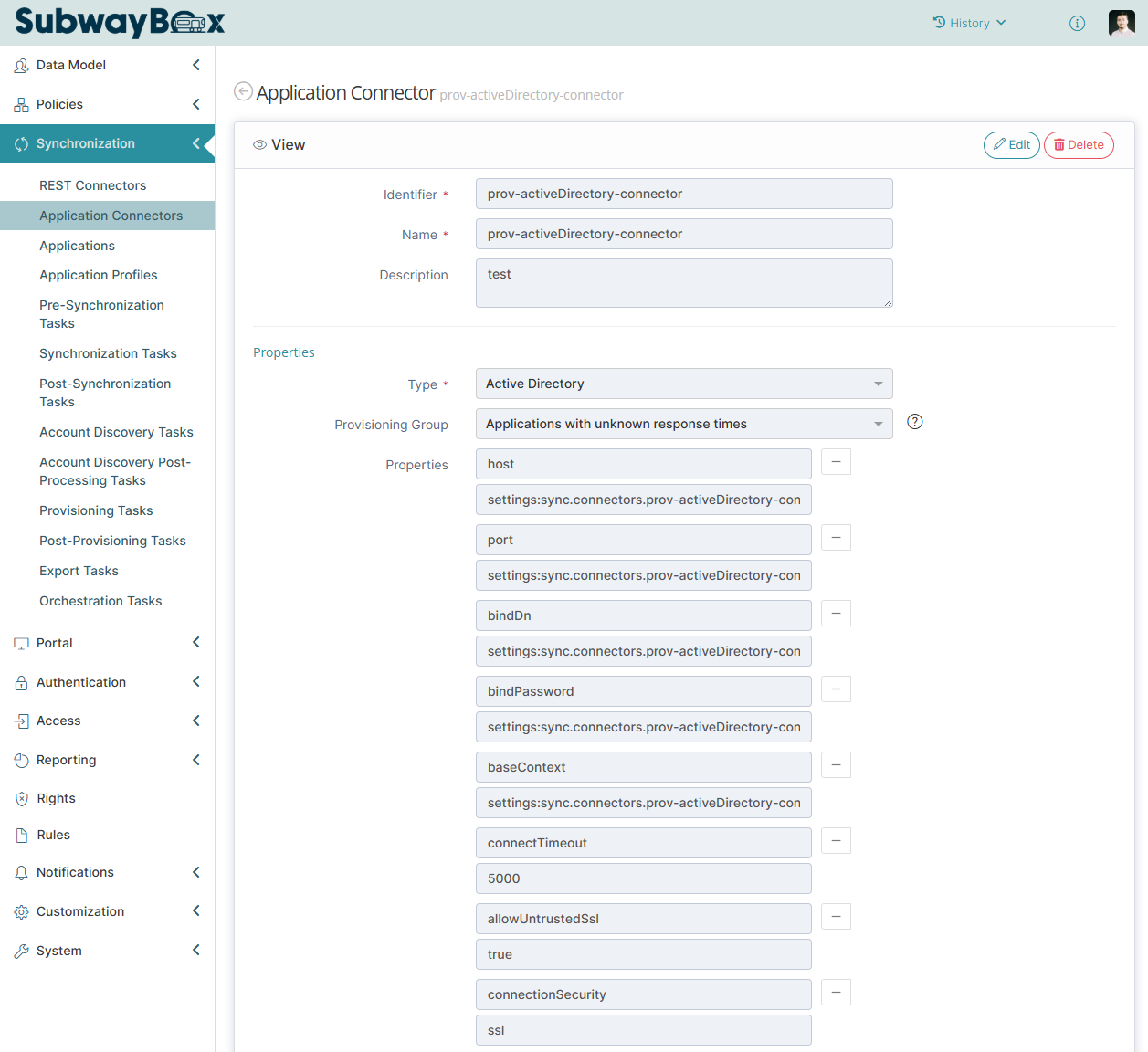
To be able to provision or import data from an Active Directory or an LDAP directory, you first need to configure a connector to establish a connection to it.
This chapter gives information about the configuration of the Active Directory & LDAP connector. For general information about connector configuration, see Application Connector.
If your directory is not published on the internet, you first need to request an IPsec tunnel setup to connect to the directory from Memority, as explained in prerequisite AUTH1. More information is available in the Memority Support Portal.
Binding configuration
To configure the connector, define the properties described below.
We strongly recommend that you use settings to define these properties, so that you can change them per environment.
To use a setting in a connector, set the value to settings: followed by the setting identifier.

|
Property |
Description |
Example |
|---|---|---|
|
host |
The FQDN of the server to bind to. |
|
|
port |
The port to bind to, usually 636, or 389 for non-production testing. See the TLS configuration for more information. |
636 |
|
servers (multi-valued) |
List of secondary servers. Their purpose may be:
A server syntax is typically: For a multi-Domain Active Directory Environment, a server syntax is typically: Any configuration parameter (host, port, bindDn, baseContext, and so on) can be overridden in a server definition, with the syntax: Because servers is multi-valued, specify the servers property once for each server.
HTML
|
|
|
bindDn |
The provisioning account DN to use for binding. It must meet prerequisites AUTH3, AUTH4 and AUTH5. |
|
|
bindPassword |
The provisioning account password. Use a secret setting to store it securely. |
*** |
|
baseContext |
Used as base context for all LDAP searches. Objects out of the base context scope cannot be managed, including groups to be assigned to accounts. Use a wide scope and filter it if necessary. |
|
|
connectTimeout |
The TCP connect and read timeouts, in milliseconds. Set to 5000 by default.
|
5000 |
TLS configuration
The connector can be configured with or without TLS. Both options are described below.
TLS is mandatory for production environments.
Active Directory does not allow account password provisioning if the TLS connection is not configured.
Without TLS
To configure the connector, define the properties described below.
To bind to the directory without TLS, port 389 is usually used. The IPsec tunnel must allow connections to port 389.
|
Property |
Description |
Example |
|---|---|---|
|
port |
The port to bind to (usually 389) |
389 |
|
connectionSecurity |
The security used for the binding. In this case, it must be set to none. |
none |
With TLS
To configure the connector, define the properties described below.
To bind to the directory with TLS, port 636 is usually used. The IPsec tunnel must allow connections to port 636.
To authenticate, the connector must be able to validate the TLS certificate chain of the server. If the certificate was issued by a custom certification authority, add the root and intermediate certificates to the Synchronization Service setting groovy.client.rest.http.trustStorePEM.
|
Property |
Description |
Example |
|---|---|---|
|
port |
The port to bind to (usually 636) |
636 |
|
connectionSecurity |
The security used for the binding. In this case, it must be set to ssl. |
ssl |
|
allowUntrustedSsl |
Whether to accept a certificate chain that cannot be validated. Set to false for production environments. |
false |
Custom attributes
The LDAP connector relies on the LDAP schema of the LDAP class configured in the ObjectSchema of the application, for example inetOrgPerson for users. This means that the LDAP connector only sees the LDAP attributes explicitly associated with this class. To read or write other LDAP attributes that are not explicitly associated with the class, configure them with the operationalAttributes property:
|
Property |
Description |
Example |
|---|---|---|
|
operationalAttributes |
The list of attributes complementing the LDAP schema, separated by commas |
objectClass,customAttribute1,customAttribute2 |
Additional search filter
By default, when importing objects into Memority from an LDAP source, the connector searches all LDAP objects of the configured LDAP class under baseContext. This scope may be too wide and return too many entries. To narrow it, you can configure a search filter that the connector adds to every LDAP search:
|
Property |
Description |
Example |
|---|---|---|
|
additionalSearchFilter |
An LDAP filter restricting the objects to retrieve. |
(objectCategory=person) |
The following sections give common examples.
The object filter applies to imports, account discovery tasks and provisioning. Any object outside the scope cannot be managed by the connector, including the groups to be assigned to accounts.
If you want different scopes for provisioning and imports/account discovery, you can use objectIgnoredCondition in application configuration (Object Schema Mapping Definition) or duplicate the connector configuration.
Filter on user accounts only
You can use the following filter on the objectCategory attribute to get only user accounts from an Active Directory.
(objectCategory=person)
Filter on organizational units
You can use the following filter on the msDS-parentdistname attribute to get objects from a specific organizational unit in an Active Directory (it must be specified with its DN).
(msDS-parentdistname=OU=Users,DC=internal,DC=my,DC=com)
Filter on assigned groups
You can use the following filter on the memberOf attribute to get accounts directly assigned to a group in an Active Directory (it must be specified with its DN).
(memberOf=CN=MyApp-User,OU=applications,DC=internal,DC=my,DC=com)
To get any account assigned to the group, even through nested groups, you need to filter on memberOf:1.2.840.113556.1.4.1941: (memberOf:1.2.840.113556.1.4.1941:=CN=MyApp-User,OU=applications,DC=internal,DC=my,DC=com)
Application configuration
To be able to provision or import data from an Active Directory or an LDAP directory, you need to configure a data model mapping.
This chapter gives information about the attribute mapping specific to Active Directory and LDAP. For general information about application configuration, see Application.
Distinguished Name definition
The Distinguished Name (DN) is a mandatory attribute that must be unique in the directory.
The DN attribute is used as the correlation key, so you need to set the target attribute to __NAME__.
The value can be set directly through a simple or custom mapping, but you can also use the built-in constructDnFromRdnOpenAm normalization rule.
The connector handles object moves automatically when the DN changes: no specific action is required.
<attributeMappingDefinition>
	<targetAttributeId>__NAME__</targetAttributeId>
	<targetAttributeType>STRING</targetAttributeType>
	<mandatory>true</mandatory>
	<simpleAttributeMappingStrategyDefinition>
		<inputAttributeId>id</inputAttributeId>
		<normalizeRule class="constructDnFromRdnOpenAm">
			<config xsi:type="dmn:ConstructDnFromRdnOpenAmRuleConfigurationType" xmlns:xsi="http://www.w3.org/2001/XMLSchema-instance">
				<baseDn>ou=Users,dc=internal,dc=my,dc=com</baseDn>
				<rdnAttributeName>uid</rdnAttributeName>
			</config>
		</normalizeRule>
	</simpleAttributeMappingStrategyDefinition>
	<multiValued>false</multiValued>
</attributeMappingDefinition>
Account status
In Active Directory, the account status is managed with the userAccountControl attribute. This attribute is a bit mask that defines the account status and additional information such as password expiration (see UserAccountControl property flags on Microsoft Learn).
To manage the account status, you can set the value according to the enabled status (512 for active accounts, 514 for inactive accounts):
<attributeMappingDefinition>
	<targetAttributeId>userAccountControl</targetAttributeId>
	<targetAttributeType>INTEGER</targetAttributeType>
	<mandatory>true</mandatory>
	<secret>false</secret>
	<customAttributeMappingStrategyDefinition>
		<computeRule>
			<script><![CDATA[
					return IDM_OBJECT.enabled as Boolean ? "512" : "514"
				]]></script>
		</computeRule>
		<computeRuleAttributeDependencies>
			<dependency>enabled</dependency>
		</computeRuleAttributeDependencies>
	</customAttributeMappingStrategyDefinition>
	<multiValued>false</multiValued>
</attributeMappingDefinition>
You can also use a mask computation to enable and disable the account without modifying the other flags:
<attributeMappingDefinition>
	<targetAttributeId>userAccountControl</targetAttributeId>
	<targetAttributeType>INTEGER</targetAttributeType>
	<mandatory>true</mandatory>
	<secret>false</secret>
	<customAttributeMappingStrategyDefinition>
		<computeRule>
			<script><![CDATA[
					def userAccountControl = SHADOW.userAccountControl as int
					def enabled = IDM_OBJECT.enabled as boolean
					def disabledMask = 2
					def accountEnabled = ((userAccountControl & disabledMask) != disabledMask)

					// If account status == memority status, return the userAccountControl as is
					if (enabled == accountEnabled) {
						LOG.debug("Provisioning AD User - userAccountControl - {} - No status modification", IDM_OBJECT.id)
						return userAccountControl
					}

					// If the account should be disabled, return userAccountControl + disable mask
					if (!enabled) {
						LOG.debug("Provisioning AD User - userAccountControl - {} - Disable account", IDM_OBJECT.id)
						return (userAccountControl | disabledMask)
					}

					// If the account should be enabled, return userAccountControl - disable mask
					if (enabled) {
						LOG.debug("Provisioning AD User - userAccountControl - {} - Enable account", IDM_OBJECT.id)
						return (userAccountControl ^ disabledMask)
					}
				]]></script>
		</computeRule>
		<computeRuleAttributeDependencies>
			<dependency>enabled</dependency>
		</computeRuleAttributeDependencies>
	</customAttributeMappingStrategyDefinition>
	<multiValued>false</multiValued>
</attributeMappingDefinition>
Password management
In Active Directory, passwords are managed with the unicodePwd attribute. You can also use the pwdLastSet attribute to force a password change at first logon.
If you want to set the password on account creation only, the WEAK mapping strength alone is not enough, because the connector cannot read the password back from the account. Use a custom mapping that checks whether the account is being created.
You can use the Memority password directly, or a new attribute to generate and store a dedicated password. In the second case, make sure that the attribute definition is secret and encrypted, and use the PASSWORD binding to generate the value.
Set the unicodePwd mapping as secret to hide the password in audit, logs and reports.
Password modification requires an SSL binding, due to Active Directory policies.
<attributeMappingDefinition>
	<targetAttributeId>unicodePwd</targetAttributeId>
	<targetAttributeType>STRING</targetAttributeType>
	<mandatory>false</mandatory>
	<secret>true</secret>
	<customAttributeMappingStrategyDefinition>
		<computeRule>
			<script><![CDATA[
				if (!SHADOW) {
					return IDM_OBJECT.password
				}
			]]></script>
		</computeRule>
		<computeRuleAttributeDependencies>
			<dependency>password</dependency>
    </computeRuleAttributeDependencies>
    </customAttributeMappingStrategyDefinition>
	<multiValued>false</multiValued>
	<mappingStrength>WEAK</mappingStrength>
</attributeMappingDefinition>
<attributeMappingDefinition>
	<targetAttributeId>pwdLastSet</targetAttributeId>
	<targetAttributeType>INTEGER</targetAttributeType>
	<mandatory>false</mandatory>
	<secret>false</secret>
	<customAttributeMappingStrategyDefinition>
		<computeRule>
			<script><![CDATA[
				// Set the value to 0 to force password modification on first connection
				return 0
				]]></script>
		</computeRule>
		<computeRuleAttributeDependencies/>
	</customAttributeMappingStrategyDefinition>
	<multiValued>false</multiValued>
	<mappingStrength>WEAK</mappingStrength>
</attributeMappingDefinition>
Migrating users between Active Directory domains in the same forest
This section describes the configuration of the Memority Active Directory connector that allows you to migrate users from one Active Directory domain to another in the same forest. Only intra-forest migration is currently supported: all domains must belong to the same forest. Inter-forest migration (between several forests) is not supported yet.
In addition, only users can be migrated. Computers and other resources cannot be migrated yet.
The Active Directory domain migration feature therefore has the following limitations:
-
intra-Forest (same Forest)
-
for users only
Prerequisites
Some technical prerequisites are required to migrate users between AD Domains: ADMT and OpenSSH.
ADMT
It is not possible to move a user between Windows Domains with the LDAP protocol, more precisely with the ModifyDNRequest LDAP command specified by RFC 2251. The Active Directory Migration Tool (ADMT) version 3.2 must be used to migrate users between Domains. ADMT also enables you to preserve Domain permissions and user passwords, ensuring “user continuity” during Domain migration.
When users are migrated from a source Domain to a target Domain, ADMT 3.2 must be installed on each target Domain Controller. ADMT does not need to be installed on a source Domain Controller, unless it later becomes a migration target.
This guide does not describe the ADMT installation procedure. Refer to the Microsoft documentation.
OpenSSH
The Memority AD connector executes ADMT remotely on each Domain Controller using the SSH protocol. OpenSSH must therefore be enabled on the Domain Controllers, and its port (usually 22) must be accessible from the Memority AD connector.
OpenSSH is now a standard service of Windows Server. Refer to the Microsoft documentation to enable it.
Memority AD Connector Configuration
The following table lists AD Connector properties pertaining to the AD Domain migration. They come in addition to the AD connector properties described in the previous sections.
Some properties such as host are repeated here, to highlight their specific role regarding the Domain migration.
In this example, a root Domain memority.local has 2 child Domains: child1.memority.local and child2.memority.local.
The Administrator account memority.local\Administrator can manage all Domains of the Forest.
|
Property |
Type |
Description |
Mandatory |
Default Value |
Example |
|---|---|---|---|---|---|
|
host |
string |
A Domain Controller host belonging to the Forest’s root Domain. |
Yes |
N/A |
memority.local |
|
port |
integer |
The port of the Domain Controller host belonging to the Forest’s root Domain. |
No |
389 |
N/A |
|
baseDn |
string |
The Forest root Domain |
Yes |
N/A |
DC=memority,DC=local |
|
bindDn |
string |
The LDAP account used by the AD connector |
Yes |
N/A |
CN=Administrator,CN=Users,DC=memority,DC=local |
|
globalCatalogServers |
multi string |
One or more Forest Global Catalogs. Their syntax is the same as that of servers. |
Yes |
N/A |
host=memority.local;port=3269 |
|
servers |
multi string |
Structured definition of a server in the directory topology. It contains attribute-value pairs that define each individual server. The names of configuration properties can be used, separated by equal signs and semicolons, such as this: The server will be selected for each operation according to the “best matching” |
Yes |
N/A |
baseContext=DC=child1,DC=memority,DC=local;host=child1.memority.local;port=636 baseContext=DC=child2,DC=memority,DC=local;host=child2.memority.local;port=636 |
|
searchWithGlobalCatalog |
boolean |
Whether to use the Global Catalog when searching entries. This does not concern searches by GUID or by DN. |
No |
|
N/A |
|
allowDomainMigration |
boolean |
Whether to allow migration of users between Domains. |
No |
|
N/A |
|
ADMTPath |
string |
The absolute path to admt.exe. Not needed with a standard ADMT install. |
No |
|
C:\Windows\ADMT\admt.exe |
|
keepSameGroupsOnDomainMigration |
boolean |
Whether groups are retained upon Domain migration. |
No |
|
N/A |
|
sshPort |
integer |
The SSH port. |
No |
22 |
N/A |
|
sshAuthenticationMethod |
string |
The SSH authentication method. Possible values: Only |
No |
|
N/A |
|
sshUsername |
string |
The SSH username used to authenticate to the remote Domain Controllers to execute PowerShell commands. If not configured, it is constructed using the LDAP credentials configured in |
No |
<root domain>\<bindDn> |
memority.local\Administrator |
|
sshPassword |
string |
The SSH authentication password. |
No |
Same value as |
N/A |
|
sshKeyExchangeAlgorithms |
multi string |
SSH key exchange algorithms, for example: "ecdh-sha2-nistp521". The advertised key exchange algorithms can be obtained via the command: The possible values are all listed in the “Default Value” column. |
No |
diffie-hellman-group1-sha1 diffie-hellman-group14-sha1 diffie-hellman-group14-sha256 diffie-hellman-group16-sha512 diffie-hellman-group18-sha512 diffie-hellman-group-exchange-sha1 diffie-hellman-group-exchange-sha256 ecdh-sha2-nistp256 ecdh-sha2-nistp384 ecdh-sha2-nistp521 |
ecdh-sha2-nistp256 ecdh-sha2-nistp384 ecdh-sha2-nistp521 |
|
sshKeyAlgorithms |
multi string |
Host SSH key algorithms (aka server key type), for example: "ecdsa-sha2-nistp384" You can get the host key algorithms advertised by a server with the ssh-keyscan -t ecdsa <host> command. The possible values are all listed in the “Default Value” column.
|
No |
ssh-rsa ssh-dss rsa-sha2-512 rsa-sha2-256 ssh-ed25519 ecdsa-sha2-nistp521
|
ecdsa-sha2-nistp384 |