
Definition
A rule is an extension point of the application to implement custom behavior, for example (validation ....).
Rule Types & Categories
There are several rule types supported by Memority , that are listed in the table below:
|
Type |
Signature |
Description |
|---|---|---|
|
Choices |
|
Return a set of choices to choose from. Typically used to populate a select box in the UI. The |
|
Compute |
|
Compute a value from the context. The value can be anything (it is up to the caller to safely cast the returned value) |
|
Condition |
|
Decide whether or not a condition is fulfilled (according to the given context), returning a true or false result. |
|
Normalize |
|
Normalize a given value. The context may be used to perform the normalization, but it is neither mandatory nor common. |
|
Select |
|
Select a value amongst a list of choices. |
|
Transform |
|
Modify the Context, applying a direct modification. Note that modifications are limited to certain values only. There is no return type. |
|
Validate |
|
Validate the given value, optionally using the context to do so. The |
|
Action |
|
Custom code to attach to business policies, features and workflows |
|
Library |
|
Methods and classes meant to be used by other rules of any type (including Libraries), but of the same or compatible category |
Rules are also considered usable for a certain category of usage, which dictates what information is available to the Rule upon execution.
These categories are:
-
Attribute: The rule is executed in the context of a single attribute, whose properties and value are made available
-
Object: The rule is executed in the context of an IM object that is being manipulated
-
Business policy: The rule is executed in the context of a trigger
-
Feature: The Rule is executed in the context of an feature operation
-
Scope: The rule is an inline groovy snippet in a scope
-
Access code policy: The rule is executed in the context of an access code policy execution
Choices rules
Choices rules are used to create a drop-down list of choices which will be displayed on the user portal (only if the value type = STRING).
The choice rule is combined with the validation rule (if there is one). The user will be block if he tries to set an unauthorized value.
The attribute will have to be configured via a Select Edit Widget in the feature (if not the drop-down list will not be available).
When configuring choices rules there are three possibilities :
|
How |
UI Configuration |
Example |
||
|---|---|---|---|---|
|
1 |
Attribute |
Other |
||
|
2 |
By reference table : To use value of a Reference Table. Before defining the choice rule, you must create a Reference Table. |
|
|
The i18n key is used to display values in the choice list regardless of the language of the user portal. |
|
3 |
By script groovy (list) : To list authorized values. |
|
|
Groovy
Groovy
With the 2nd syntax ( |
Compute rules
Compute rules are used to calculate the value each time the Object is modified. At each modification, the data is recorded in database.
When configuring Compute Rules there are two possibilities :
|
How |
UI Configuration |
Example |
||
|---|---|---|---|---|
|
1 |
Attribute |
Other |
||
|
2 |
By Random Identifier Generator |
|
|
Not relevant on a Compute rule. |
|
3 |
By groovy script:
|
|
|
Groovy
In this case, at the modification, the "fullName" Attribute value is calculated with 3 others Attributes: "firstName", "lastName" and "id". |
Normalization rules
Normalization rules are used to normalize data and therefore to modify the entered value of the Attribute before storing it in the database.
Several normalization rules can be configured for the same Attribute (by clicking on the "+" button).
When configuring normalization rules there are four possibilities :
|
How |
UI Configuration |
Example |
||
|---|---|---|---|---|
|
1 |
Attribute |
Other |
||
|
2 |
Capitalization : The value of the first letter will be in uppercase and the rest in lowercase. The user can choose the word separator characters.
|
|
|
XML
|
|
3 |
Lowercase : The value is stored in lowercase. |
|
|
XML
|
|
4 |
Uppercase : The value is stored in uppercase. |
|
|
XML
|
|
5 |
By groovy script:
|
|
|
XML
|
Validation rules
Validation rules are used to validate the data before saving to the database. For example, to prohibit special characters for an Attribute.
When configuring validation rules there are different possibilities :
Validation rules
|
How to validate the data |
UI Configuration |
Example |
||
|---|---|---|---|---|
|
1 |
Attribute |
Other |
||
|
2 |
Groovy Script: Allows to configure validation rules by using a Groovy script.
|
|
|
In this case, a date of birth is valid if it is less than 100 years and more than 10 years. Groovy
|
|
3 |
Binary Attribute Media Types Validation: Allows to checks that the uploaded binary file’s media-type is one of an acceptable value. |
|
|
In this case, an idcardrecto is valid if it’s an image in jpeg, gif or png format. 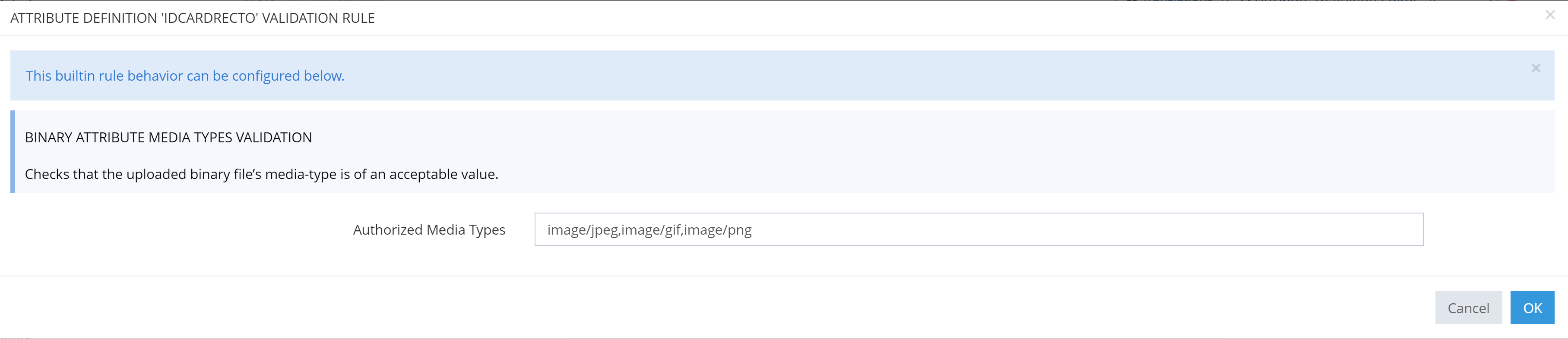
|
|
4 |
Binary Attribute Size Limit Validation: Only for binary Attribute.
|
|
|
In this case, an idcardrecto is valid if it’s size is lower thant 768 ko. 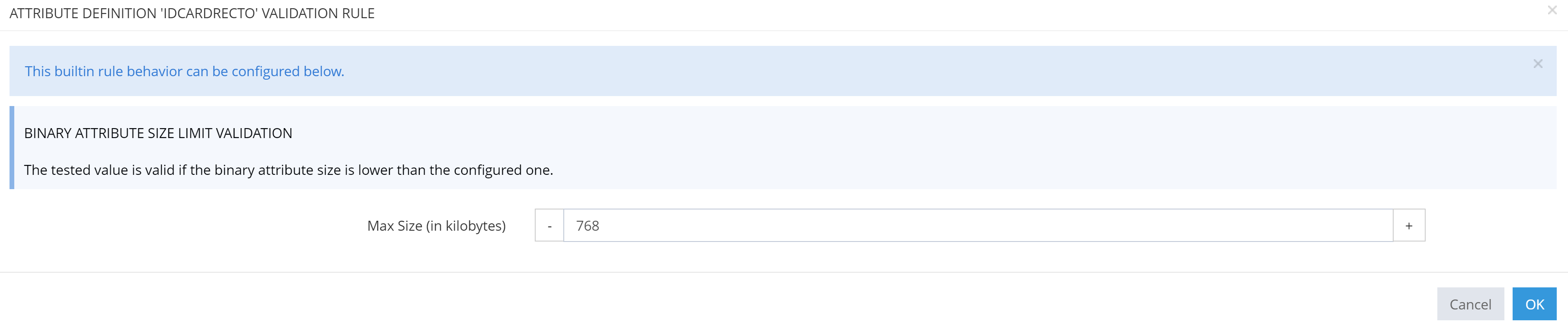
|
|
5 |
Email Validation: Allows to restrict the domain part of emails by configuring domains whitelist. |
|
|
In this case, only emails with explicit ending "ext.mpsa.com", "domain1" or "[172.16.47.45]" are allowed, and emails ending with implicit ending such as "subdomain2.org", "stellantis.domain2.com" or "subdomain3.accenture.com". The wildcard (asterisk) stands for an entire subdomain, domain or extension. 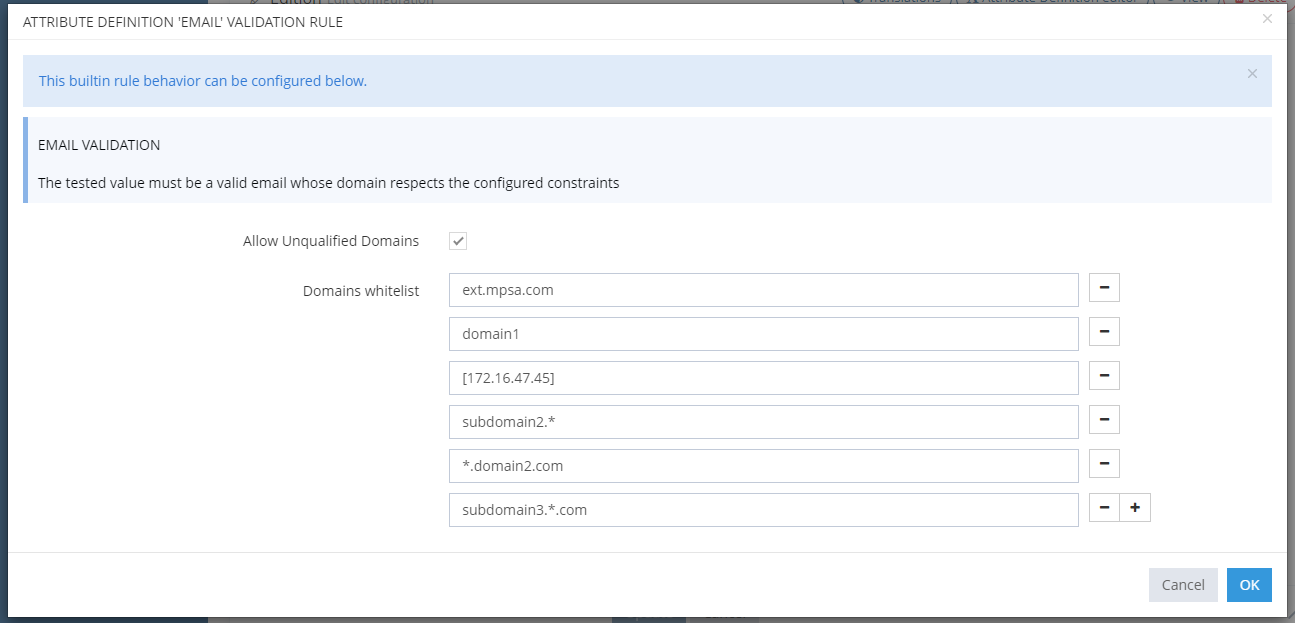
|
|
6 |
Email Validation - Reference Table: Allows to restrict the domain part of emails by configuring a reference table. |
|
|
Allows to indicate the Reference Table with authorized domains, with the same syntax as for Email Validation. 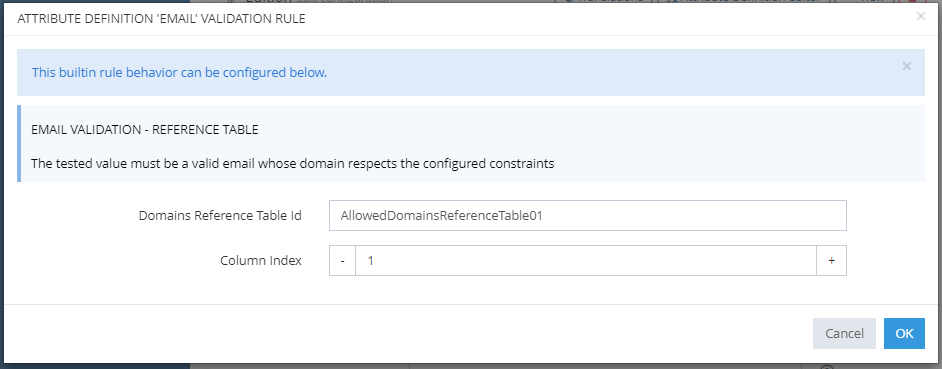
|
|
7 |
Regex Validation:Allows to define a character string. This validation rule is described using operators, values and variables. The validation failure i18n key allows to configure a personalized i18n key. This key will be displayed when the user enters an incorrect value of the attribute. |
|
|
XML
|
|
8 |
URL Validation: Allows to check if the value of the attribute is an URL.
|
|
|
XML
|
|
9 |
X509 Certificate Validation: Allows to he check if the uuploaded data is a valid X509 Certificate . |
|
|
XML
|
Initialization rules
Initialization rules are used to calculate the value when the Object is created. It's mainly used to set a default value.
When configuring Initialization Rules there are two possibilities :
|
How |
UI Configuration |
Example |
||
|---|---|---|---|---|
|
1 |
Attribute |
Other |
||
|
2 |
By Random Identifier Generator: Used to generate a random id from a given regular expression. |
|
|
In this case, at creation, the "login" will be created according to the regular expression patterns. |
|
3 |
By groovy script :Used to associate one or more values of existing attributes to the created Object.
|
|
|
Groovy
In this case, at the creation, if "type" Attribute is set to "Employee" and "level" attribute is set to "2", then the "badgeAuthorized" attribute will be set to "true". |
|
4 |
By Uuid Idenfier Genreator : Used to generate a random id based on Uuid. |
|
|
In this case, at creation, the "login" will have the generated Uuid value. |
Read Next
-
XML configuration All IM configuration can be imported or exported in XML, either through the UI or through API. This page describes the general principles governing this XML representation, and conventions used throughout this Technical documentation.
-
Search Expressions Search Expressions are a domain-specific language for searching objects (Managed Objects, Reporting collections…) or expressing constraints on them. A Search Expression combines Property Expressions (e.g. firstName LIKE 'John*') and Functions with Logical Operators (AND, OR, NOT)
-
Rules -
Scope A Scope describes a population of objects (Managed Objects such as Identities, Role Assignments,…). They are used throughout IM configuration to specify on which Data a Configuration Entity operates. For instance, which Objects are accessible through a Feature, or to which Identities a Password Policy applies to.
-
Execution Plan Execution Plan allows to configure the scheduling of scheduled tasks.