
Federate Memority with S3NS PREMI3NS
You chose PREMI3NS, the sovereign cloud offer by Thales and Google Cloud, to keep your workloads within the European trust perimeter. To stay consistent with that choice, Memority is the identity provider built to federate with S3NS. This guide shows you how to connect your Memority tenant to PREMI3NS so your users can sign in to the cloud console with the identities you already manage in Memority.
How the federation works
Memority acts as your OpenID Connect (OIDC) identity provider. When a user signs in to the PREMI3NS console, they are redirected to Memority for authentication. Memority issues an OIDC token that carries:
-
sub— the user's unique identifier in Memority. It must match the login expected in the PREMI3NS console. -
groups— a list of strings representing the S3NS groups the user belongs to, for example["s3ns-prod-devops", "s3ns-prod-developers"]. This claim is populated automatically by Memority through theapp.s3ns.groupsright (configured in each scenario below).
The
groupsclaim is returned as a JSON array by default.
PREMI3NS receives this token through a Workforce Identity Pool, reads the groups claim, and maps it to Google Groups. Those groups carry the IAM permissions you configure in PREMI3NS.
The two mappings that matter:
-
Subject mapping — identifies the user.
-
Group mapping — determines what the user is allowed to do.
These are two examples (i.e. there can be other ways to configure)
Choose your scenario
|
|
Scenario A — Roles |
Scenario B — Dimensions |
|---|---|---|
|
Best for |
Small to mid-size organisations (~100 users) |
Large enterprises with complex structures |
|
How access is assigned |
Admins assign applicative roles manually |
Access derived automatically from organisational dimensions |
|
Admin overhead |
Manual, per-user assignments |
Configured once, updates automatically |
Prerequisites
-
Access to an active Memority tenant with administrator rights.
-
A PREMI3NS organisation with a user holding
roles/iam.workforcePoolAdminat the organisation level. -
Access with PREMI3NS admin rights on your project (tenant in s3ns)
-
The gcloud CLI installed locally and configured to target the S3NS universe (
s3nsapis.fr/cloud.s3nscloud.fr). -
The list of S3NS groups (Scenario A) or organisational dimensions (Scenario B) you want to federate.
Scenario A. Role-based federation
In this scenario, you define applicative roles in Memority that correspond to S3NS groups. Administrators assign those roles to users manually.
Important — Scenario A depends entirely on data quality.
The Memority role name must be identical to the S3NS group name: this is the link between the two systems, and no name translation happens. The matching is an exact string comparison — case, hyphens, and spacing included — and neither system validates it: a typo does not produce an error, it silently results in missing permissions. Agree on a naming convention with the PREMI3NS administrators before creating the roles, and treat any role rename as a change impacting access in PREMI3NS.
Example
A cybersecurity consulting firm with around 80 employees defines four roles. Each role name matches an S3NS group name exactly.
|
Memority role (= S3NS group) |
Access in PREMI3NS |
|---|---|
|
|
Read-only access to resources and logs |
|
|
Access to console logs |
|
|
Kubernetes Engine administration |
|
|
Full infrastructure access |
Step 1. Create the S3NS application
In the Memority administration console, create the S3NS application.
Step 2. Create the app.s3ns.groups right
Create a right named app.s3ns.groups with the following configuration:
-
Scope: On a resource
-
Right Dimensions: none
-
Right mappings → Target mapping: Expression (Groovy Script)
Configure the Groovy Script to retrieve the names of all roles assigned to the user that start with s3ns. These role names populate the groups claim sent to PREMI3NS. A role whose name does not start with s3ns is silently excluded.
Groovy Script example:
import com.memority.citadel.shared.api.im.identity.RoleAssignment

// Get all roles assigned to the identity
def roleNames = []

if (OBJECT.roles) {
    // Filter roles and collect roleNames that start with "s3ns"
    roleNames = OBJECT.roles.findAll {
        RoleAssignment ra ->
            def role = FIND.role().withAttributesProjection("roleName").withId(ra.role)
            role != null && role.roleName != null && role.roleName.startsWith("s3ns")
    }.collect {
        RoleAssignment ra ->
            def role = FIND.role().withAttributesProjection("roleName").withId(ra.role)
            role.roleName
    }
}

LOG.debug("s3nsgroups compute - {} - roleNames: {}", OBJECT.id, roleNames)
return roleNames
Your Memority team can provide the exact script
.png?cb=91cd6493be5e798ab58bbceba00e9a64)
Step 3. Create the applicative roles
Create one applicative role per S3NS group (for example s3ns-prod-ps). For each role, add two rights:
-
app.access.<applicationID>— grants access to the application. -
app.s3ns.groups— produces the list of S3NS groups for the token.
Assign the relevant role(s) to each user. A user can be assigned one or more roles.
Step 4. Create the attribute function
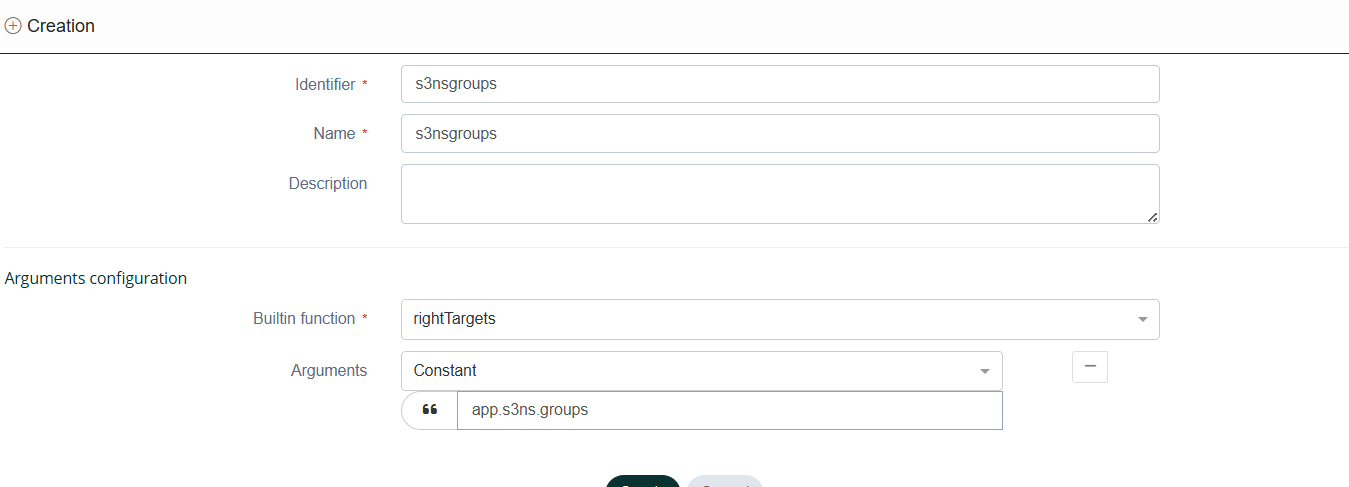
In the My-Access configuration interface, create an attribute function named s3nsgroups. Configure it to use the rightTargets builtin function with the constant argument app.s3ns.groups.
The function reads the values produced by the app.s3ns.groups right (the role names retrieved by the Groovy Script) and constructs the groups claim sent to PREMI3NS.
Step 5. Create the federation in Memority
Create the federation on the S3NS application. Use one federation per environment (production and staging).
|
Setting |
Value (production) |
|---|---|
|
Client ID |
|
|
Client secret |
Generated by Memority — store securely |
|
Subject |
User's email in Memority |
|
Issuer |
|
|
Scopes |
|
|
Redirect URI |
|
The custom scopes carry the information PREMI3NS needs:
-
groups— the list of S3NS group names the user belongs to, produced by thes3nsgroupsattribute function from theapp.s3ns.groupsright. -
name— the user's full name, for exampleJane Doe.
In the federation Scopes section, source the groups scope from the s3nsgroups attribute function.
.png?cb=7562e7e9f7043908aa92a419a025c72d)
PREMI3NS fetches the groups and name claims from the user_info endpoint after authentication. You do not need to embed these claims directly inside the ID token.
Replace <your-pool-name> and <your-provider-name> with the names you choose in Steps 6 and 7. Throughout this guide we use memority-fede-pool and memority-idp-prod.
For staging, repeat this configuration with a dedicated client ID such as app-premi3ns-staging.
Validate the federation configuration
Before moving to PREMI3NS, it is recommended to quickly validate the OIDC flow using an API testing client (i.e. Insomnia, Postman, etc.):
-
Create a new OAuth 2.0 request using the Authorization Code grant type. Set the authorisation URL to your Memority issuer and the token URL to
<your-tenant-issuer>/token. Add the scopesopenid,groups, andname. -
Complete the login flow in the browser window that opens. Postman or Insomnia will exchange the code for tokens automatically.
-
Send a GET request to
<your-tenant-issuer>/userinfowith the obtained access token as a Bearer token in the Authorization header. -
Confirm the response body contains:
-
namewith the user's full name -
groupsas a list of S3NS group names, for example["s3ns-devops", "s3ns-viewer"]
-
Step 6. Create the Workforce Identity Pool in PREMI3NS
-
Sign in to the PREMI3NS console with a user holding
roles/iam.workforcePoolAdminat the organisation level. -
Navigate to IAM & Admin → Workforce Identity Federation at the organisation level.
-
Click Create pool and configure:
-
Name:
memority-fede-pool(this is an example) -
Session duration: 12 hours (the maximum currently supported)
-
-
Save the pool.
Step 7. Add the Memority provider to the pool
Inside the pool, create an OIDC provider.
|
Field |
Value |
|---|---|
|
Display name |
|
|
Description |
Memority IdP — Production |
|
Issuer |
|
|
Client ID |
|
|
Response type |
Code |
|
Assertion claims behaviour |
User info and ID token |
The provider wizard walks you through four sub-steps:
1. Create a provider
Select Generic Identity Provider as the provider vendor and OpenID Connect (OIDC) as the authentication protocol. Enter the name, issuer URL, and client ID from the table above.
-
Share your provider information with IdP
Copy the Redirect URI shown on this screen — it must match the Redirect URI you set in the Memority federation (Step 5).
-
Configure OIDC Web Sign-in
Set Flow type to Code and Assertion claims behavior to User info and ID token. Enter the client secret generated by Memority in Step 5.
Do not select the Implicit / ID-Token flow or "Only ID token". The console offers these options, but with them PREMI3NS cannot fetch the groups and name claims from the user_info endpoint, and the federation will not carry group information.
Attribute mapping:
google.subject        = assertion.sub
google.display_name   = assertion.name
google.groups         = assertion.groups
Memority returns the groups claim as a JSON array, which maps directly to google.groups without any transformation.
google.groups maps directly to assertion.groups.
Submit the form to create the provider.
Step 8. Add the additional scopes via gcloud
The PREMI3NS console UI does not currently allow declaring extra OIDC scopes beyond openid. Use the gcloud CLI to add groups and name.
8.1. Authenticate as a super-administrator
Create a login configuration file for the S3NS universe (for example login-config-s3ns.json):
{
  "universe_domain": "s3nsapis.fr",
  "universe_cloud_web_domain": "cloud.s3nscloud.fr",
  "type": "external_account_authorized_user_login_config",
  "audience": "//iam.googleapis.com/locations/global/workforcePools/<your-pool>/providers/oidc",
  "auth_url": "https://auth.cloud.s3nscloud.fr/authorize",
  "token_url": "https://sts.s3nsapis.fr/v1/oauthtoken",
  "token_info_url": "https://sts.s3nsapis.fr/v1/introspect"
}
Then sign in:
gcloud auth login --login-config=login-config-s3ns.json
8.2. Add the scopes
gcloud iam workforce-pools providers update-oidc memority-idp-prod \
  --workforce-pool=memority-fede-pool \
  --web-sso-additional-scopes="groups,name" \
  --location=global
After this command, PREMI3NS will request the additional scopes when redirecting users to Memority for authentication.
Step 9. Distribute the sign-in URL
Share this URL with your users:
https://auth.cloud.s3nscloud.fr/signin/locations/global/workforcePools/memority-fede-pool/providers/memority-idp-prod?continueUrl=https://console.cloud.s3nscloud.fr/
The continueUrl parameter controls the page users land on after authentication.
Step 10. Grant IAM permissions
Bind IAM roles to your federated groups in the PREMI3NS console. The principal format for a federated group is:
principalSet://iam.googleapis.com/locations/global/workforcePools/memority-fede-pool/group/s3ns-devops
Repeat for each group. Refer to the PREMI3NS IAM documentation for the full binding syntax.
Scenario B. Dimension-based federation
In this scenario, access is derived automatically from organisational dimensions already present in your Memority tenant — attributes such as department, business unit, or environment scope, typically sourced from your HR or directory data.
This approach suits large organisations where manual role assignment at scale is not practical.
How dimensions work
At least one applicative role must exist in Memority — typically an S3NS Console role that grants access to the application. The dimensions are configured on that role to control which S3NS groups the user receives, based on their organisational attributes.
Scenario B uses the same app.s3ns.groups right as Scenario A, but configured with a dimension (values from a reference table) instead of a Groovy Script expression.
There is no fixed naming convention for dimensions. The exact attribute names depend on your Memority tenant configuration. Work with your Memority administrator to identify the relevant attribute names and their values.
Example
A large industrial group with around 4,000 employees has two dimensions configured on the S3NS Console role in Memority:
-
department— values such asrd,operations,finance -
environment_scope— values such asprod,nonprod
The dimensions are configured on the S3NS Console role. The S3NS group name is then built by combining the dimension values assigned to that role for each user:
|
department |
environment_scope |
→ S3NS group |
|---|---|---|
|
|
|
|
|
|
|
|
|
|
|
|
When a user moves to a new department or changes environment scope in Memority, their PREMI3NS access updates automatically — no manual intervention required.
Step 1. Configure the S3NS application with dimensions
1.1. Create the reference table
In the Memority administration console, create a reference table named s3nsgroups containing all the S3NS group values you want to manage (for example s3ns-prod-audit, s3ns-prod-ops).
1.2. Create the S3NS application
Create the S3NS application in Memority.
1.3. Create the app.s3ns.groups right with a dimension
Create the app.s3ns.groups right (Scope: On a resource).
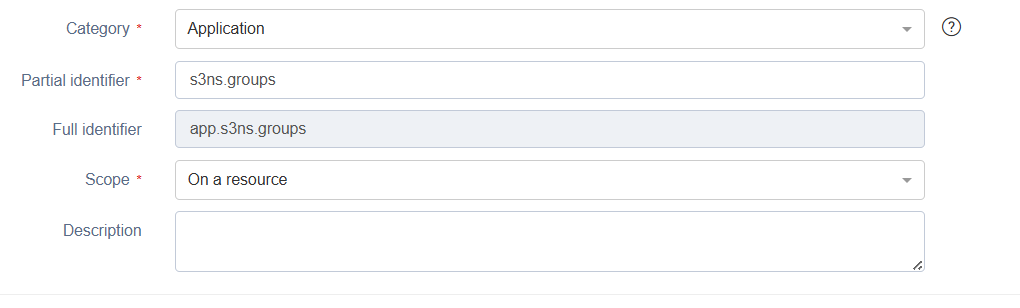
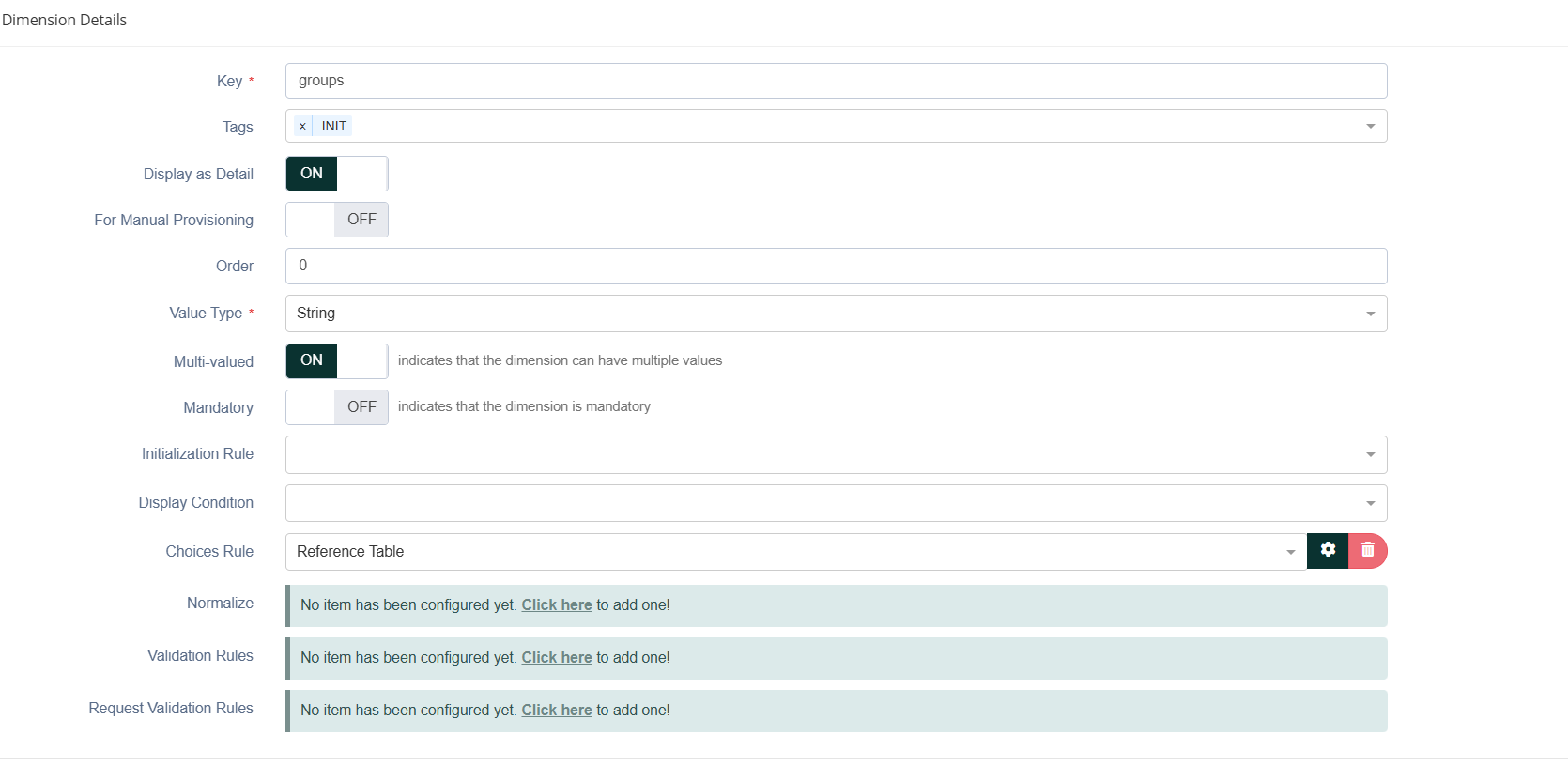
Configure a dimension on this right with a choiceRule pointing to the s3nsgroups reference table:
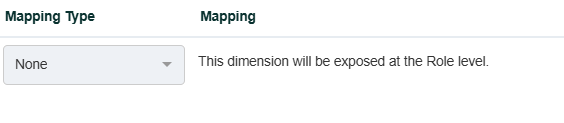
Set the dimension mapping type to None so it is exposed at the Role level.
At the bottom of the form, set the right's Target mapping to Direct → groups, so the right maps directly to the dimension key, then create the right.

1.4. Create the applicative role
Create an applicative role on the S3NS application — for example S3NS Console — with two rights:
-
app.access.<S3NS>— grants access to the application. -
app.s3ns.groups— carries the dimension configured in 1.3.
The dimension is set at the role level.
Step 2. Create the attribute function
Create the s3nsgroups attribute function exactly as described in Scenario A, Step 4. In Scenario B, rightTargets retrieves the dimension values assigned to the app.s3ns.groups right for the user — the S3NS group names selected from the reference table.
Step 3. Create the federation
Create the federation on the S3NS application using the attribute function defined in Step 2.
In the federation Scopes section, source the groups scope from the s3nsGroups attribute function.
Steps 4 to 8. PREMI3NS configuration
Follow Scenario A Steps 6 to 10 without changes. The google.groups attribute mapping is identical to Scenario A:
google.groups = assertion.groups
The attribute function has already constructed the correct group values from rightTargets before the token is issued.
Support
If you encounter issues during setup, contact your Memority support representative.