
The Role Assignment Certification Widget allows to define the scope of role assignments to recertify during an ad hoc recertification campaign. With this widget, you select:
-
Target roles
-
Identities whose assignments to those roles you will recertify
To launch the ad hoc recertification campaign, go to your User Portal.
Widget Use
|
Description |
Example |
|---|---|
|
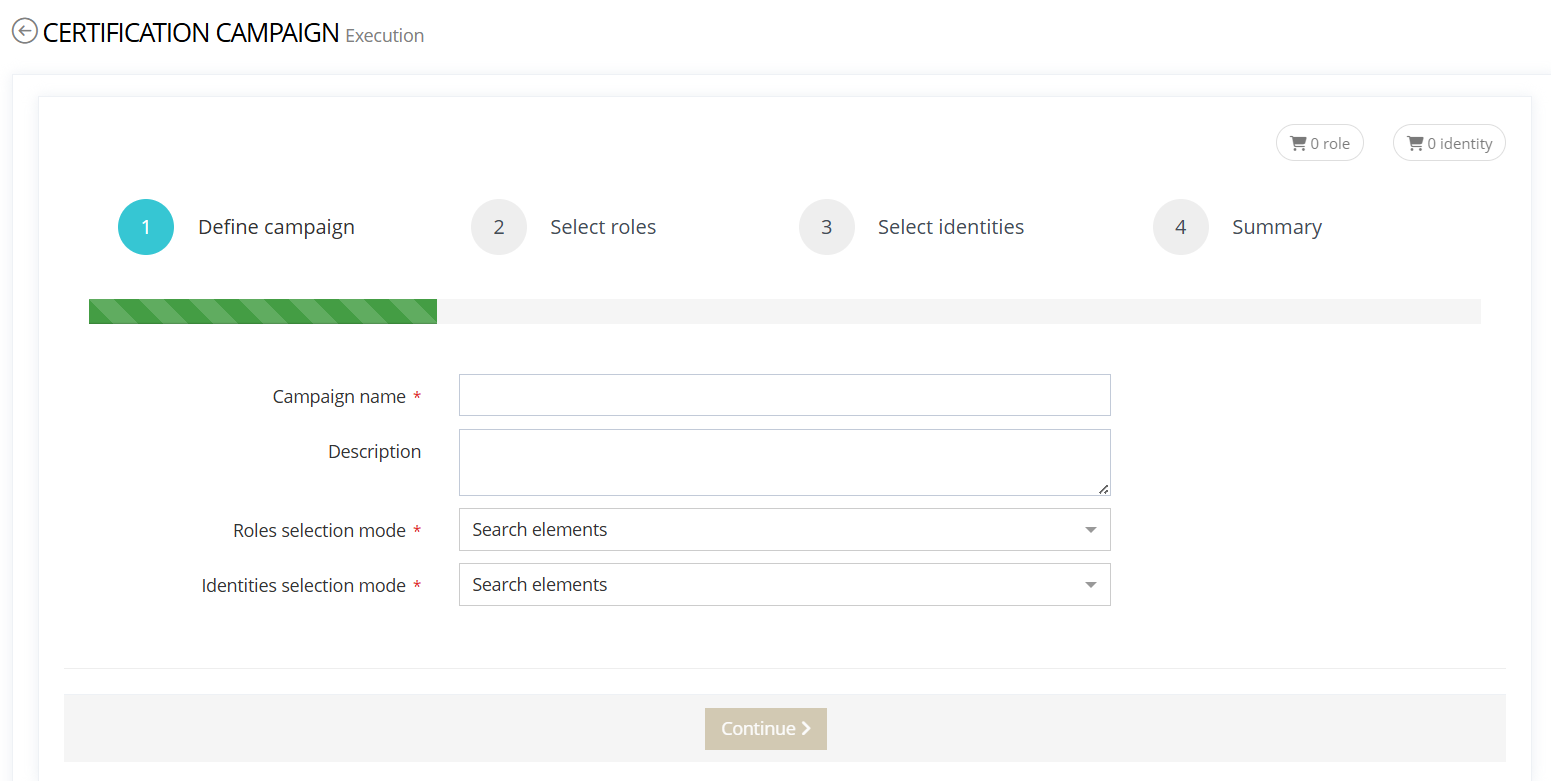
Step 1: Define campaign Name the campaign For both Roles and Identities, pick a selection mode:
Or
|
|
|
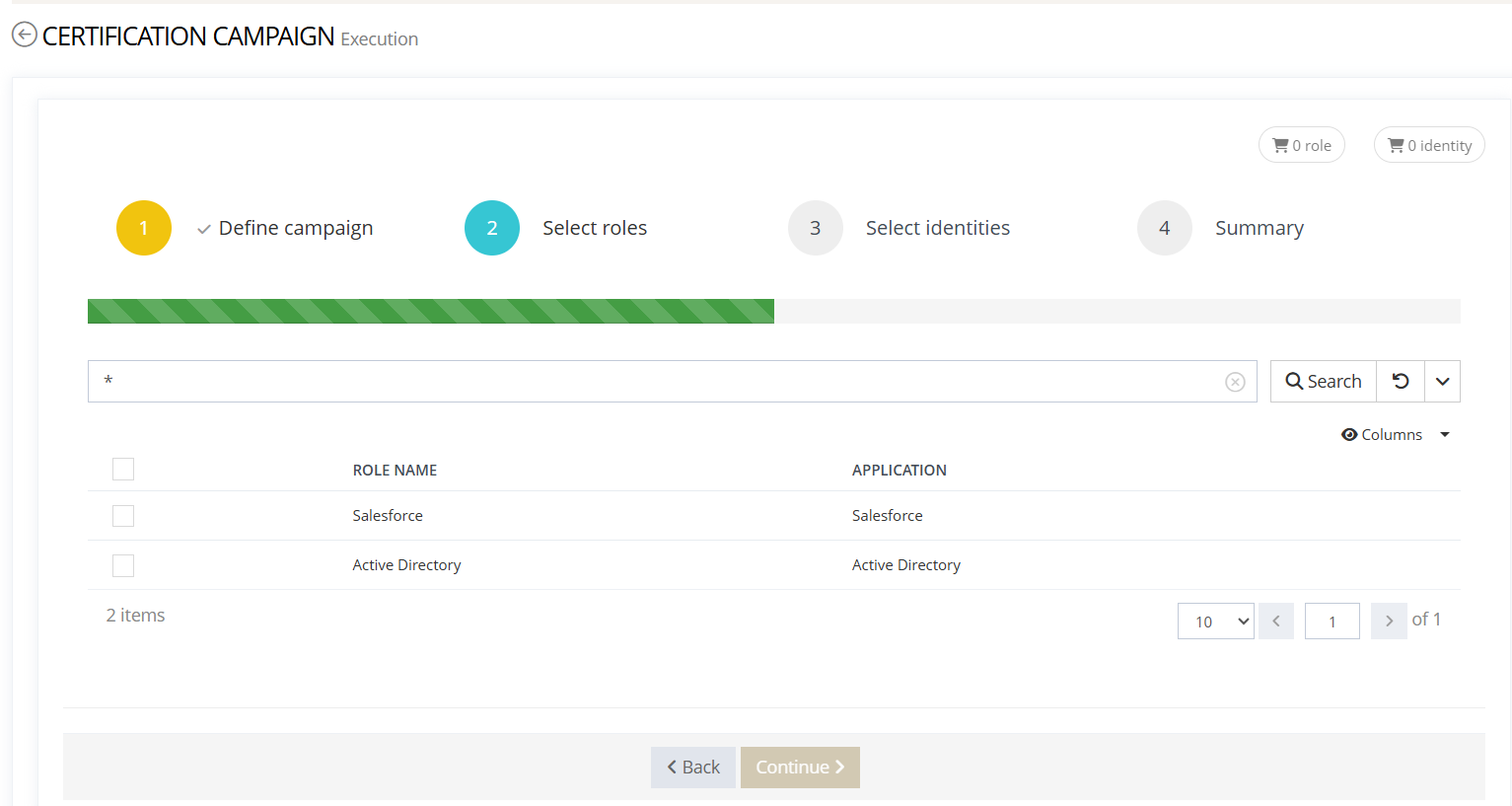
Step 2: Select roles Depending on the Roles selection mode (Step 1), select the roles to certify:
|
|
|
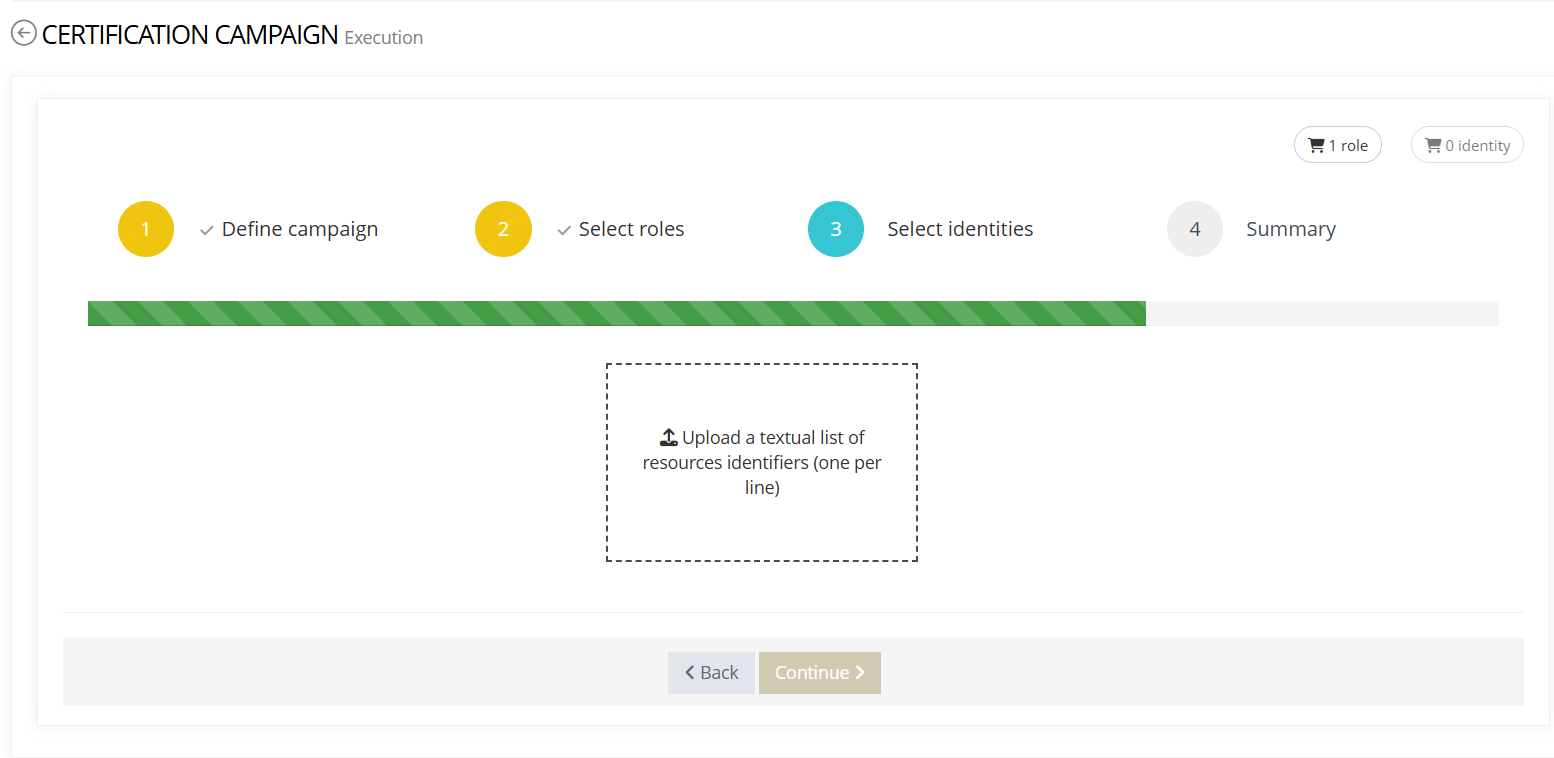
Step 3: Select identities Depending on the Identities selection mode (Step 1), select the identities whose assignments to the roles (Step 2) you will recertify:
|
|
Configuration
Properties
|
Property Name |
Type |
Mandatory |
Description |
Values (default in bold) |
|---|---|---|---|---|
|
hidden |
|
NO |
Display or hide the widget |
true, false |
|
displayOptions |
- |
YES |
Defines the widget display options |
|
|
config |
- |
YES |
Defines the widget configuration |
|
displayOptions properties
|
Property Name |
Type |
Mandatory |
Description |
Values (default in bold) |
|---|---|---|---|---|
|
modalSize |
|
NO |
Defines the size of the modal |
XS, SM, LG
|
config properties
|
Property Name |
Type |
Mandatory |
Description |
Values (default in bold) |
|---|---|---|---|---|
|
bordered |
|
NO |
Defines if the action buttons have a border or not |
true, false |
|
title |
|
NO |
Defines the widget title |
true, false
|
|
completionRedirectURL |
|
NO |
Redirect destination after the action completes |
e.g. /home |
|
displayWizardProgressBar
|
|
NO |
Display the step progress bar |
true, false |
|
identityOptions |
-
|
YES |
Configure identities search / selection |
See below |
|
roleOptions |
-
|
YES |
Configure role search / selection |
See below |
IdentityOptions.scope properties
|
Property Name |
Type |
Mandatory |
Description |
Values (default in bold) |
|---|---|---|---|---|
|
scope@type |
|
YES |
Scope definition mode |
EXPRESSION |
|
scope@objectKind |
|
YES |
Target object kind |
IDENTITY
|
|
scope.objectTypes |
|
YES |
Allowed identity types |
Internal, Provider |
IdentityOptions.search properties
|
Property Name |
Type |
Mandatory |
Description |
Values (default in bold) |
|---|---|---|---|---|
|
allowExport |
|
YES |
Allow exporting the result list |
true, false |
|
columns |
|
YES |
Columns displayed in the identity list |
e.g., id, firstName, lastName, organization |
|
displayFrozenOperators |
|
NO |
Display fixed search operators |
true, false |
|
frozen |
|
NO |
Freeze the search header |
YES, NO |
|
modes |
|
NO |
Possible search modes |
SIMPLE, MULTICRITERIA |
|
objectReferences |
|
NO |
References to filter identities |
e.g., organization (See below) |
IdentityOptions.search.columns
|
Column (dataKey) |
Hidden |
Data Type |
Type |
Sortable |
Default Sort |
|
id |
true |
|
general |
true |
ALPHA ASC |
|
firstName |
false |
|
general |
true |
ALPHA ASC |
|
lastName |
false |
|
general |
true |
ALPHA ASC |
|
organization
|
false |
|
excerpt |
true |
ALPHA ASC |
IdentityOptions.search.objectReferences (Organization picker) properties
|
Property Name |
Type |
Mandatory |
Description |
Values (default in bold) |
|---|---|---|---|---|
|
objectReferences.attribute |
|
NO |
Reference attribute to filter identities |
organization |
|
editWidget@xsi:type |
|
NO |
Reference selector widget |
e.g., ctdbum:AdvancedObjectReferenceEditWidgetType |
|
hidden |
|
NO |
Display or hide the reference widget |
true, false |
|
conditional |
|
NO |
Conditional display |
true, false
|
|
required |
|
NO |
Make the reference mandatory |
true, false |
|
popupAttributes |
|
NO |
Attributes displayed in the popup header |
organizationName |
|
displayPopup |
|
NO |
Open a popup for selection |
true, false |
Organization popup search (editWidget.config.search) properties
|
Property Name |
Type |
Mandatory |
Description |
Values (default in bold) |
|---|---|---|---|---|
|
allowExport |
|
YES |
Allow export in popup |
true, false |
|
columns |
|
YES |
Popup columns |
e.g., organizationName, parentOrganization |
|
displayFrozenOperators |
|
NO |
Display fixed operators |
true, false |
|
frozen |
|
NO |
Freeze the search header |
YES, NO |
|
modes |
|
NO |
Possible search modes |
SIMPLE, MULTICRITERIA |
roleOptions
roleOptions.scope
|
Property Name |
Type |
Mandatory |
Description |
Values |
|---|---|---|---|---|
|
cope@type |
|
NO |
Scope definition mode |
EXPRESSION |
|
scope@objectKind |
|
NO |
Target object kind |
ROLE |
|
scope.searchExpression |
|
NO |
Additional role filter |
needCertification = true |
|
scope.objectTypes |
|
NO |
Allowed role types |
application |
roleOptions.search
|
Property Name |
Type |
Mandatory |
Description |
Values |
|---|---|---|---|---|
|
allowExport |
|
YES |
Allow exporting the result list |
true, false |
|
columns |
|
YES |
Columns displayed in the role list. |
See roleOptions.search.columns |
|
displayFrozenOperators |
|
NO |
Show fixed search operators. |
true, false |
|
frozen |
|
NO |
Freeze the search header. |
YES, NO |
|
modes |
|
NO |
Enabled search modes. |
SIMPLE, MULTICRITERIA, FORMULA |
roleOptions.search.columns
|
Column (dataKey) |
Hidden |
Data Type |
Type |
Sortable |
|
id |
true |
|
general |
false |
|
roleName |
false |
|
general |
false |
|
roleApplication
|
false |
|
excerpt |
false |
Example