
Definition
Risk-Based Authentication Replay (RBA Replay) lets you test your RBA configuration against real, historical authentication data before deploying any changes. Since any configuration change can significantly impact which authentication mechanisms are available to users, RBA Replay lets you validate your rules and policies against real traffic first.
The output is an RBA Replay Report, with detailed statistics on score distribution, policy matches, and rule usage.
Prerequisites
RBA Replay is intended for integrators who have already configured RBA on their tenant. Before starting a replay, ensure the following:
|
Prerequisite |
Details |
|---|---|
|
RBA is configured |
At least one Environment Risk Policy, User Risk Policy, and Authentication Risk Policy must be configured on the tenant |
|
Authentication mechanisms are defined |
Authentication mechanism definitions with risk correction values must exist |
|
Historical data is available |
The tenant must have recorded authentication events to replay. The further back and the larger the dataset, the more representative the results |
|
Administration console access |
You must have access to the Administration console → Analytic Replays |
Configuration
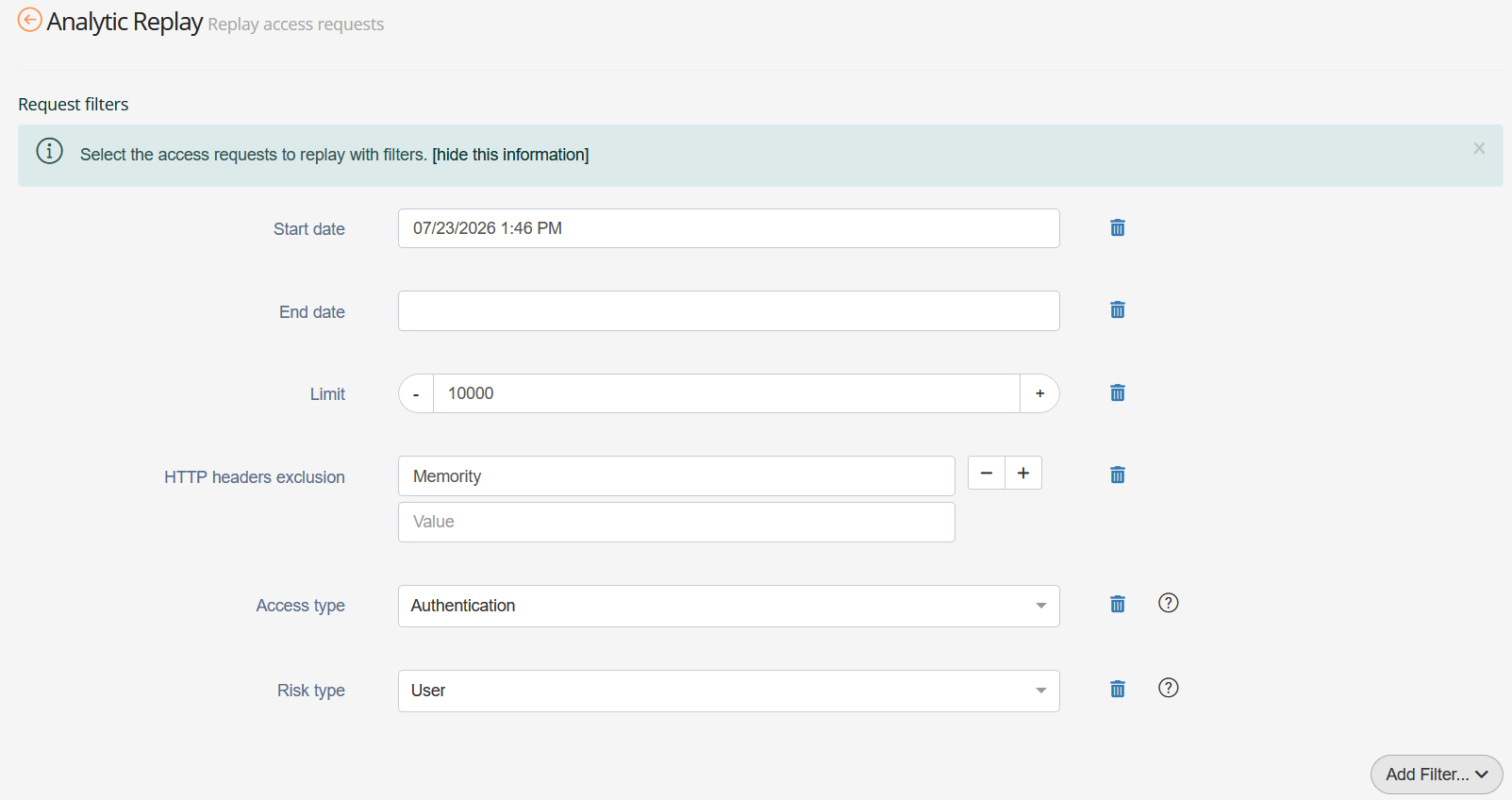
To start a new replay, navigate to the Analytic Replays page in the Administration console and click Replay access requests.

Request Filters
Select the historical authentication data to replay by configuring the following filters. Add or remove filters as needed.
|
Filter |
Type |
Usage |
|---|---|---|
|
Start date |
Date |
Sets the earliest authentication to include in the replay |
|
End date |
Date |
Sets the latest authentication to include in the replay |
|
Limit |
Integer |
Caps the maximum number of requests to replay |
|
HTTP headers exclusion |
List of |
Excludes requests containing a specific HTTP header, to filter out non-human traffic (e.g. automated health check probes) |
|
Access type |
Enum |
Filters by request type: |
|
Risk type |
Enum |
Filters by request risk type: |
ExcludeRequestsMatchingHeaders
|
Property Name |
Type |
Mandatory |
Description |
|---|---|---|---|
|
name |
|
Mandatory |
HTTP header name to match against RBA requests from replay. |
|
valueRegex |
|
optional |
Regular expression applied to the values of the header identified by the above name. If any value matches, the RBA request is excluded from the replay list. |
Available authentication mechanisms strategy
Available authentication mechanisms may change over time if you add, remove, or reconfigure them after recording the historical data. This section controls how the replay handles those differences.
|
Option |
Usage |
|---|---|
|
Include new authentication mechanisms |
Includes mechanisms added after the historical data period |
|
Ignore obsolete authentication mechanisms |
Excludes mechanisms deleted since the historical data period |
|
Refresh authentication levels |
Uses the current authentication level for each mechanism rather than the level at the time of the original request |
|
Available authentication mechanisms |
Restricts the replay to a specific set of mechanisms. If left empty, the replay includes all available mechanisms |

RBA Configuration
The Configuration section contains the full RBA configuration the replay uses to score requests. It includes:
|
Component |
Description |
|---|---|
|
Authentication mechanism definitions |
Each mechanism and its associated risk correction value, which the system subtracts from the computed risk score to determine whether the mechanism is available for a given request |
|
User Risk policies and rules |
Rules that evaluate user behaviour (e.g. login time, location) and adjust the user risk score accordingly |
|
Environment Risk policies and rules |
Rules that evaluate the user's environment (e.g. device, browser) and adjust the environment risk score |
|
Authentication Risk policies and rules |
Policies that define, for a given application or context, the Maximum Acceptable Risk (MAR) and the minimum authentication level the system requires |
By default, the replay uses the current active RBA configuration. To test a different configuration, modify the XML directly in the editor or upload a custom XML file.
A custom configuration must be complete and valid. If an element is missing, the system will not fall back to the current configuration.
Once you have defined all settings, click Replay access requests to start the replay. The duration of the replay depends on the volume of events returned by the request filters.
Reading the Replay Report
Once the replay completes, the report breaks down results across three risk dimensions: Environment Risk, User Risk, and Authentication Risk.
Environment Risk
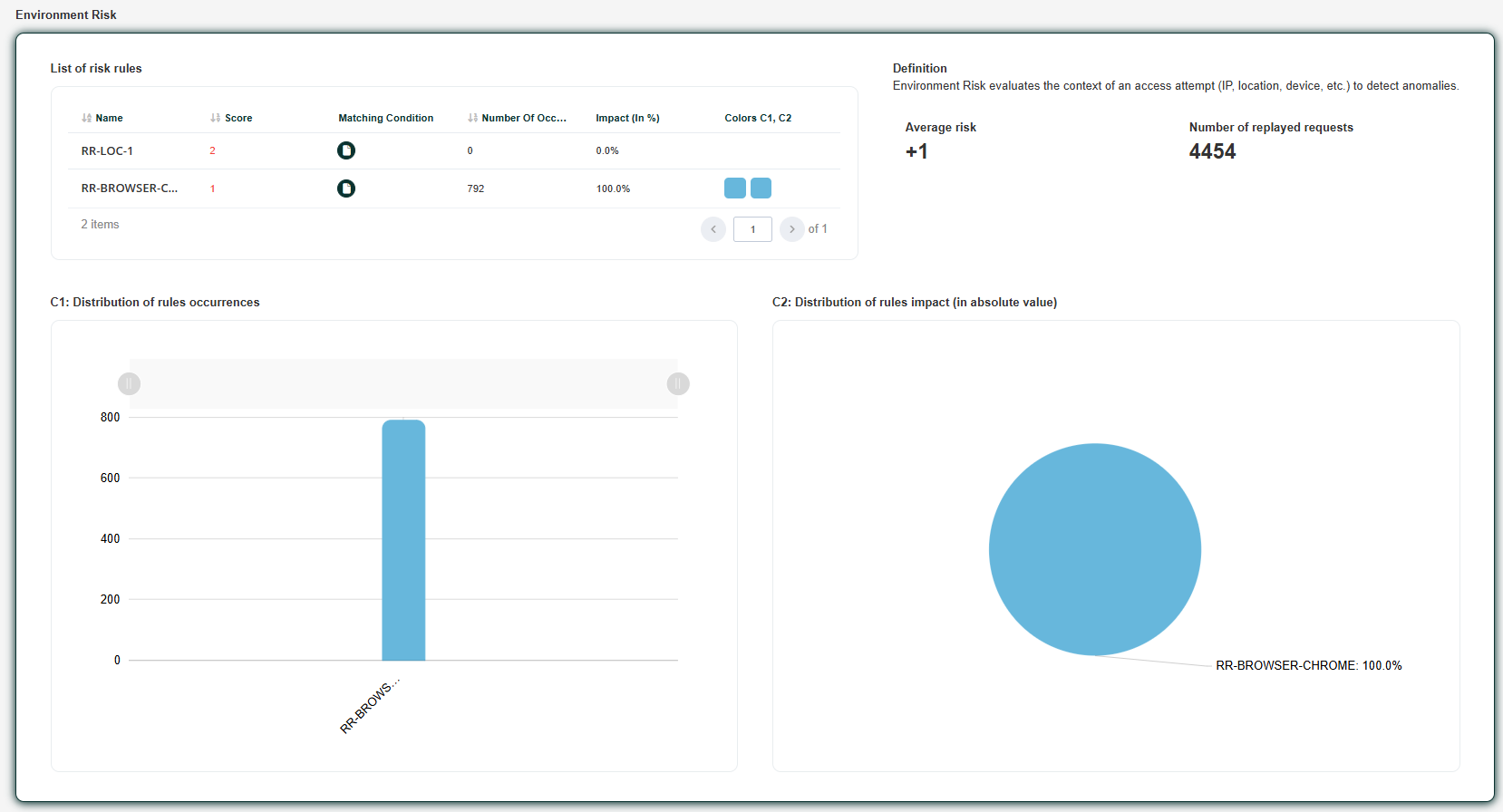
This section covers the unique Environment Risk policy and how its rules performed against the replayed requests.
|
Element |
Description |
|---|---|
|
Average environment risk score |
The average score the system computed across all replayed requests |
|
Rules table |
For each environment risk rule: its risk score, matching condition, number of occurrences, and impact as a percentage |
|
Distribution chart |
A visual representation of rule occurrences and their impact. Bars above the line indicate a positive impact (risk increases); bars below indicate a negative impact (risk decreases) |
User Risk
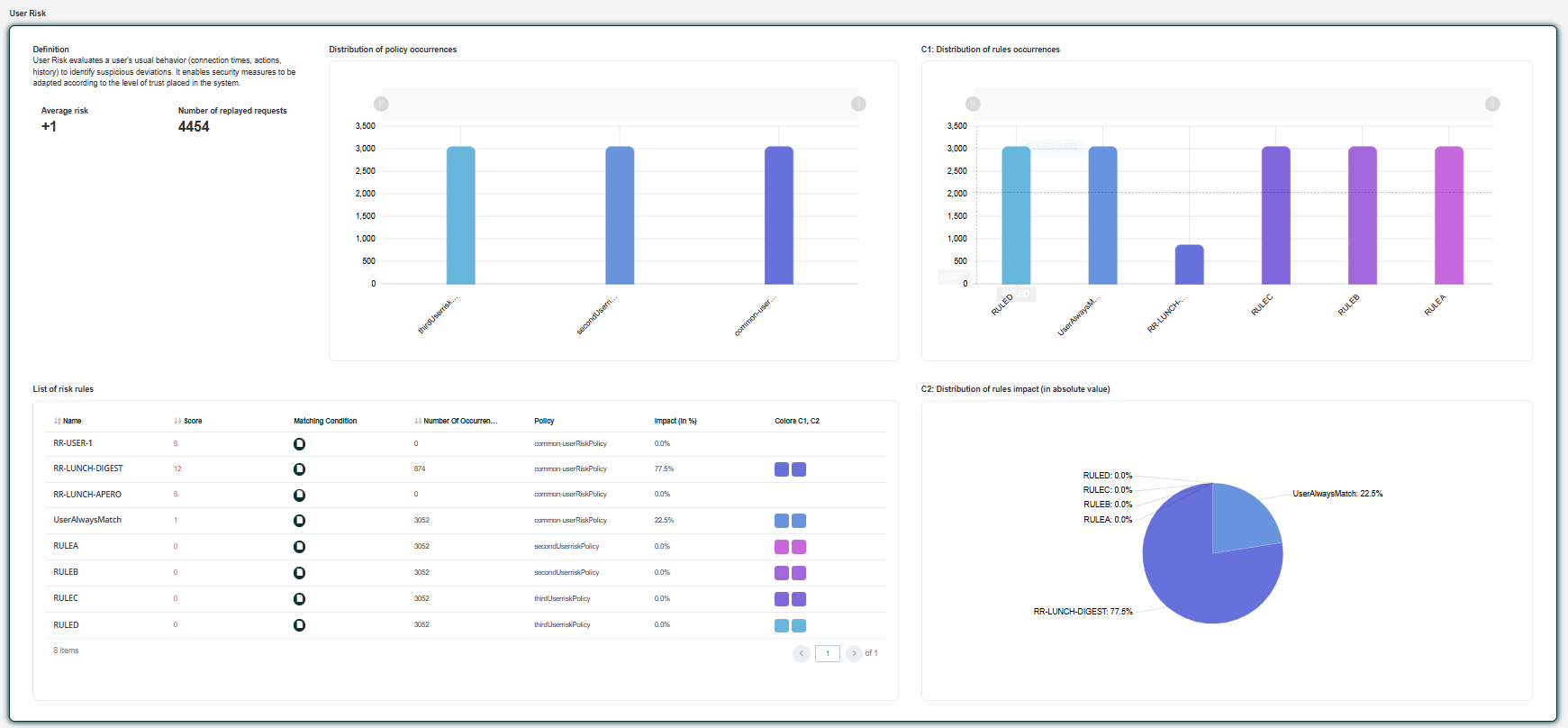
This section covers all User Risk policies and their rules.
|
Element |
Description |
|---|---|
|
Policy distribution |
A progress bar showing which User Risk policies matched across the replayed requests |
|
Average user risk score |
The average score the system computed across all replayed requests |
|
Rules table |
For each user risk rule: its risk score, matching condition, number of occurrences, and impact as a percentage |
|
Distribution chart |
A visual representation of rule occurrences and their impact. Bars above the line indicate a positive impact (risk increases); bars below indicate a negative impact (risk decreases) |
Authentication Risk
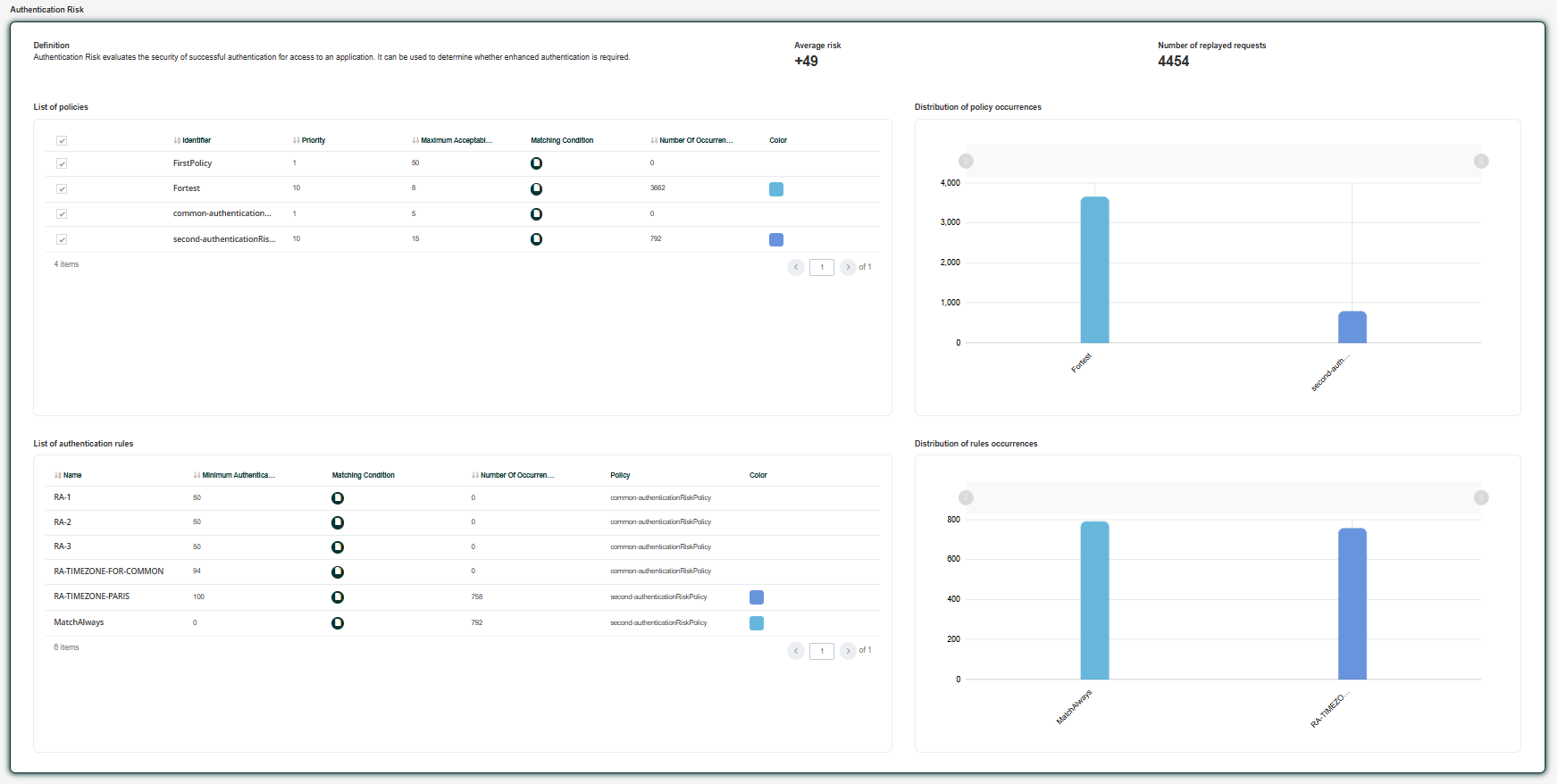
This section covers all Authentication Risk policies and shows which authentication mechanisms the system made available given the computed risk scores.
This is the most important part of the report. Authentication Risk shows the direct impact of your configuration on users . It reveals which authentication mechanisms were available to them, and is the clearest indicator of whether your configuration achieves the intended user experience.
|
Element |
Description |
|---|---|
|
Mechanism distribution |
For each policy, the distribution of authentication mechanisms the system determined as available |
|
Policies table |
Lists all Authentication Risk policies with their identifier, priority, Maximum Acceptable Risk (MAR), matching condition, and the number of times each policy matched |
|
Rules table |
For each authentication rule within a policy: its minimum authentication level, matching condition, number of occurrences, and impact as a percentage |
Interpreting the Results
Once you have read the report, use the following questions to assess whether your configuration achieves the desired outcome. You can also adjust settings directly in the replay form to obtain an immediate estimate of the impact of your changes.
|
Check |
What to look for |
|---|---|
|
Mechanism distribution* |
Verify that the expected authentication mechanisms are available in the Authentication Risk section |
|
Score distribution |
Review the score distribution across Environment Risk and User Risk |
|
Rule coverage |
Review the occurrences column in each rules table to identify rules that never match or match too broadly |
|
Policy coverage |
Check what percentage of authentications each Authentication Risk policy allows or blocks |
*This is the most critical part to check. Mechanism distribution directly reflects the authentication options presented to your users.
Configuration Structure
This section describes the structure of the XML configuration passed to the replay. The following example combines all configurable objects and illustrates what each one does.
<kit:DataSet xmlns:kit="http://www.memority.com/toolkit/1_0"
             xmlns:riskrba="http://www.memority.com/risk/rba/1_0"
             xmlns:xs="http://www.w3.org/2001/XMLSchema"
             xmlns:xsi="http://www.w3.org/2001/XMLSchema-instance">

   <riskrba:EnvironmentRiskPolicy>
      <riskRules>
         <riskRule>
            <enabled>true</enabled>
            <name>ENV-RR-DEV-1</name>
            <matchingCondition>
               <script><![CDATA[
                  // Device not used since 30 days
                  DYN.device.lastAuthenticationInterval >= 30]]></script>
            </matchingCondition>
            <riskCorrection>10</riskCorrection>
         </riskRule>
         <riskRule>
            <enabled>true</enabled>
            <name>ENV-RR-DEV-2</name>
            <matchingCondition>
               <script><![CDATA[
                  // Device not used since 90 days
                  DYN.device.lastAuthenticationInterval >= 90]]></script>
            </matchingCondition>
            <riskCorrection>15</riskCorrection>
         </riskRule>
      </riskRules>
   </riskrba:EnvironmentRiskPolicy>

   <riskrba:UserRiskPolicy id="common-userRiskPolicy">
      <name>Common User Risk Policy</name>
      <description>Common user risk policy for all users.</description>
      <matchingCondition>
         <script><![CDATA[return true]]></script>
      </matchingCondition>
      <riskRules>
         <riskRule>
            <enabled>true</enabled>
            <name>USER-RR-AUTH-1</name>
            <matchingCondition>
               <script><![CDATA[
                  // User authenticated within the last 24 hours
                  DYN.user.lastAuthenticationDate.isAfter(Instant.now().minus(24, ChronoUnit.HOURS))]]></script>
            </matchingCondition>
            <riskCorrection>-5</riskCorrection>
         </riskRule>
         <riskRule>
            <enabled>true</enabled>
            <name>USER-RR-MOM-1</name>
            <matchingCondition>
               <script><![CDATA[
                  // Authentication during night hours
                  LocalTime lt = DYN.location.localTime
                  lt.isAfter(LocalTime.of(22, 0)) || lt.isBefore(LocalTime.of(06, 0))]]></script>
            </matchingCondition>
            <riskCorrection>20</riskCorrection>
         </riskRule>
         <riskRule>
            <enabled>true</enabled>
            <name>USER-RR-LOC-1</name>
            <matchingCondition>
               <script><![CDATA[
                  // Trusted country — do not apply location risk
                  if (DYN.location.countryCode == 'FR') {
                     return false
                  }
                  return DYN.user.newLocation]]></script>
            </matchingCondition>
            <riskCorrection>30</riskCorrection>
         </riskRule>
         <riskRule>
            <enabled>true</enabled>
            <name>USER-RR-LOC-2</name>
            <matchingCondition>
               <script><![CDATA[
                  // Authentication from an unusual distance at high speed
                  DYN.user.lastLocationDistance > 100 && DYN.user.lastLocationVelocity > 10]]></script>
            </matchingCondition>
            <riskCorrection>50</riskCorrection>
         </riskRule>
      </riskRules>
   </riskrba:UserRiskPolicy>

   <riskrba:AuthenticationRiskPolicy id="usrPortal-authenticationRiskPolicy">
      <name>USR Portal Authentication Policy</name>
      <description>USR Portal Authentication Policy</description>
      <evaluationPriority>100</evaluationPriority>
      <matchingCondition>
         <script><![CDATA[
            // Apply to the user portal application
            def appName = APP?.name as String ?: ""
            return appName.contains("usrPortal")]]></script>
      </matchingCondition>
      <maximumAcceptableRisk>100</maximumAcceptableRisk>
      <authenticationRules>
         <authenticationRule>
            <enabled>true</enabled>
            <name>RR-APP-1</name>
            <matchingCondition>
               <script><![CDATA[return true]]></script>
            </matchingCondition>
            <minimumAuthenticationLevel>0</minimumAuthenticationLevel>
         </authenticationRule>
      </authenticationRules>
   </riskrba:AuthenticationRiskPolicy>

</kit:DataSet>
|
Object / Rule |
What it does |
Read more |
|---|---|---|
|
|
If the device last authenticated 30 or more days ago, a correction of +10 is applied |
|
|
|
If the device last authenticated 90 or more days ago, an additional +15 is applied — stacking with |
|
|
|
This user risk policy applies to all users |
|
|
|
If the user authenticated within the last 24 hours, a correction of −5 is applied, reducing the risk score |
|
|
|
If the authentication occurs after 10:00 PM or before 6:00 AM, a correction of +20 is applied |
|
|
|
Uses |
|
|
|
If the user is more than 100 km away from their last authentication location and moving at more than 10 km/h, a correction of +50 is applied |
|
|
|
Applies to the user portal application. Tolerates a Maximum Acceptable Risk of 100 with a minimum authentication level of 0 |
Tuning the Configuration
After reviewing the report, adjust the configuration XML to move closer to your target outcome. The following levers are available.
|
Change |
Where to tune |
|---|---|
|
Date range, number of requests |
Directly in the report form |
|
Available authentication mechanisms strategy |
Directly in the report form |
|
Risk rules (add, remove, or modify) to change how the system scores requests |
XML configuration → re-run the replay |
|
|
XML configuration → re-run the replay |
|
|
XML configuration → re-run the replay |
|
Minimum authentication levels on authentication rules to tighten or loosen the minimum strength requirement |
XML configuration → re-run the replay |
Examples
|
Observation |
Possible cause |
Tuning action |
|---|---|---|
|
A rule never matches (occurrences = 0) |
The |
Broaden the |
|
A rule matches every request |
The |
Tighten the condition to target only the relevant subset of requests |
|
Too many users are prompted for strong authentication |
|
Raise |
|
Too few users are prompted for strong authentication |
|
Lower |
|
A mechanism is never offered to users |
Its |
Increase the mechanism's |
|
A mechanism is offered to all users regardless of risk |
Its |
Reduce |
|
Environment risk score is consistently high across all requests |
A broad environment rule applies to most requests, or no negative correction rules are configured |
Add a rule with a negative |
|
User risk score is the same for all users |
No user risk rules are matching, or all rules have identical corrections |
Review |
|
A policy never matches |
Its |
Adjust the |
Iterating
Once you have reviewed the report, you can edit the configuration directly in the editor and re-run the replay without leaving the page. Adjust the date range and limit to control how many requests the system processes and reduce replay time when needed.