
Definition
A Business Policy allows to configure how to trigger actions on Object Types through a Feature with an optional configured Workflow.
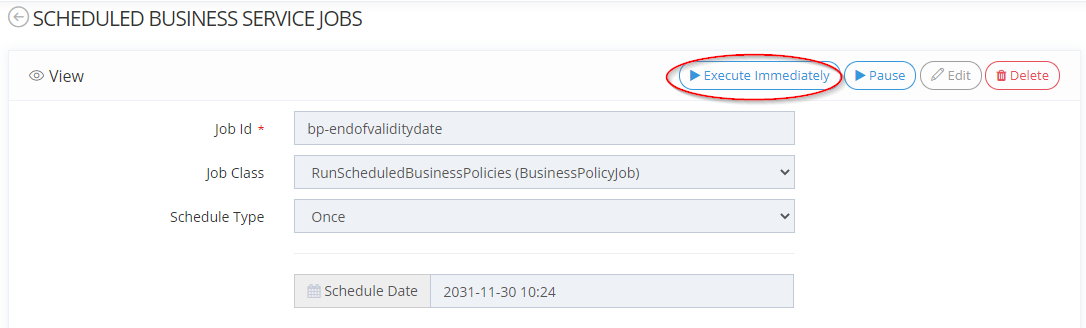
Each time a Business Policy is created, an associated Job is created (according to the id of the Business Policy) in the "Business Service" tab. This job should be executed immediately or launched in scheduled mode to activate the Business Policy.
A Business Policy is triggered when:
-
the configured activation event is reached:
-
A scheduled activation time has been reached, either unique or recurring (e.g: every Sunday at 5pm or next Monday at 9am)
-
A fixed execution time has been reached (trigger execution fixed for a certain task/object)
-
-
a domain event has been received (e.g: an identity has been created)
However, a Business Policy might not be triggered if no execution targets could be resolved (the object may have been deleted...).
Usage
When the end of validity date of a user expires, we want to launch a Workflow to his/her manager.
In this case, the manager can validate or modify the end of validity date.
|
Steps |
|
|---|---|
|
1 |
Configure an update Feature on Identity type with:
|
|
2 |
Configure the Workflow which will be launched when this Attribute is modified. |
|
3 |
Configure the Business Policy with an action using a Groovy script. |
|
4 |
Access the update Feature of an Identity and add an end of validity date. |
|
5 |
Access the admin portal.
The Business Policy has been executed.
|
|
6 |
Access the Workflow dashboard on the User Portal to see all identities concerned by the user task. 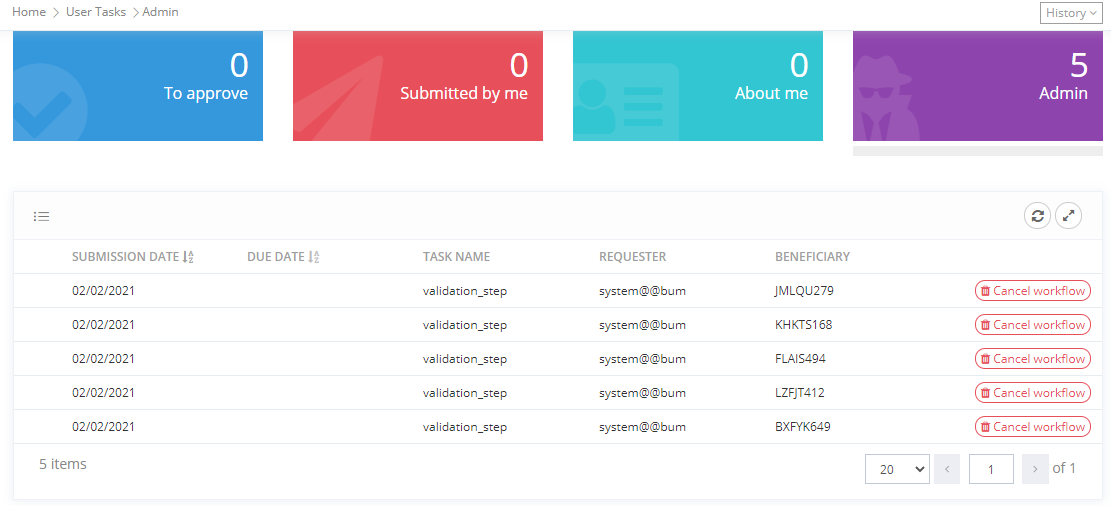
|
Configuration
You can access the Business Policy configuration :
-
by clicking on "Portal" → “Business Policies”
-
by clicking on "System" → "Configurations" → "Business Model" and perform an import/export.
Properties
|
Property name |
Type |
Mandatory |
Description |
Values (default value in bold) |
|---|---|---|---|---|
|
id |
|
YES |
The identifier is the unique identifier of each Business Policy. It is case sensitive and no special characters (except - or _) are allowed. |
- |
|
name |
|
YES |
The Business Policy name. The name may be different from the identifier.Specifying the name first allows to define automatically the identifier.
|
- |
|
active |
|
NO |
Allows to define if the Business Policy is activated or not. |
ON, OFF |
|
description |
|
NO |
Allows to describe the purpose of the Business Policy. |
- |
|
objectKind |
|
YES |
Allows to link the Business Policy to an Object kind.
|
Identity, Organization, Resource, Role, Role Publication |
|
scope |
|
YES |
Allows to configure on which Objects the Business Policy will be applied. It is possible to define several Object Types. |
- |
|
activation |
|
YES |
Allows to choose how the Business Policy will be triggered either:
|
Object Event, Scheduled |
|
handleEvent |
|
NO |
A test Rule to decide whether to handle the current event (can only be used in EVENT mode) |
- |
|
pageSize (only if activation is set to "Scheduled") |
|
NO |
Used to indicate how many objects can be processed in a batch by actions. |
10 to 100 |
|
executionPlan (only if activation is set to "Scheduled") |
|
NO |
Used to configure the trigger frequency of the Business Policy:
|
Once, Cron, Interval |
|
actions |
|
NO |
Used to configure:
It is possible to configure several actions. |
- |
Example
Read Next
-
Business Policies -
Object Policies An Object Policy is an Identity Management Service Policy allowing to execute arbitrary actions on Managed Objects, either on a scheduled basis, or in reaction to an Object Operation.
-
Deduplication Policies A Deduplication Policy describes how duplicates should be searched for when creating a managed object.
-
Feature Access Policies A Feature Access Policy is composed of a right which encompasses several Features.
-
Manual Provisioning Policies A Manual Provisioning Policy allows to define that manual provisioning or deprovisioning Workflow is launched when the Role assignment status changes.
-
Object Lifecycle Policies An Object Lifecycle Policy allows to configure rules, on all Object Types, that will alter an Object attribute directly when certain lifecycle events occur.
-
Password Policies A Password Policy determines how passwords should be composed and which rules apply to their lifecycle.
-
Role Request Policies A Role Request Policy allows to define if a Role can be requested, for whom, by whom, and using which Workflow.
-
Workflow Administration Policies A Workflow Administration Policy is composed of a right which encompasses several Features.
-
Memority MFA Account Policies A Memority MFA Policy allows to configure how multi factor authentication should be applied to a population of user
-
Homepage Selection Policies A Memority Home Page Selection Policy allows to configure differents home page depending on user rights.
-
SoD Policies In Memority, SoD rules are based on a SoD policy. A SOD Policy allows to define what kinds of conflicts you can specify and what attributes the system will use to detect them.